This thread has been set up this thread so you can let us know of any issues that you may be having with the various components of VLC- As an ongoing project and given the complexity of FSX, it's possible that there are small errors or omissions that are affecting your experience of VLC. Some issues are simply due to the way FSX displays data (and so may not be able to be fixed). Some issues may be caused by limitations in the data itself (which could be fixed given enough community demand). Some issues may be caused by other addon packages or the interaction between them. However, all are important as we want to do our best to ensure that VLC gives you maximum enjoyment -So let us know on this thread and we will do our best to sort them out.
A lot of the initial issues with VLC V1.00 have been fixed in the V1.01 patch so, as a first step, please ensure that you have installed this patch (this step is only needed for those that purchased their copy of VLC before 20th December 2011) - Seehere for instructions for downloading the patch from the Windowlight store.
(Please note this thread will be getting edited and trimmed to remove discussion in diagnosing problems after we have found a fix/work around)
Known Issues to be fixed in the next patch:
* VLC Config tool doesn't switch off the 'veg_palm1.dds' texture due to missing definition in the config.xml file.
Known Issues fixed in the V1.01 patch:
* VLC Config tool doesn't display correctly when larger than defaults text sizes are used. This will be fixed in the upcoming patch but a replacement tool is available now on request. PM me for the link
*Two lakes around Glenorchy are the incorrect elevation (Fixed)
* DTM tiles don't merge well near Glenorchy (Fixed)
* Great Barrier Island is missing in the mesh. (Fixed)
* Various Airport Elevation issues. (Fixed where possible, ongoing airport development will fix)
* Gap in DTM near Napier (Fixed)
* Airport boundaries within the VLC data conflict with default data (Fixed)
Other issues (which aren't caused by VLC or can be fixed by the user)
Issue: Milford sound airport sits on a large plateau
Cause: The option to install the Milford Sound Fix was un-ticked when you installed VLC. This option provides a basic fix for Milford Sound which was incorrectly placed by Microsoft due to an errant default DTM in this area.
Fix: Either reinstall VLC and ensure the 'Fix Milford Sound' is ticked on OR download and install HardCorePawns/Creators Milford Sound X V3 (http://nzff.org/forum/viewtopic.php?t=1 ... try8266062)
Issue: Milford Sound has strange elevations spikes around the airport or cut terrain/excluded water.
Cause: This is caused by conflicts between the VLC milford fix and HardCordPawns/Creators MilfordX. There should only be one version of Milford Sound installed by the user.
Fix:If you had previously installed HardCorePawn and Mike/Creators2003 Milford SoundX please uninstall it and install the new version (http://nzff.org/forum/viewtopic.php?t=1 ... try8266062).
Bugs, Issues And Annoyances
76 posts
• Page 1 of 4 • 1, 2, 3, 4
 by toprob » Wed Sep 01, 2010 11:32 am
scon wrote:QUOTE (scon @ Sep 1 2010, 11:21 AM) <{POST_SNAPBACK}>Yep I am running v2 of your scenery.
With your flattens or the VLC ones I get errors.
Do you have a screenshot?
I think you have to be careful with mixing and matching different bits of Milford. If you have any Milford Sound scenery installed, then you really shouldn't install the VLC fix until you have removed the previous scenery. The fix is designed for those who don't have any other scenery which fixes the elevation of Milford. You'd need to make sure that you remove ALL components of either Milford X or the VLC fix.
The VLC fix includes three files, the facilities file and flatten in Addon Scenery\Scenery, and the elevation switch in Scenery\World\Scenery.
The simplest way to remove the fix if you installed it when you didn't mean to is to uninstall and reinstall VLC with the fix unselected.
-

toprob - NZFF Pro
- Joined: Sat Apr 29, 2006 4:56 pm
- Posts: 6741
- Location: Upper Hutt
by russhart » Wed Sep 01, 2010 8:16 pm
(FIXED IN V1.01 PATCH) Just noticed a couple of lakes that are not sitting at the correct level. One is just west of Glenorchy (Diamond Lake) and the other is east of Queenstown (Lake Hayes). Does anyone else show this or is it just me. I have completely removed Red Baron Mesh Topo & NZLC.
Last edited by russhart on Mon Feb 14, 2011 11:34 am, edited 1 time in total.
Russell
i5 3470 @ 3.4GHz | 8.0GB DDR3 | GTX 560 Ti | Dell SP2309W | Win 7 Pro x64 | FSX SP2 | REX 2 | Ultimate Traffic 2 | Radar Contact 4| UTX USA | UTX Canada | UTX Europe | UTX Alaska | GEX North America | GEX Europe | RealNZ (all regions) | FTX AU (all regions) | FSGenesis
i5 3470 @ 3.4GHz | 8.0GB DDR3 | GTX 560 Ti | Dell SP2309W | Win 7 Pro x64 | FSX SP2 | REX 2 | Ultimate Traffic 2 | Radar Contact 4| UTX USA | UTX Canada | UTX Europe | UTX Alaska | GEX North America | GEX Europe | RealNZ (all regions) | FTX AU (all regions) | FSGenesis
- russhart
- Member
- Joined: Fri May 12, 2006 9:58 am
- Posts: 35
- Location: Nelson, New Zealand
by scon » Wed Sep 01, 2010 8:55 pm
(CAUSED BY A CONFLICT BETWEEN DIFFERENT VERSIONS OF MILFORD SOUND AIRPORT. PLEASE ENSURE ONLY ONE VERSION IS USED AND IS SUITABLE FOR VLC) Here are the images of the issues I am having at Milford.
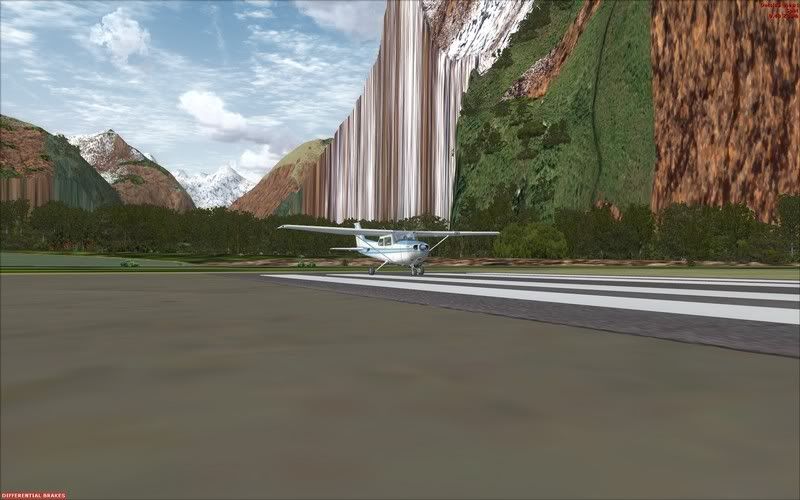
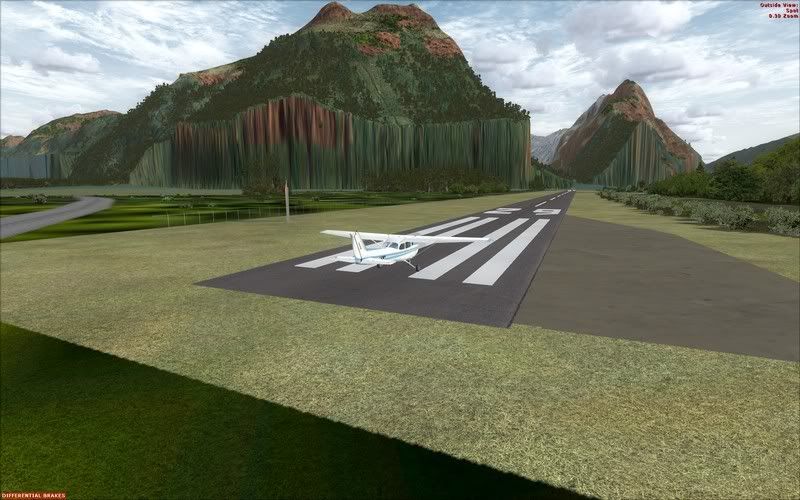
I have tried the following combinations
Milford Version 2 (no flattens) + VLC (with flattens)
uninstalled VLC, added Milford flattens, reinstalled VLC
Milford Version 2 (with flattens) + VLC (no flattens)
Both deliver exactly the same issue.
Regards, Scott
I have tried the following combinations
Milford Version 2 (no flattens) + VLC (with flattens)
uninstalled VLC, added Milford flattens, reinstalled VLC
Milford Version 2 (with flattens) + VLC (no flattens)
Both deliver exactly the same issue.
Regards, Scott
Last edited by scon on Mon Feb 14, 2011 11:35 am, edited 1 time in total.
- scon
- Sim-holic
- Joined: Mon Oct 16, 2006 7:16 pm
- Posts: 963
- Location: NZ
by Timmo » Wed Sep 01, 2010 9:26 pm
Scon can you give a top down view of Milford with the problems please?
I seem to remember that the Milford fix released by Mike and ? included a flatten placed in Scenery/World/Scenery for users of the default mesh as well as flattens placed in the MilfordSoundX folder. The MilfordSoundX folder can be disabled using the normal scenery library but the additional flatten will need to be manually disabled.
A milford install should either be
Mikes Milford installed:
Addon Scenery/Scenery/MilfordSoundX/xxxxxx.bgl etc (with the cvxNZMF_Flattens_valleys... files disabled by renaming to .bak)
plus
Scenery/World/Scenery/Milford Sound NZMF_ARP.bgl
OR
In addon scenery/Scenery/NZMF_ADEX_VLC.BGL and NZMF_ADEX_VLC_CVX.bgl
plus
in Scenery/World/Scenery/NZMF_ADEX_VLC_ALT.BGL
And Thanks Russ for the lakes- These will be fixed in a patch
I seem to remember that the Milford fix released by Mike and ? included a flatten placed in Scenery/World/Scenery for users of the default mesh as well as flattens placed in the MilfordSoundX folder. The MilfordSoundX folder can be disabled using the normal scenery library but the additional flatten will need to be manually disabled.
A milford install should either be
Mikes Milford installed:
Addon Scenery/Scenery/MilfordSoundX/xxxxxx.bgl etc (with the cvxNZMF_Flattens_valleys... files disabled by renaming to .bak)
plus
Scenery/World/Scenery/Milford Sound NZMF_ARP.bgl
OR
In addon scenery/Scenery/NZMF_ADEX_VLC.BGL and NZMF_ADEX_VLC_CVX.bgl
plus
in Scenery/World/Scenery/NZMF_ADEX_VLC_ALT.BGL
And Thanks Russ for the lakes- These will be fixed in a patch
Last edited by Timmo on Wed Sep 01, 2010 9:27 pm, edited 1 time in total.
- Timmo
- NZFF Pro
- Topic author
- Joined: Wed Oct 25, 2006 6:28 pm
- Posts: 2056
- Location: Tauranga
by russhart » Thu Sep 02, 2010 11:43 am
toprob wrote:QUOTE (toprob @ Sep 6 2010, 08:55 AM) <{POST_SNAPBACK}>Yes, I think you are right, the lake level at Glenorchy seems to be a bit out.
By the way, Glenorchy is a great place to fly from in VLC -- quite stunning.
Russ, your textures seems different -- do you use a replacement texture set?
There shouldn't be any other textures for NZ showing but I am always worried that there are some leftover files in some of the scenery folders. The only other textures I have are those from FTX (switched off) and UTX/GEX (shouldn't affect NZ?).
Just did some checks in other parts of the SI and to me the textures seen at Glenorchy appear to be similar to what I am seeing elsewhere. The question now is "am I displaying VLC correctly?"
Toprob, I have posted another screenshot and would appreciate it if you could at some stage compare this to a similar shot with your settings.Last edited by russhart on Thu Sep 02, 2010 11:44 am, edited 1 time in total.Russell
i5 3470 @ 3.4GHz | 8.0GB DDR3 | GTX 560 Ti | Dell SP2309W | Win 7 Pro x64 | FSX SP2 | REX 2 | Ultimate Traffic 2 | Radar Contact 4| UTX USA | UTX Canada | UTX Europe | UTX Alaska | GEX North America | GEX Europe | RealNZ (all regions) | FTX AU (all regions) | FSGenesis
- russhart
- Member
- Joined: Fri May 12, 2006 9:58 am
- Posts: 35
- Location: Nelson, New Zealand

by creator2003 » Thu Sep 02, 2010 12:57 pm
Ok ok i wont need to talk to Timmo about this ,anyway my findings on the milford sound v2 problem ,as i thought, remove the flattens and road fix bgl files out of the milford v2 /scenery folder ,do not put in any other files that the readme refers to in any other folders they are not needed with VLC as Tim says this is fixed, as with my fresh install of FSX and VLC shows ..
ill still remake the milford file download minus the files which cause some conflict to work with VLC
Next fault someone mentioned is of the christchurch Area being a rise somewhere ,ive just flown around this area completely and the only rise ive found is the main fsx NZCH airport which has a rise around the afcad about 5-10 meters ,though this would be expected with new mesh heights and new addon airports will address things like this in the future, unless Tim address this in a patch
its seems in the above shots to be the Gex textures showing which could be picking up by a world nz landclass file that was floating around last month ,which was later found to be pirated textures ,if you had this file it will be upsetting your install and wont work without issues until its removed ,i did try these myself in assorts of varations and mostly just messed my VLC install up with the conflicting landclass files
anyway looks like this is just small conflicts that are easy to fix by the user .
remove all meshes and landclass addons for NZ by uninstaller and deactivate them in the fsx library manager then install VLC and you should have a very good NZ to fly around without errors like me
cheers
Edit :plz refer to this post here if you are having problems with milford soundX v2 http://nzff.org/forum/viewtopic.php?t=...p;#entry8266058
ill still remake the milford file download minus the files which cause some conflict to work with VLC
Next fault someone mentioned is of the christchurch Area being a rise somewhere ,ive just flown around this area completely and the only rise ive found is the main fsx NZCH airport which has a rise around the afcad about 5-10 meters ,though this would be expected with new mesh heights and new addon airports will address things like this in the future, unless Tim address this in a patch
its seems in the above shots to be the Gex textures showing which could be picking up by a world nz landclass file that was floating around last month ,which was later found to be pirated textures ,if you had this file it will be upsetting your install and wont work without issues until its removed ,i did try these myself in assorts of varations and mostly just messed my VLC install up with the conflicting landclass files
anyway looks like this is just small conflicts that are easy to fix by the user .
remove all meshes and landclass addons for NZ by uninstaller and deactivate them in the fsx library manager then install VLC and you should have a very good NZ to fly around without errors like me
cheers
Edit :plz refer to this post here if you are having problems with milford soundX v2 http://nzff.org/forum/viewtopic.php?t=...p;#entry8266058
Last edited by creator2003 on Thu Sep 02, 2010 1:52 pm, edited 1 time in total.
-

creator2003 - NZFF Pro
- Joined: Fri Jun 16, 2006 12:08 am
- Posts: 4633
- Location: Cant U C im LOCO
by russhart » Thu Sep 02, 2010 1:38 pm
Toprob, Creator2003, thanks for that I now know there is an issue but what it is I am not sure. I haven't installed any other landclass or textures for NZ. Before installation of VLC I made sure that all the GEX (Europe and North America) original FSX files were restored. After VLC install I then re-installed the GEX textures so whether or not there is some interference here I don't know. It shouldn't be as GEX keep there files in its own folders but whether or not a file is put into the Addon Scenery Folder of the FSX Scenery folder that calls on the GEX files is unclear.
Just picked up an additional glitch in the same Glenorchy area. The attached shows a trench across the Dart River, which could be a leftover from the filming of Lord of the Rings
Just picked up an additional glitch in the same Glenorchy area. The attached shows a trench across the Dart River, which could be a leftover from the filming of Lord of the Rings
Russell
i5 3470 @ 3.4GHz | 8.0GB DDR3 | GTX 560 Ti | Dell SP2309W | Win 7 Pro x64 | FSX SP2 | REX 2 | Ultimate Traffic 2 | Radar Contact 4| UTX USA | UTX Canada | UTX Europe | UTX Alaska | GEX North America | GEX Europe | RealNZ (all regions) | FTX AU (all regions) | FSGenesis
i5 3470 @ 3.4GHz | 8.0GB DDR3 | GTX 560 Ti | Dell SP2309W | Win 7 Pro x64 | FSX SP2 | REX 2 | Ultimate Traffic 2 | Radar Contact 4| UTX USA | UTX Canada | UTX Europe | UTX Alaska | GEX North America | GEX Europe | RealNZ (all regions) | FTX AU (all regions) | FSGenesis
- russhart
- Member
- Joined: Fri May 12, 2006 9:58 am
- Posts: 35
- Location: Nelson, New Zealand
by Timmo » Thu Sep 02, 2010 3:20 pm
Russ- From your screen shots, it looks as if the GEX are written into the main texture directory rather than their own so they will replace all textures which we call with our landclass (they may have done it this way to avoid having to provide their own landclass file) If you enjoy those textures more than the default ones then there is no reason to turn them off (VLC custom textures will still show)- The main thing was they they were turned off when you installed
Last edited by Timmo on Thu Sep 02, 2010 3:29 pm, edited 1 time in total.
- Timmo
- NZFF Pro
- Topic author
- Joined: Wed Oct 25, 2006 6:28 pm
- Posts: 2056
- Location: Tauranga
by russhart » Thu Sep 02, 2010 8:08 pm
Timmo wrote:QUOTE (Timmo @ Sep 7 2010, 03:20 AM) <{POST_SNAPBACK}>Russ- From your screen shots, it looks as if the GEX are written into the main texture directory rather than their own so they will replace all textures which we call with our landclass (they may have done it this way to avoid having to provide their own landclass file) If you enjoy those textures more than the default ones then there is no reason to turn them off (VLC custom textures will still show)- The main thing was they they were turned off when you installed
Timmo, you are bang on. I did some experimenting as the GEX manual did state that some textures and AGN's are likely to show up in other parts of the world (as opposed to Europe and North America). Based on this I re-installed the original FSX textures from the GEX backup and then flew around Glenorchy, Christchurch and Auckland. I now get exactly the same look as Toprob. At least I now have an option to have either showing in NZ.Russell
i5 3470 @ 3.4GHz | 8.0GB DDR3 | GTX 560 Ti | Dell SP2309W | Win 7 Pro x64 | FSX SP2 | REX 2 | Ultimate Traffic 2 | Radar Contact 4| UTX USA | UTX Canada | UTX Europe | UTX Alaska | GEX North America | GEX Europe | RealNZ (all regions) | FTX AU (all regions) | FSGenesis
- russhart
- Member
- Joined: Fri May 12, 2006 9:58 am
- Posts: 35
- Location: Nelson, New Zealand
by dbcunnz » Fri Sep 03, 2010 2:18 am
Flatten problems with VLC
Airports in a hole
Dargaville, Mercer, Opotiki, Te Anau, Waihi Beach, Waimate and waipukurau.
Example Daegaville and Mercer.
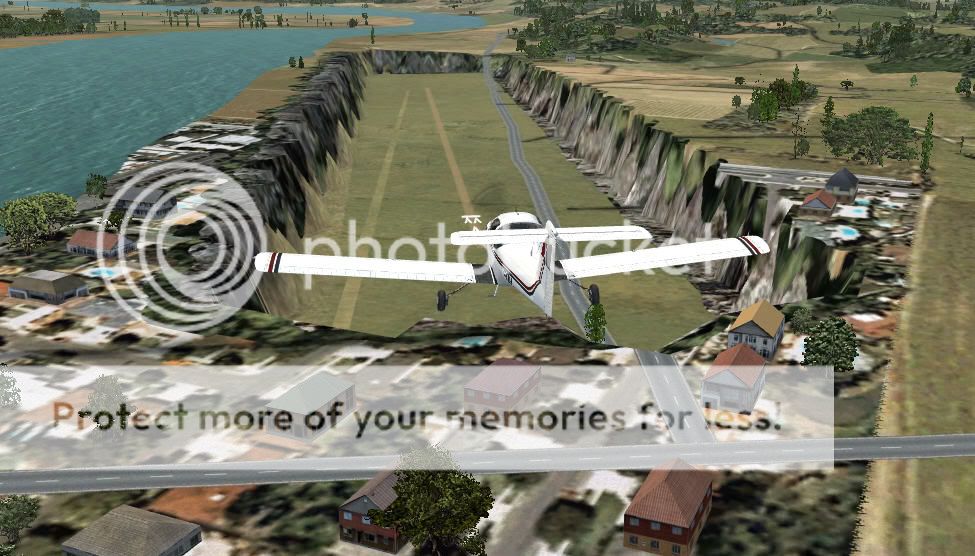
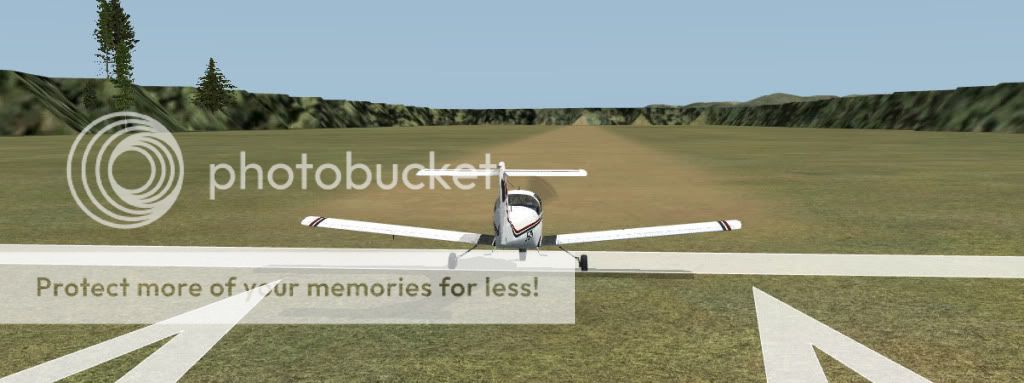
The others are with big dropoffs on an end and sides
Glentanner, Hokatika, Kaikohe, Karamea, Lake Station, Mt Cook, Murchison, Pukaki, Queenstown, Stratford, Taieri, Takaka, Tuamaranui, Tokoroa, Toupo, Turangi and Waiuru.
Examples Hokatika and Kaikohe
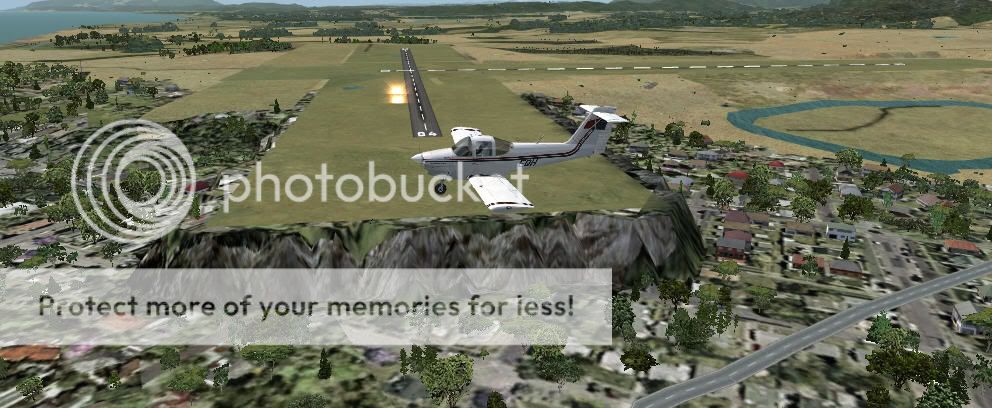
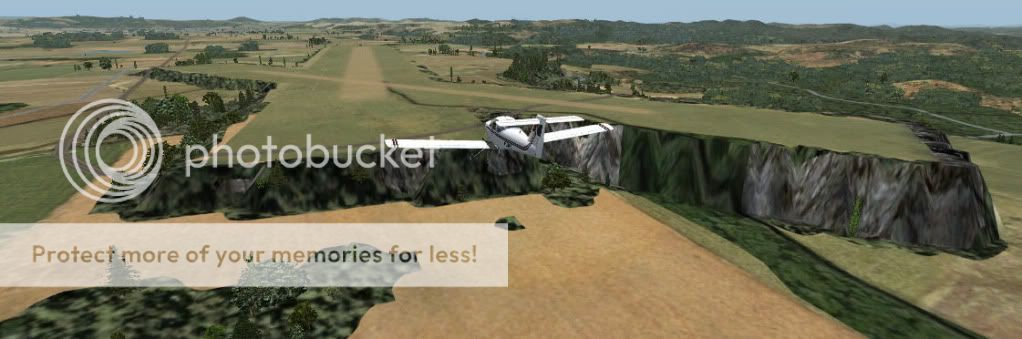
Airports in a hole
Dargaville, Mercer, Opotiki, Te Anau, Waihi Beach, Waimate and waipukurau.
Example Daegaville and Mercer.
The others are with big dropoffs on an end and sides
Glentanner, Hokatika, Kaikohe, Karamea, Lake Station, Mt Cook, Murchison, Pukaki, Queenstown, Stratford, Taieri, Takaka, Tuamaranui, Tokoroa, Toupo, Turangi and Waiuru.
Examples Hokatika and Kaikohe
Last edited by dbcunnz on Fri Sep 03, 2010 10:22 pm, edited 1 time in total.

-


dbcunnz - NZFF Pro
- Joined: Thu Feb 21, 2008 12:56 pm
- Posts: 4016
- Location: Blenheim New Zealand
by toprob » Fri Sep 03, 2010 11:03 am
The airport elevation issues were inevitable, expected, and on the todo list. The problem is that the default airports are placed to minimise this mis-match of elevation using the default mesh. The default airport elevation isn't accurate, it is 'computed' to sit at the level of the mesh. Any more accurate mesh would highlight any discrepancies.
There are some real issues with fixing these -- many people have a lot of little addon airports, including just AFCAD-style addons to handle AI, and any of these would clash with a NZ-wide fix. So we really need to come up with a system where people can install just the fixes they need. You can see how this gets tricky when you look at the issues with Milford (the only airport 'fixed' in this way) -- some people with other Milford scenery can get a very strange result if they are not careful. That's just one airport, and they may be a lot of little AFCAD-type files about.
AFCADs (I call them that because I'm old-fashioned, they are no longer called that with FSX, so I suppose I mean Airport Facilities) are the most difficult things to organise -- you get a weird result if you have more than one AFCAD for any one airport, and there are a lot of ways to accidentally pick up additional AFCADS.
I did imagine that this tidy-up process would wait until we had a NZ set of airport library objects, and that each airport could be improved in other ways when the elevation was fixed (some decent NZ hangers that sort of thing), but it looks like a quicker fix might be in order.
EDIT: the issue of one side of an airport flatten causing a cliff is just the way that FSX works. Most airports have this to some extent, its just that the 'softer' the mesh the less likely it is to be a problem. The fact is FSX requires a flat airport, even though probably only one out of 100 airports in NZ are that flat. All a flatten does is force an airport elevation flat, and this is always going to cause an elevation mismatch on at least one side of any airport. The bigger the airport, the bigger the flatten, so the more likely it is that one side will run off down hill towards the coast...
There are some real issues with fixing these -- many people have a lot of little addon airports, including just AFCAD-style addons to handle AI, and any of these would clash with a NZ-wide fix. So we really need to come up with a system where people can install just the fixes they need. You can see how this gets tricky when you look at the issues with Milford (the only airport 'fixed' in this way) -- some people with other Milford scenery can get a very strange result if they are not careful. That's just one airport, and they may be a lot of little AFCAD-type files about.
AFCADs (I call them that because I'm old-fashioned, they are no longer called that with FSX, so I suppose I mean Airport Facilities) are the most difficult things to organise -- you get a weird result if you have more than one AFCAD for any one airport, and there are a lot of ways to accidentally pick up additional AFCADS.
I did imagine that this tidy-up process would wait until we had a NZ set of airport library objects, and that each airport could be improved in other ways when the elevation was fixed (some decent NZ hangers that sort of thing), but it looks like a quicker fix might be in order.
EDIT: the issue of one side of an airport flatten causing a cliff is just the way that FSX works. Most airports have this to some extent, its just that the 'softer' the mesh the less likely it is to be a problem. The fact is FSX requires a flat airport, even though probably only one out of 100 airports in NZ are that flat. All a flatten does is force an airport elevation flat, and this is always going to cause an elevation mismatch on at least one side of any airport. The bigger the airport, the bigger the flatten, so the more likely it is that one side will run off down hill towards the coast...
Last edited by toprob on Fri Sep 03, 2010 11:15 am, edited 1 time in total.
-
toprob - NZFF Pro
- Joined: Sat Apr 29, 2006 4:56 pm
- Posts: 6741
- Location: Upper Hutt
by Adamski » Fri Sep 03, 2010 9:56 pm
toprob wrote:QUOTE (toprob @ Sep 3 2010, 09:46 PM) <{POST_SNAPBACK}>Welcome to a not-very-exclusive club:)
Could someone please take a look at the NE end of NZQN? This is what I get:
VLC - with all other Topo etc. disabled ...
FSX default:
My previous set up: NZMesh, RB Topo, R&R and FTX Pacific:



-

Adamski - NZFF Pro
- Joined: Thu Nov 01, 2007 2:22 am
- Posts: 5072
- Location: Birkenhead, Auckland
by Timmo » Fri Sep 03, 2010 10:49 pm
toprob wrote:QUOTE (toprob @ Sep 3 2010, 08:04 PM) <{POST_SNAPBACK}>Yes, but I think I didn't make this clear enough -- we do intend to offer a fix for every airport which can be fixed, as an addon to VLC. The original intention was to improve each airport at the same time, replacing generic buildings and library objects with an update NZ library, but the flattens may be done first just to get them out.
Just an additional point too.....and it can get a little complex......some issues are the airports themselves being the incorrect elevation (i.e. Glenorchy, Milford) and some are differences in the VLC mesh compared to a) correct AIP values b) other mesh files.
The default airports aren't tagged with heights from the AIP, they simply get their heights from the default mesh.....which can lead to interesting results.
Some other airports which have been released as addons are at the correct height (as defined by the AIP/Real life) but not in relation to the VLC mesh- Most of these should be OK but I have noticed a couple which were omitted. For these it may be best to fix the mesh if there are other issues on the same tile.
To summarise- Simply let us know what you find and then we can make a judgement on what the best course of action is.
- Timmo
- NZFF Pro
- Topic author
- Joined: Wed Oct 25, 2006 6:28 pm
- Posts: 2056
- Location: Tauranga
by Timmo » Fri Sep 03, 2010 10:57 pm
Adamski wrote:QUOTE (Adamski @ Sep 3 2010, 09:56 PM) <{POST_SNAPBACK}>
Could someone please take a look at the NE end of NZQN? This is what I get:
VLC - with all other Topo etc. disabled ...
This one (as well as Hokitika) is caused by the innacurate FSX airport polygons/flattens- You can see the VLC airport extent in the shot and then the default FSX flatten/airport grass extending further than it should- In this case, simply replacing the default flatten/extents should work to get rid of the terrace.
- Timmo
- NZFF Pro
- Topic author
- Joined: Wed Oct 25, 2006 6:28 pm
- Posts: 2056
- Location: Tauranga
by GlennAV8R » Mon Sep 06, 2010 9:47 am
FIXED IN THE V1.01 PATCH.
My issue is with duplicate airfields where there appears to be both an FSX default and a VLC supplied field, they both show up. Dannevirke for example. Maybe fields that are in FSX already need to be removed from the 3000 that VLC provides.
[attachment=319:2010_9_6...8_41_650.jpg]
My issue is with duplicate airfields where there appears to be both an FSX default and a VLC supplied field, they both show up. Dannevirke for example. Maybe fields that are in FSX already need to be removed from the 3000 that VLC provides.
[attachment=319:2010_9_6...8_41_650.jpg]
Last edited by GlennAV8R on Mon Feb 14, 2011 11:46 am, edited 1 time in total.
- GlennAV8R
- Forum Addict
- Joined: Tue Mar 04, 2008 3:19 pm
- Posts: 154
- Location: Wellington
by Naki » Wed Sep 08, 2010 10:08 pm
Question over at SOH:
Well I just bought it. Can't wait to try it out! One question tho - it says the app replaces some default textures (installer makes a copy of default textures), so presumably you'd need to deactivate this scenery before activating OrbX Australian scenery, and vice-versa. There doesn't seem top be a deactivate function in the configuration app like there is in the OrbX one?
and my answer - hopefuly I am correct?
I dont have Orbx Australia but I do have Orbx PNW and of course VLC. Whilst Orbx PNW dosen't have to be deactivated I am pretty sure Orbx Australia does. Ill double check over at the VLC forum.
You can deactivate VLC textures with the box in the corner of the config screen - just untick this to deactivate VLC
Well I just bought it. Can't wait to try it out! One question tho - it says the app replaces some default textures (installer makes a copy of default textures), so presumably you'd need to deactivate this scenery before activating OrbX Australian scenery, and vice-versa. There doesn't seem top be a deactivate function in the configuration app like there is in the OrbX one?
and my answer - hopefuly I am correct?
I dont have Orbx Australia but I do have Orbx PNW and of course VLC. Whilst Orbx PNW dosen't have to be deactivated I am pretty sure Orbx Australia does. Ill double check over at the VLC forum.
You can deactivate VLC textures with the box in the corner of the config screen - just untick this to deactivate VLC
Last edited by Naki on Wed Sep 08, 2010 11:23 pm, edited 1 time in total.
-

Naki - NZFF Pro
- Joined: Sat Aug 05, 2006 10:03 pm
- Posts: 7175
- Location: Tauranga
by Timmo » Thu Sep 09, 2010 3:39 pm
Naki wrote:QUOTE (Naki @ Sep 8 2010, 10:08 PM) <{POST_SNAPBACK}>Question over at SOH:
Well I just bought it. Can't wait to try it out! One question tho - it says the app replaces some default textures (installer makes a copy of default textures), so presumably you'd need to deactivate this scenery before activating OrbX Australian scenery, and vice-versa. There doesn't seem top be a deactivate function in the configuration app like there is in the OrbX one?
and my answer - hopefuly I am correct?
I dont have Orbx Australia but I do have Orbx PNW and of course VLC. Whilst Orbx PNW dosen't have to be deactivated I am pretty sure Orbx Australia does. Ill double check over at the VLC forum.
You can deactivate VLC textures with the box in the corner of the config screen - just untick this to deactivate VLC
Yep I saw that post Naki but when I went to sign up it wouldn't let me(am signed up now though)- So thanks for responding
Your method is correct if you want to fly in another country (i.e. Aus)- If you actually want to turn off the VLC data (i.e. go back to default data in NZ) then you just need to disable it in the scenery library- Ill add this to the website FAQ when I get a chance
- Timmo
- NZFF Pro
- Topic author
- Joined: Wed Oct 25, 2006 6:28 pm
- Posts: 2056
- Location: Tauranga
76 posts
• Page 1 of 4 • 1, 2, 3, 4
Who is online
Users browsing this forum: No registered users and 16 guests