Newbie Q&A

A place to converse about the general aspects of flight simulation in New Zealand

Postby H500Fan » Sun Oct 10, 2010 12:10 pm

Hi guys recently stumbled accross this forum and have enjoyed some great reading and viewing. Just getting started and wanted a bit of advice on PC requirements etc.
I'm currently looking at starting with a set up something like this:

Aspire M5630 Q6600.
Core 2 Quad CPU Q6600@2.4 ghz.
2GB DDR2 Ram.(2X1GB)
320 GB Hard Drive.
ATI Radeon PCI-E HD4650 1GB Graphic card

Do you think it would be suitable as a starting point? I am on a budget so can't buy the best unit from new but want to build up from something like this.
It will be used solely as a FSX PC, have a laptop for all my other darnation. Ultimate goal is to bump up the scenery and purchase VLC, have been amazed at some of the amazing screen shots from you guys.
I'm prodominately interested in helicopters, have bought a logitech G940 for a reasonable price recently.
I see there's no dedicated helicopter spot on here! ohmy.gif
thanks in advance guys, have loved seeing what you all get up to!
cheers
Jamie

H500Fan
Member
 
Topic author
Joined: Sun Oct 10, 2010 10:43 am
Posts: 112

Postby Ian Warren » Sun Oct 10, 2010 12:40 pm

Hi Jamie and Welcome to NZFF ,
Your using XP ? i would increase your RAM to 4 gig , Peter 'Islandboy77' would give you the full ATI heads up and details .
Image
User avatar
Ian Warren
NZFF Pro
 
Joined: Fri May 05, 2006 5:23 pm
Posts: 41187
Location: AREA 51

Postby AlisterC » Sun Oct 10, 2010 12:42 pm

Welcome Jamie. I'm sure there are better gurus here to advise than me, but on first sight I'd bump up the ram to at least 4GB. I have an older computer than this with more RAM, I'm pretty sure it will make a difference. Especially if using Win 7.
Image
User avatar
AlisterC
NZFF Pro
 
Joined: Thu Jul 20, 2006 11:13 am
Posts: 2543
Location: Nelson, NZ

Postby IslandBoy77 » Sun Oct 10, 2010 12:47 pm

H500Fan wrote:
QUOTE (H500Fan @ Oct 10 2010, 01:10 PM) <{POST_SNAPBACK}>
Hi guys recently stumbled accross this forum and have enjoyed some great reading and viewing. Just getting started and wanted a bit of advice on PC requirements etc.
I'm currently looking at starting with a set up something like this:

Aspire M5630 Q6600.
Core 2 Quad CPU Q6600@2.4 ghz.
2GB DDR2 Ram.(2X1GB)
320 GB Hard Drive.
ATI Radeon PCI-E HD4650 1GB Graphic card

Do you think it would be suitable as a starting point? I am on a budget so can't buy the best unit from new but want to build up from something like this.
It will be used solely as a FSX PC, have a laptop for all my other darnation. Ultimate goal is to bump up the scenery and purchase VLC, have been amazed at some of the amazing screen shots from you guys.
I'm prodominately interested in helicopters, have bought a logitech G940 for a reasonable price recently.
I see there's no dedicated helicopter spot on here! ohmy.gif
thanks in advance guys, have loved seeing what you all get up to!
cheers
Jamie

Hey Jamie - welcome to NZFF

Your system is a fair base start, with one 'but' - you must go with 4GB of RAM or FSX will grind along painfully. Ideally you want 8GB. So, either go the whole hog now, or upgrade to 4GB with room to grow. By that I mean buy RAM that leaves you with a slot or 2 free on the motherboard. If your board has 2 slots, you want to get 1 x 4GB. If your board has 4 slots, go with 2 x 2GB. It's always cheaper to buy more or wisely now than later. I run a computer reselling business, with a small sideline in gaming rigs, so have seen how this plays out, especially in regards to FSX & RAM. Eventually, you'll need to get into a 5000 or 6000 series ATI, but the 4670 is an ok start point. As you will see from various comments, it's best to start your sliders on the low side and work your way 'up' (to the right) in stages. Funnily enough, one can actually get better results with this, and FSX will run on higher settings than if you just shove them up in one fell swoop.

You will also note that there is a decided polarisation regarding Intel vs AMD & ATI vs nVidia. There is no doubt that AMD + ATI give a cheaper 'bang for buck' with good frame rates, where Intel + nVidia are more expensive for better frame rates (with the possible exception of the very high end cards which I doubt many simmers would ever spend money on). But whatever you decide long term, just make an informed choice and enjoy it rather than some who feel the need to go with "the gurus" (who BTW rarely compare identical Intel + nVidia systems with AMD + ATI equivalents) and then passionately defend their position because it's 'the only correct position'. Personally, I've been very disappointed with the 'return on investment' of the Intel + nVidia scenario and will be going AMD + ATI in the next upgrade round (currently Intel + ATI).

All the best! smile.gif

EDIT: If you have a choice of OS go Win 7 64-bit. There is the nuisance factor of having to do that silly little jiggery-pokery when adding scenery, but otherwise why would one want to limit oneself to 4GB? If you're on XP, your max is 3.5GB usable, but you still want either a pair of 2GBs or a single 4GB (although I have seen XP get a bit weird about the 500MB it can't use - all the more reason to go with Win 7 64-bit)
Last edited by IslandBoy77 on Sun Oct 10, 2010 12:50 pm, edited 1 time in total.
User avatar
IslandBoy77
Senior Member
 
Joined: Tue Feb 03, 2009 2:23 pm
Posts: 1020
Location: Napier, New Zealand

Postby H500Fan » Sun Oct 10, 2010 12:47 pm

thanks for the replys and welcomes, the OS on it is windows vista premium. I've been looking on trademe but after a while there seems
to be just too many to look at!
I had thought the ram might be the let down, are they one of the easier components to upgrade or should I just keep looking? cheers
Last edited by H500Fan on Sun Oct 10, 2010 12:48 pm, edited 1 time in total.
H500Fan
Member
 
Topic author
Joined: Sun Oct 10, 2010 10:43 am
Posts: 112

Postby IslandBoy77 » Sun Oct 10, 2010 12:55 pm

H500Fan wrote:
QUOTE (H500Fan @ Oct 10 2010, 01:47 PM) <{POST_SNAPBACK}>
thanks for the replys and welcomes, the OS on it is windows vista premium. I've been looking on trademe but after a while there seems
to be just too many to look at!
I had thought the ram might be the let down, are they one of the easier components to upgrade or should I just keep looking? cheers

Hi again. I'd avoid Vista. I'm using it on my non-sim PC and it is servicable, but Win 7 is a definite step up and runs faster. You don't want to be saddled with Vista long-term while Win 7 is better - and it is. RAM is a cheaper upgrade, but I will give you the advice I give all my clients: spend as much as possible now, as it's more expensive to do it later (usually, with a couple of small exceptions). Bear in mind that a number of people will be ditching old systems coming up to Christmas - there is a reason they are ditching them, and it's not because they like you. winkyy.gif (and that goes for businesses too: just because a business is selling a system doesn't mean it's modern or 'now' - it may well be end of line) Note also that there is a shift underway in computers with SATA3 and USB3 now replacing SATA2 & USB2. You need to ask yourself if you really want to buy obsolete technology. I certainly don't! I know money is always an issue - same for me - but every time I've scrimped I've regretted it.
Last edited by IslandBoy77 on Sun Oct 10, 2010 12:57 pm, edited 1 time in total.
User avatar
IslandBoy77
Senior Member
 
Joined: Tue Feb 03, 2009 2:23 pm
Posts: 1020
Location: Napier, New Zealand

Postby H500Fan » Sun Oct 10, 2010 12:57 pm

just read your reply island boy, thanks for the crash course it makes alot of sense. I've been researching by the way of having a watchlist on TME full of PC's so have a basic grasp of whats good and whats not. Obviously integrated graphics is far from desireable, and a 1TB grahics card is ideal. what about DDR2 vs DDR3?
H500Fan
Member
 
Topic author
Joined: Sun Oct 10, 2010 10:43 am
Posts: 112

Postby IslandBoy77 » Sun Oct 10, 2010 1:05 pm

H500Fan wrote:
QUOTE (H500Fan @ Oct 10 2010, 01:57 PM) <{POST_SNAPBACK}>
just read your reply island boy, thanks for the crash course it makes alot of sense. I've been researching by the way of having a watchlist on TME full of PC's so have a basic grasp of whats good and whats not. Obviously integrated graphics is far from desireable, and a 1TB grahics card is ideal. what about DDR2 vs DDR3?

Definitely DDR3 - DDR2 is now most certainly obsolete. Both my PCs are stuck with DDR2, but DDR3 was a way off when I completed building them. I built an FSX rig for a client 2 weeks' back with a 3.4GHz AMD Quad, 8GB DDR3, 1TB main drive & 64GB SSD for FSX (the best, fastest way to run FSX), 1GB GDDR5 HD5830 vid, 600W PSU & Win 7 64-bit for $2200 (no screen, keyb or mouse) - I'd say that would be about right for a reasonable-quality rig that will get you good frame rates and would be $200 - $300 cheaper than a roughly equivalent Intel + nVidia rig. The motherboard in that rig has SATA3 & USB3.

Another point to consider is power supply. Scrimping here could literally mean 'life or death' to a gaming rig - you don't want ANY of your components to be starved of power ANY time: that's a recipe for disaster. And PSUs are not all created equal - one needs a 600W (true, not peak) with at least 2 x 12V rails (pref 3), active PFC and a decent rating - 80 PLUS silver or better. As you can see, there are advantages to buying from us smaller assemblers who actually know what we're doing, and build systems to fit the individual, not just something that's mass produced to make a quick buck.
Last edited by IslandBoy77 on Sun Oct 10, 2010 1:06 pm, edited 1 time in total.
User avatar
IslandBoy77
Senior Member
 
Joined: Tue Feb 03, 2009 2:23 pm
Posts: 1020
Location: Napier, New Zealand

Postby H500Fan » Sun Oct 10, 2010 1:58 pm

thanks alot for the advice, certainly been a huge learning curve! I will keep looking and aim for windows 7, might as well get the right stuff of what I can afford from the start.
How much juice does the likes of VLC and other add-ons require?
H500Fan
Member
 
Topic author
Joined: Sun Oct 10, 2010 10:43 am
Posts: 112

Postby kcgb » Sun Oct 10, 2010 2:03 pm

H500Fan wrote:
QUOTE (H500Fan @ Oct 10 2010, 01:10 PM) <{POST_SNAPBACK}>
Hi guys recently stumbled accross this forum and have enjoyed some great reading and viewing. Just getting started and wanted a bit of advice on PC requirements etc.
I'm currently looking at starting with a set up something like this:

Aspire M5630 Q6600.
Core 2 Quad CPU Q6600@2.4 ghz.
2GB DDR2 Ram.(2X1GB)
320 GB Hard Drive.
ATI Radeon PCI-E HD4650 1GB Graphic card

Do you think it would be suitable as a starting point? I am on a budget so can't buy the best unit from new but want to build up from something like this.
It will be used solely as a FSX PC, have a laptop for all my other darnation. Ultimate goal is to bump up the scenery and purchase VLC, have been amazed at some of the amazing screen shots from you guys.
I'm prodominately interested in helicopters, have bought a logitech G940 for a reasonable price recently.
I see there's no dedicated helicopter spot on here! ohmy.gif
thanks in advance guys, have loved seeing what you all get up to!
cheers
Jamie


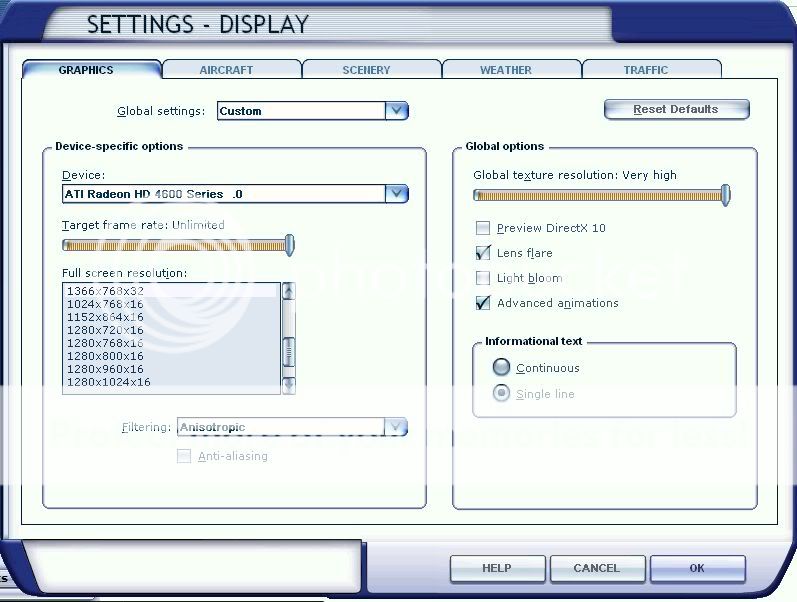
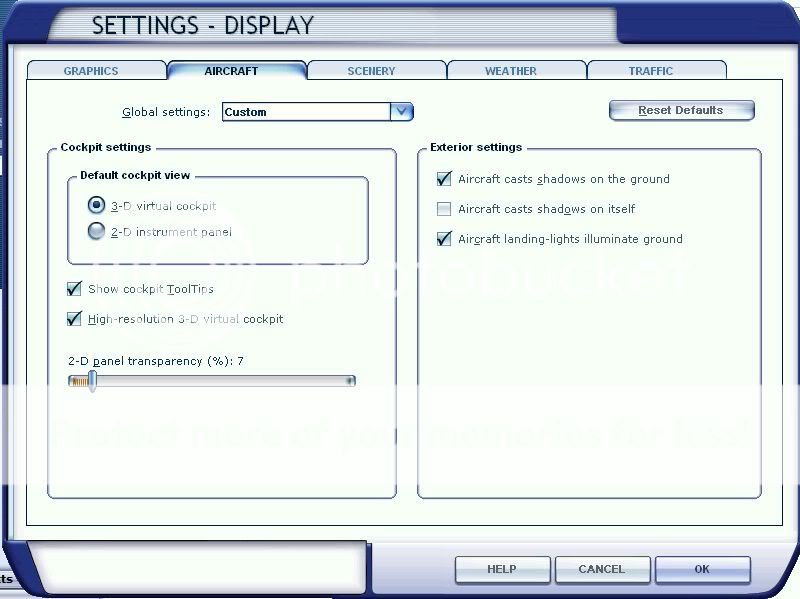
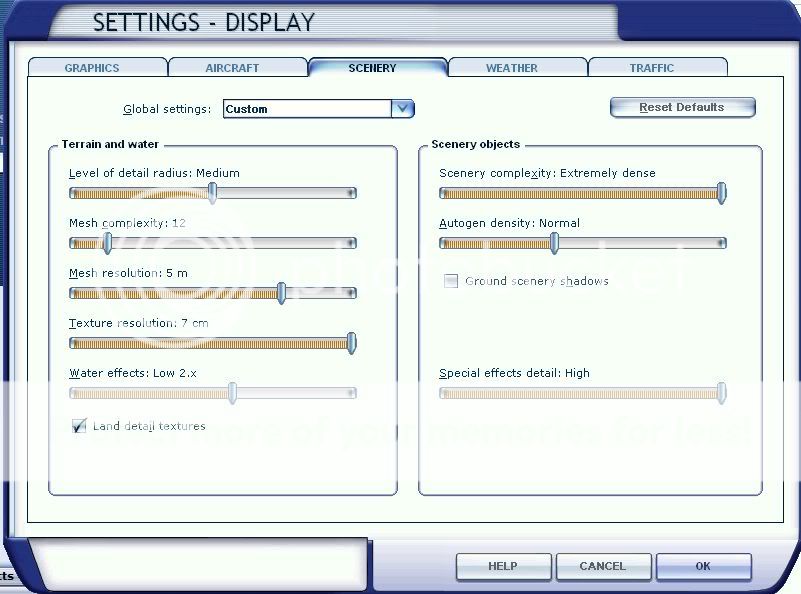
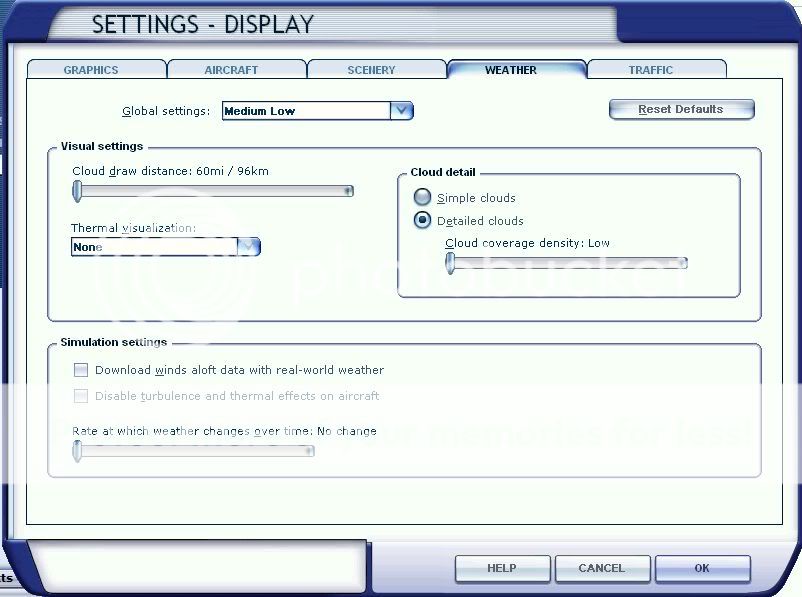
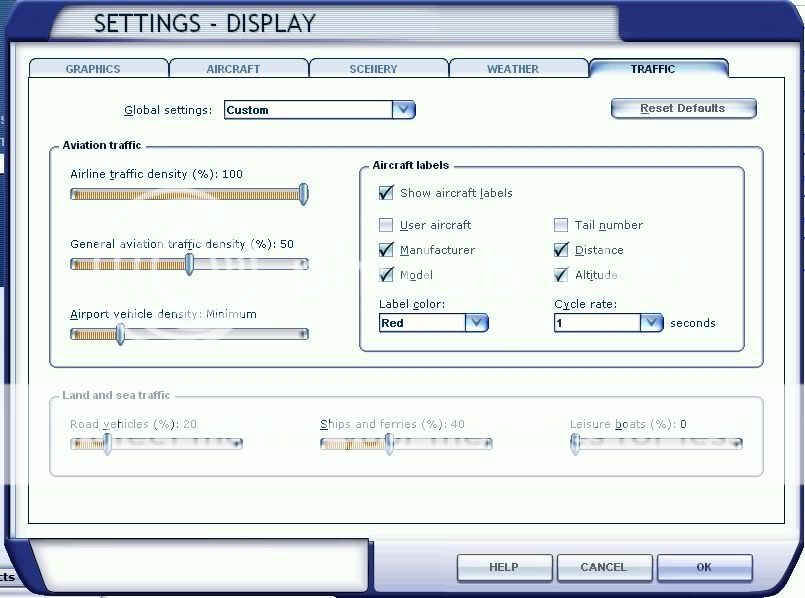
I have the same graphics card, same size hard drive, 3GB ram, an aspire M3201 with a 2.3 ghz AMD triple core processor and windows Vista 32bit and I can get my locked frame rate of 25 (with fps limiter program) everywhere in NZ with these settings:


I use Catalyst Control center for my Anti-aliasing and I can move the autogen to full if I am only in New Zealand but I also fly around PNW.
So with that system, with a bit more Ram, you could get FSX running very smooth with maybe a few more sliders moved up. But mine only stays smooth because it has alot of tweaks biggrin.gif
kcgb
Sim-holic
 
Joined: Sun Aug 30, 2009 7:44 pm
Posts: 679
Location: NZLX

Postby IslandBoy77 » Sun Oct 10, 2010 2:16 pm

kcgb wrote:
QUOTE (kcgb @ Oct 10 2010, 03:03 PM) <{POST_SNAPBACK}>
I have the same graphics card, same size hard drive, 3GB ram, an aspire M3201 with a 2.3 ghz AMD triple core processor and windows Vista 32bit and I can get my locked frame rate of 25 (with fps limiter program) everywhere in NZ with these settings:

I use Catalyst Control center for my Anti-aliasing and I can move the autogen to full if I am only in New Zealand but I also fly around PNW.
So with that system, with a bit more Ram, you could get FSX running very smooth with maybe a few more sliders moved up. But mine only stays smooth because it has alot of tweaks biggrin.gif

Having your screen res only at 1366 x 768 will help a lot too. I run mine at 1920 x 1080, but hardware struggles with that. Looks great, but poor old Intel Quad not really up to that task... sad.gif
User avatar
IslandBoy77
Senior Member
 
Joined: Tue Feb 03, 2009 2:23 pm
Posts: 1020
Location: Napier, New Zealand

Postby H500Fan » Sun Oct 10, 2010 2:17 pm

wow thanks for that KC, had a look at your post on screenshots of the PNW, is something like that what I could expect to see? If so at this stage it is more than enough they were great shots.
I do fully appreciate spending more buying quality is best, but need to start somewhere. maybe when I'm a vet like some of you guys I can upgrade to a big system but at the moment its a little out of my reach.
thanks again
H500Fan
Member
 
Topic author
Joined: Sun Oct 10, 2010 10:43 am
Posts: 112

Postby kcgb » Sun Oct 10, 2010 2:38 pm

H500Fan wrote:
QUOTE (H500Fan @ Oct 10 2010, 03:17 PM) <{POST_SNAPBACK}>
wow thanks for that KC, had a look at your post on screenshots of the PNW, is something like that what I could expect to see? If so at this stage it is more than enough they were great shots.
I do fully appreciate spending more buying quality is best, but need to start somewhere. maybe when I'm a vet like some of you guys I can upgrade to a big system but at the moment its a little out of my reach.
thanks again


Those shots where done with Real Enviroment Extreme Overdrive installed but I was still getting 25fps so yeah, you could easily see it like that. But with a system like that don't expect to have amazing weather, thunderstorms really make it slow down.
Last edited by kcgb on Sun Oct 10, 2010 2:54 pm, edited 1 time in total.
kcgb
Sim-holic
 
Joined: Sun Aug 30, 2009 7:44 pm
Posts: 679
Location: NZLX

Postby H500Fan » Sun Oct 10, 2010 2:56 pm

thanks KC thats good to know. this one here is my second option:

Computer Case Antec NSK2480 Micro ATX Desktop Case (AT13346) Super Silent and low energy consumption certified

1. *CPU Intel Core2 Quad Processor Q8400
(4M Cache, 2.66 GHz, 1333 MHz FSB)

2. *RAM Memory - Kingston 4GB Dual Chanel

3. *Main Board - Gigabyte EG45M-UD2H Intel G45 Chipset mATX - for more info: http://www.gigabyte.com/products/product-p...aspx?pid=3021#o
v

4. *Graphic card: Gigabyte ATI Radeon HD5450 GV-R545SC-1GI 1GB PCI-Express Video Card *VGA *DVI *HDMI -Super Silent with aluminum cooling system (No fan, no noise)

5. *Sound card: 5.1 Dolby Surround with optical output SPDIF

6. Hard drive: 500GB Seagate Barracuda

its running window 7 ultimate.
H500Fan
Member
 
Topic author
Joined: Sun Oct 10, 2010 10:43 am
Posts: 112

Postby IslandBoy77 » Sun Oct 10, 2010 3:04 pm

H500Fan wrote:
QUOTE (H500Fan @ Oct 10 2010, 03:56 PM) <{POST_SNAPBACK}>
thanks KC thats good to know. this one here is my second option:

Computer Case Antec NSK2480 Micro ATX Desktop Case (AT13346) Super Silent and low energy consumption certified

1. *CPU Intel Core2 Quad Processor Q8400
(4M Cache, 2.66 GHz, 1333 MHz FSB)

2. *RAM Memory - Kingston 4GB Dual Chanel

3. *Main Board - Gigabyte EG45M-UD2H Intel G45 Chipset mATX - for more info: http://www.gigabyte.com/products/product-p...aspx?pid=3021#o
v

4. *Graphic card: Gigabyte ATI Radeon HD5450 GV-R545SC-1GI 1GB PCI-Express Video Card *VGA *DVI *HDMI -Super Silent with aluminum cooling system (No fan, no noise)

5. *Sound card: 5.1 Dolby Surround with optical output SPDIF

6. Hard drive: 500GB Seagate Barracuda

its running window 7 ultimate.

Nope, stay away from that one - mATX means you will always be cramped for choice with video cards and PSUs (since an mATX case is quite short in it's depth and shallow in width - a recipe for cutting off all your upgrade options right at the start!). Otherwise, specs are ok - note that the CPU is the older last generation (like mine), so you're buying obsolete again.

Note also with KC's setup 2 things: he's running at fairly low resolution, and he's tweaked the heck out of his FSX. To me, that's like buying a 3 cylinder car, then spending weeks tweaking under the hood to bring it up to 4 cylinders. Better to start with 4 & tweak to 5... winkyy.gif It's fair enough that you don't want to spend a bomb straight out of the gate, but you'll easily and quickly "outgrow" whatever you start with. I've NEVER heard a simmer or serious gamer say "I wish I bought a slower / cheaper computer" laugh.gif
Last edited by IslandBoy77 on Sun Oct 10, 2010 3:05 pm, edited 1 time in total.
User avatar
IslandBoy77
Senior Member
 
Joined: Tue Feb 03, 2009 2:23 pm
Posts: 1020
Location: Napier, New Zealand

Postby H500Fan » Sun Oct 10, 2010 3:23 pm

I had thought it looked a little odd component wise, I knew you'd know islandboy. well the only thing to do is keep looking, and more importantly keep saving cool.gif
H500Fan
Member
 
Topic author
Joined: Sun Oct 10, 2010 10:43 am
Posts: 112

Postby IslandBoy77 » Sun Oct 10, 2010 7:40 pm

H500Fan wrote:
QUOTE (H500Fan @ Oct 10 2010, 04:23 PM) <{POST_SNAPBACK}>
I had thought it looked a little odd component wise, I knew you'd know islandboy. well the only thing to do is keep looking, and more importantly keep saving cool.gif

That's actually a very good idea - the saving bit. It really is better to get that "bit better" system now than regret it later. A thought: why not purchase from a local shop? I know TM is a place for bargains - but what about warranty? If things go pear-shaped, how much cost / hassle will there be to get it back to where you got it? And will the person you got it from still be around? Of course if you're going second hand (boo, hiss!!), you'll have no warranty. As well, internal components all have warranties longer than the 1 year RTB that most assemblers give. All my clients know that they have "extended" warranties on various parts. Typically - CPU: 3 Years, Hard Drive - 3-5 Years, PSU - 5-10 Years (which, BTW, is what "lifetime" actually means), RAM - 5-10 Years, DVD - 12-18 Months, Motherboard - 2-3 Years, Video Card - 2-3 Years, Windows - None. And will the person assembling your PC - regardless of who it is - supply you with a machine that is 100% uptodate (BIOS, Drivers, Windows, Subsystems), or will it be 1, 2 or 3 month's out of date? What about supplied software - will you get stuck with bloatware (AVG, Norton, TrendMicro, McAfee, Microsoft Office Trial, Acrobat Reader, Toolbars etc), or will your system be trim and fighting fit?

So many questions to consider when one really thinks about a PC. Again, the benefits of us smaller assemblers who really put time, effort and thought into building / supplying our systems. And they've got our 'name' on them, too... ohmy.gif The really gutting thing for us is when people take our knowledge and then look for bottom dollar elsewhere - very uncool. smiliz2.png
Last edited by IslandBoy77 on Sun Oct 10, 2010 7:44 pm, edited 1 time in total.
User avatar
IslandBoy77
Senior Member
 
Joined: Tue Feb 03, 2009 2:23 pm
Posts: 1020
Location: Napier, New Zealand

Postby H500Fan » Sun Oct 10, 2010 8:15 pm

thanks again for the help, now that you've got me spending that bit more, I have definitely written off going second hand. And I'm in little old Masterton so limited to shops but will go and ask one tomorrow what they can do, and I agree its always the little guy who delivers best customer service and back up!
heres my latest hussle I've been asking questions about:
Quote "best I can do is $1080 for AMD 250, M4N68 board, 4GB DDR3, 500GB, 5770 1GB, Foxconn Case + 510W Power Supply, Windows 7 Home Premium, 24X DVD writer"
Obviously there is alot more details to it, but thats the gist of it, at a glance does that look reasonable islandboy?
thanks again
Jamie
H500Fan
Member
 
Topic author
Joined: Sun Oct 10, 2010 10:43 am
Posts: 112

Postby IslandBoy77 » Sun Oct 10, 2010 8:27 pm

H500Fan wrote:
QUOTE (H500Fan @ Oct 10 2010, 09:15 PM) <{POST_SNAPBACK}>
thanks again for the help, now that you've got me spending that bit more, I have definitely written off going second hand. And I'm in little old Masterton so limited to shops but will go and ask one tomorrow what they can do, and I agree its always the little guy who delivers best customer service and back up!
heres my latest hussle I've been asking questions about:
Quote "best I can do is $1080 for AMD 250, M4N68 board, 4GB DDR3, 500GB, 5770 1GB, Foxconn Case + 510W Power Supply, Windows 7 Home Premium, 24X DVD writer"
Obviously there is alot more details to it, but thats the gist of it, at a glance does that look reasonable islandboy?
thanks again
Jamie

The AMD 250 is only Dual Core, and a 2.4GHz at that - so no to that. The M4N68 is an Asus board - I have taken an extreme dislike to Asus due to their bad attitude with warranties and capacitors that "squeal" - having said that, Asus is a very large company so they must keep some people happy. My personal preference is Gigabyte. I have used Albatron, Intel & Foxconn - but they all have things not to like. Gigabyte is not perfect - just the best all around despite their own drawbacks. The 4GB is fine, of course - make sure the RAM is DDR3 1600 not 1333: the motherboard will also need to be able to happily handle DDR3 1600 (beware: some boards only handle 1600 as 'overclocking' - that's not a good way to be). The 5770 is ok - check. So long as the case is ATX size or can handle an ATX board, Foxconn cases are pretty good. Power supply - you'd need to know exactly what model it is. 510W is a bit low - you'd just need to be aware that if you upgraded to a more powerful vid card AND added a 2nd hard drive (not an SSD) that you'd probably be coming up near the PSU's limit.
Sorry to not just say "yeah, go for it" - but it does highlight how much one needs to be mindful of components in a sim PC and how most TM assemblers are just "making a box" to make a buck.
Masterton's not overly far from Palmy - VR Concepts make good PCs and are right into gaming / simming in a big way. You could try them (I used to supply CH Products to them - they seem to know what they are on about, and I've had feedback from a simmer in the area who they look after: he seems pretty happy with their service).
User avatar
IslandBoy77
Senior Member
 
Joined: Tue Feb 03, 2009 2:23 pm
Posts: 1020
Location: Napier, New Zealand

Postby H500Fan » Sun Oct 10, 2010 9:05 pm

More great advice, could you build anything for around the $1000 mark with the right key ingredients to expand later? Or do I keep saving smile.gif
my apologies for not posting this in the tech section, certainly turned out more indepth than I anticipated.
H500Fan
Member
 
Topic author
Joined: Sun Oct 10, 2010 10:43 am
Posts: 112

Next

Return to General

Who is online

Users browsing this forum: No registered users and 6 guests