Help needed with Nvidia GeForce 9500 GT settings

The place to ask for help or solve each others technical issues and discuss hardware

Postby ShadowMystDK » Sun Oct 10, 2010 7:37 pm

I've had my GeForce 9500 GT graphics card for some time now, and while I get outstanding graphics during daytime flights, my night-time, dusk, and dawn graphics are horrid (especially in terms of aircraft and cloud textures) - worse even than on my old laptop (which had a built-in GPU with only a 4th of the graphics memory of the Nvidia card). Any ideas on what settings I can change (and what to change them to) to fix this?
I've included a couple screenshots to help diagnose what settings may be wrong.
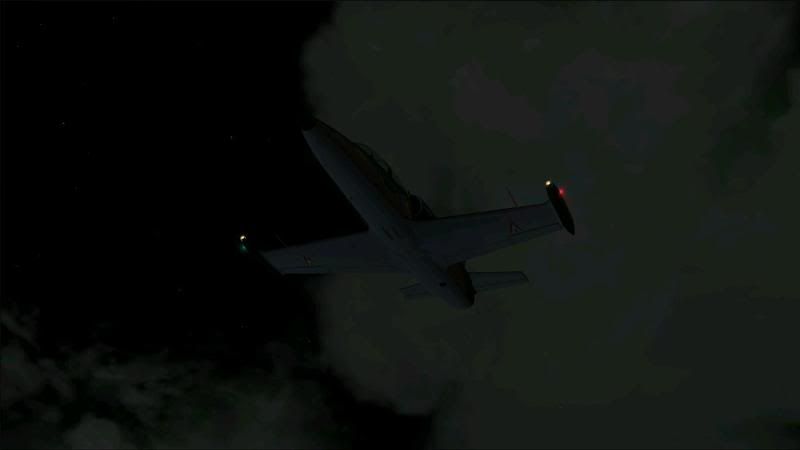
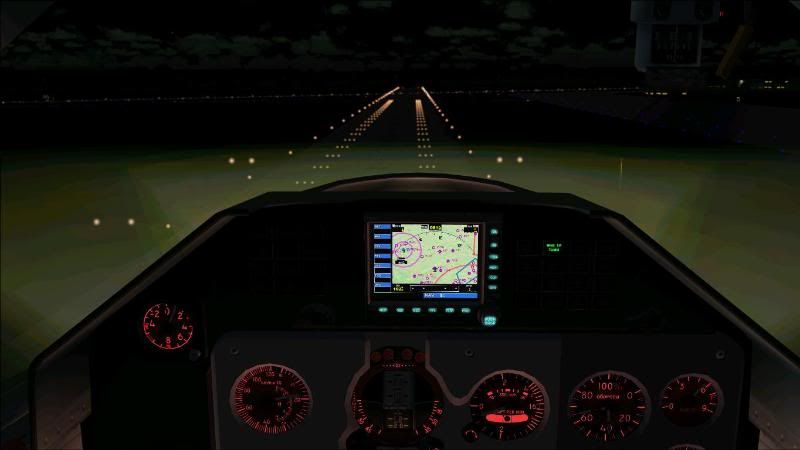


Any help would be much appreciated.
ShadowMystDK
Forum Addict
 
Topic author
Joined: Mon Feb 18, 2008 7:36 am
Posts: 200

Postby IslandBoy77 » Sun Oct 10, 2010 8:16 pm

The pics are a little low-res. Can you clarify - is the specific problem banding (gradation between shades of colours showing bands)? What else looks specifically "horrid"? It looks partly like a colour bit-depth problem on the surface.
Last edited by IslandBoy77 on Sun Oct 10, 2010 8:16 pm, edited 1 time in total.
User avatar
IslandBoy77
Senior Member
 
Joined: Tue Feb 03, 2009 2:23 pm
Posts: 1020
Location: Napier, New Zealand

Postby ShadowMystDK » Sun Oct 10, 2010 9:48 pm

Sorry about the resolution - it's the best I've been able to get as of late using Fraps.
As to the problem itself - the differentiation between colors and depth is what I'm referring to - i.e. the shades don't blend together like they should, and there is almost no depth to them whatsoever. Ground textures appear fine - it's the aircraft itself and sky/cloud textures that is off.
Last edited by ShadowMystDK on Sun Oct 10, 2010 9:48 pm, edited 1 time in total.
ShadowMystDK
Forum Addict
 
Topic author
Joined: Mon Feb 18, 2008 7:36 am
Posts: 200

Postby IslandBoy77 » Mon Oct 11, 2010 7:05 am

Hmmm. So what you're looking for then is colour bit depth settings - either in FSX, Windows or your video driver. Have you exhaustively searched those 3 things to make sure one isn't 'out'? Oft times it can be just one setting in one of those areas that will tip the whole thing off.
User avatar
IslandBoy77
Senior Member
 
Joined: Tue Feb 03, 2009 2:23 pm
Posts: 1020
Location: Napier, New Zealand

Postby ShadowMystDK » Mon Oct 11, 2010 12:01 pm

I have no clue as to what setting I should be looking for though lol.............
ShadowMystDK
Forum Addict
 
Topic author
Joined: Mon Feb 18, 2008 7:36 am
Posts: 200

Postby IslandBoy77 » Mon Oct 11, 2010 12:38 pm

ShadowMystDK wrote:
QUOTE (ShadowMystDK @ Oct 11 2010, 01:01 PM) <{POST_SNAPBACK}>
I have no clue as to what setting I should be looking for though lol.............

FSX has a bit-depth setting next to the screen resolution - make sure it's 32-bit. The general screen properties for Windows will tell you if you're using 16 or 32-bit. And somewhere in the video card driver control panel there will probably be some mention about colour depth - again, you need to look to make sure it's 32 not 16 or 24. I hope that at least points you in the right direction.
User avatar
IslandBoy77
Senior Member
 
Joined: Tue Feb 03, 2009 2:23 pm
Posts: 1020
Location: Napier, New Zealand


Return to Technical Issues

Who is online

Users browsing this forum: No registered users and 7 guests