Hello,
Im planning to get a completely new gaming rig to run FSX and Orbx with very high settings which Im getting from a computer company - http://www.hiteksystems.co.nz/. I've brought a pc from them before which Im using now.
Here are the specs: (not finalised yet, still adding/removing some hardware)
Case: Cooler Master Storm Scout
Motherboard: Asus P6T 1366 MB
CPU: Core I7 950 3.06Ghz - hoping it to be overclocked to 4ghz
Air Cooler: i7 1366 aftermarket cooler
RAM: Corsair 6GB (3x XMS3 2GB) PC-12800 (1600MHz) XMP, DOMINATOR GT +DHX +AirFan, DDR3 For X58 MB/i7 Core, 3x240-pin DIMMs, Triple Kit, 7-7-7-20,
HDD: 4x 500GB Fast SATA2 HDs RAID 5 array
Optical Drive: Samsung DVDRW Drive
GPU: GTX 580 Graphics Card
PSU: 1000W Silverstone PSU
OS: Windows 7 Home Premium 64bit
Cost: NZD $3450 + GST
What do you guys think?
Labour to Build, Install Win 7 O/S, Configure & Test
My new pc
34 posts
• Page 1 of 2 • 1, 2
 by pilot.masman » Tue Nov 30, 2010 12:52 am
firstly i would say that im not the person to look to for over clocking (not that i wouldnt do it for myself its just others stuff i dont like OCing)
right, here is what i would recommend.
Case: Good case, leave it but personally i prefer the CM 690 2 Advanced for more space and looks better
Motherboard: Swap this out for a GIGABYTE GA-X58A-UD3R, but could also upgrade to an ASUS rampage seeing as this build is cheaper than the one you stated.
CPU: Good CPU, i know a few of my friends with I7's and they all have 950's
Air Cooler: A good Prolimatech MEGAHALEMS would be my advice, or if you dont like the look you could go for an Armageddon or a Venomous X... Coupled with 2 Silverstone Air Penetrators.
RAM: I would rather personally go for a G.SKILL Ripjaws 8GB kit, or if your set on triple channel, a Corsair Dominator set is fine (btw not much gain with triple...)
HDD: 2 x 500GB in RAID0 and 1TB or more.
Optical Drive: Good
GPU: Galaxy GTX580 etc etc
PSU: CoolerMaster Silent Pro (gold certified) 800W, can go to the 1000W version if needed but with this build 800 will suffice
OS: Good
The cost i tallied came too around $3350 including GST excluding the building and testing.
(HDD rec.) i recommended 2 x 500GB drives in RAID0 because unless your in a work environment or your data is extremely valuable to you RAID5 is unnecessary and gives low disk space efficiency. (ie with 4 500GB drives in RAID 5 you would get 1TB of usable space, wheras with 2 500GB drives in RAID0 plus an extra 1TB drive you get 2TB usable space.)
if you want me to help you with building etc im happy to help, im not doing anything until my course starts again next year.
right, here is what i would recommend.
Case: Good case, leave it but personally i prefer the CM 690 2 Advanced for more space and looks better
Motherboard: Swap this out for a GIGABYTE GA-X58A-UD3R, but could also upgrade to an ASUS rampage seeing as this build is cheaper than the one you stated.
CPU: Good CPU, i know a few of my friends with I7's and they all have 950's
Air Cooler: A good Prolimatech MEGAHALEMS would be my advice, or if you dont like the look you could go for an Armageddon or a Venomous X... Coupled with 2 Silverstone Air Penetrators.
RAM: I would rather personally go for a G.SKILL Ripjaws 8GB kit, or if your set on triple channel, a Corsair Dominator set is fine (btw not much gain with triple...)
HDD: 2 x 500GB in RAID0 and 1TB or more.
Optical Drive: Good
GPU: Galaxy GTX580 etc etc
PSU: CoolerMaster Silent Pro (gold certified) 800W, can go to the 1000W version if needed but with this build 800 will suffice
OS: Good
The cost i tallied came too around $3350 including GST excluding the building and testing.
(HDD rec.) i recommended 2 x 500GB drives in RAID0 because unless your in a work environment or your data is extremely valuable to you RAID5 is unnecessary and gives low disk space efficiency. (ie with 4 500GB drives in RAID 5 you would get 1TB of usable space, wheras with 2 500GB drives in RAID0 plus an extra 1TB drive you get 2TB usable space.)
if you want me to help you with building etc im happy to help, im not doing anything until my course starts again next year.
Last edited by pilot.masman on Tue Nov 30, 2010 12:57 am, edited 1 time in total.
Current PC - 3.2Ghz quadcore , GTX470, 750W PSU, 3.5tb, 12gb ddr3
-

pilot.masman - Sim-holic
- Joined: Sat Mar 08, 2008 9:21 pm
- Posts: 586
- Location: Tauranga
by IslandBoy77 » Tue Nov 30, 2010 7:13 am
Nzeddy wrote:QUOTE (Nzeddy @ Nov 30 2010, 01:10 AM) <{POST_SNAPBACK}>Hello,
Im planning to get a completely new gaming rig to run FSX and Orbx with very high settings which Im getting from a computer company - http://www.hiteksystems.co.nz/. I've brought a pc from them before which Im using now.
Here are the specs: (not finalised yet, still adding/removing some hardware)
Case: Cooler Master Storm Scout
Motherboard: Asus P6T 1366 MB
CPU: Core I7 950 3.06Ghz - hoping it to be overclocked to 4ghz
Air Cooler: i7 1366 aftermarket cooler
RAM: Corsair 6GB (3x XMS3 2GB) PC-12800 (1600MHz) XMP, DOMINATOR GT +DHX +AirFan, DDR3 For X58 MB/i7 Core, 3x240-pin DIMMs, Triple Kit, 7-7-7-20,
HDD: 4x 500GB Fast SATA2 HDs RAID 5 array
Optical Drive: Samsung DVDRW Drive
GPU: GTX 580 Graphics Card
PSU: 1000W Silverstone PSU
OS: Windows 7 Home Premium 64bit
Cost: NZD $3450 + GST
What do you guys think?
Labour to Build, Install Win 7 O/S, Configure & Test
That's an impressive rig you're looking at getting into - are you looking at FPS gaming as well as FSX?
The only comments I would make are:
Motherboard: Definitely steer clear of Asus - poor warranty when push comes to shove, I've had too many issues with Asus boards over the years to have any real faith in them
HDD: There's as many opinions on RAID as there are techs, I reckon!From everything I've read, I don't really see RAID being advantageous enough for the possible problems it can cause. I think you'd be better off getting a couple of fast SSDs - one for the system / general apps, one for FSX - and then have a WD Black 1TB drive for data. I know RAID is supposed to bring in efficiencies & redundancy, but the problems I've read about just don't seem to justify what could be a marginal increase in performance at best. I've even read somewhere (can't recall where now - sorry) that RAID degrades FSX performance. Would be money wasted to find that was true...
Let us know how you get on building your rig, what glitches you find, and what sort of performance you end up with.

-

IslandBoy77 - Senior Member
- Joined: Tue Feb 03, 2009 2:23 pm
- Posts: 1020
- Location: Napier, New Zealand
by Nzeddy » Tue Nov 30, 2010 8:23 am
Hey,
Firstly Im not building my computer. I don't even know how to build one in the first place, lol. Steve, one of the guys at HitekSystems is ordering, building, installing OS and testing my computer. He has worked with computer for 15+ years and he suggested that I should go with RAID5 as it's fast or w/e and doesn't fail. But thanks for the offer.
Here's what he said on one of my emails:
"RAID 5 is the next up the list and you can have between 3 to 6 drives and once you start getting 4 drives or more the RAID 5 arrays end up very fast as youend up getting the read speed of all 4 drives combined together, this is why a good & fast RAID 5 array with std fast 7200 RPM Drives can end up faster than a single SSD and even A RAID 0 SSD Array, plus you get the redundancy if you have a single drive failure you get no data loss which is nice."
Firstly Im not building my computer. I don't even know how to build one in the first place, lol. Steve, one of the guys at HitekSystems is ordering, building, installing OS and testing my computer. He has worked with computer for 15+ years and he suggested that I should go with RAID5 as it's fast or w/e and doesn't fail. But thanks for the offer.
Here's what he said on one of my emails:
"RAID 5 is the next up the list and you can have between 3 to 6 drives and once you start getting 4 drives or more the RAID 5 arrays end up very fast as youend up getting the read speed of all 4 drives combined together, this is why a good & fast RAID 5 array with std fast 7200 RPM Drives can end up faster than a single SSD and even A RAID 0 SSD Array, plus you get the redundancy if you have a single drive failure you get no data loss which is nice."
QUOTE
That's an impressive rig you're looking at getting into - are you looking at FPS gaming as well as FSX?[/quote]
Thanks. Yup.
So your really saying that I just need a 800W PSU instead of the 1000W?
Thanks. Yup.
So your really saying that I just need a 800W PSU instead of the 1000W?
Last edited by Nzeddy on Tue Nov 30, 2010 8:31 am, edited 1 time in total.
- Eddy
-

Nzeddy - Sim-holic
- Topic author
- Joined: Thu Jun 12, 2008 7:52 pm
- Posts: 866
by pilot.masman » Tue Nov 30, 2010 9:04 am
yea like nzav8tor said, not necessary but nice.
like ive said above its probably cheaper buying from elsewhere and getting it built by a community member or a shop in town. (IE mill tech, tauranga computers etc)
the RAID5 like i mentioned unnecessary
like ive said above its probably cheaper buying from elsewhere and getting it built by a community member or a shop in town. (IE mill tech, tauranga computers etc)
the RAID5 like i mentioned unnecessary
Last edited by pilot.masman on Tue Nov 30, 2010 9:06 am, edited 1 time in total.
Current PC - 3.2Ghz quadcore , GTX470, 750W PSU, 3.5tb, 12gb ddr3
-
pilot.masman - Sim-holic
- Joined: Sat Mar 08, 2008 9:21 pm
- Posts: 586
- Location: Tauranga
by IslandBoy77 » Tue Nov 30, 2010 9:08 am
Nzeddy wrote:QUOTE (Nzeddy @ Nov 30 2010, 09:23 AM) <{POST_SNAPBACK}>Hey,
Firstly Im not building my computer. I don't even know how to build one in the first place, lol. Steve, one of the guys at HitekSystems is ordering, building, installing OS and testing my computer. He has worked with computer for 15+ years and he suggested that I should go with RAID5 as it's fast or w/e and doesn't fail. But thanks for the offer.
Here's what he said on one of my emails:
"RAID 5 is the next up the list and you can have between 3 to 6 drives and once you start getting 4 drives or more the RAID 5 arrays end up very fast as youend up getting the read speed of all 4 drives combined together, this is why a good & fast RAID 5 array with std fast 7200 RPM Drives can end up faster than a single SSD and even A RAID 0 SSD Array, plus you get the redundancy if you have a single drive failure you get no data loss which is nice."
Thanks. Yup.
So your really saying that I just need a 800W PSU instead of the 1000W?
Well, if the guy building your PC is 100% confident about the RAID, that's fine I suppose. As I said, there are lots of opinions about RAID, and from people with 20-30 years+ experience at that. I've been assembling PCs for 12 years, and have steered clear of RAID: I just don't like the risks involved that I'd read about for relatively modest - if any - gains. I'd dispute the claim that a 4-disk RAID is faster than a fast SSD - for video editing, yes. For gaming, no. RAID is good at managing large, heavy volumes of data. SSD is good for "smaller but more frequent" data management. And this is one of the problems I've seen with those who are RAID proponents: they get myopic and forget that RAID is no a panacea for all computer ills / performance issues. Even though a heavy FPS game like Crysis might, maybe, move big enough chunks of data to make RAID effective, I seriously doubt it. My advice here is to seek a couple of second opinions of a couple of tech or gaming websites that you trust. www.techzonez.com is a good one, and there are a couple of good NZ gaming / overclocker website that will be able to, hopefully, give a balanced opinion. Note also that I've read that RAID does have a lot more failures than it's supporters will admit to, and that good RAID implementation is seldom achieved - either due to cheap chipsets, driver issues or lack of truly in-depth knowledge by the technician.
I also think 1000W is serious overkill - not to mention expensive to run - but it depends if you're thinking of liquid-cooling or a 2nd graphic card (for SLI) at a later date. If yes, go 1000W. If no or very likely not, a good 800W true PSU is plenty.
-
IslandBoy77 - Senior Member
- Joined: Tue Feb 03, 2009 2:23 pm
- Posts: 1020
- Location: Napier, New Zealand
by dart15 » Tue Nov 30, 2010 2:45 pm
If your primary purpose for this PC is FSX dont go the RAID way! There is evidence that it actually degrades performance with FSX. One of the major US high end specialist builders (cant remember which one but I'll post later) advised against after running numerous tests. They also gave a lot of valuable advice for those considering building/purchasing specifically for FSX. I'll try to find the link later....
Personally I have had a great experience with Asus m/bs - I'm on my 3rd - (generational changes not reliability!)
Agree with comments about PSU being an overkill too - unless you are going to drive multiple high end graphics (and here again Crossfire/SLI does not assist FSX). With PSU quality is better than quantity!!! Its about clean power. My opinion: you wont need more than 750w for what you are proposing and that would still leave ample reserve. Save yourself some money.
All the best with whatever you decide....
Dart
Personally I have had a great experience with Asus m/bs - I'm on my 3rd - (generational changes not reliability!)
Agree with comments about PSU being an overkill too - unless you are going to drive multiple high end graphics (and here again Crossfire/SLI does not assist FSX). With PSU quality is better than quantity!!! Its about clean power. My opinion: you wont need more than 750w for what you are proposing and that would still leave ample reserve. Save yourself some money.
All the best with whatever you decide....
Dart
Dart 15


Asus P6X58D Premium | i7 930 @2.8 OC 4.2 Ghz | Radeon 5850 | 3x2 GB Corsair Dominator DDR3 1600 7-8-7-7-20 |
OCZ Vertex3 120GB SSD | Corsair H50 | Corsair HX650W | Cooler Master Gladiator 600 | Win7 x64 | FSX Acceleration
Asus P6X58D Premium | i7 930 @2.8 OC 4.2 Ghz | Radeon 5850 | 3x2 GB Corsair Dominator DDR3 1600 7-8-7-7-20 |
OCZ Vertex3 120GB SSD | Corsair H50 | Corsair HX650W | Cooler Master Gladiator 600 | Win7 x64 | FSX Acceleration
- dart15
- Forum Addict
- Joined: Mon Jul 26, 2010 11:54 am
- Posts: 181
- Location: Christchurch
by Nzeddy » Tue Nov 30, 2010 11:09 pm
dart15 wrote:QUOTE (dart15 @ Nov 30 2010, 03:45 PM) <{POST_SNAPBACK}>If your primary purpose for this PC is FSX dont go the RAID way! There is evidence that it actually degrades performance with FSX.
What? Guys over at Orbx use RAID0 so I don't know...- Eddy

-
Nzeddy - Sim-holic
- Topic author
- Joined: Thu Jun 12, 2008 7:52 pm
- Posts: 866
by nzav8tor » Tue Nov 30, 2010 11:30 pm
I think the its all much of a muchness anyway. Your going to have a killer system mate so go for multiple HDD in a RAID setup, SSD or just a fast HDD.
I got a Raptor a couple of years back and I still think it makes the single biggest difference to my system, load times are less, texures pop up straight away, it hums.
With an i7 chip you won't find any limits to your FSX system...!
I got a Raptor a couple of years back and I still think it makes the single biggest difference to my system, load times are less, texures pop up straight away, it hums.
With an i7 chip you won't find any limits to your FSX system...!
-

nzav8tor - Forum Addict
- Joined: Sat Feb 24, 2007 4:31 am
- Posts: 222
- Location: PN
by IslandBoy77 » Wed Dec 01, 2010 7:18 am
The thing to remember with RAID is that it is easy to stuff up doing a proper installation, and it is most certainly not a fail-safe technology as is trumpeted by it's proponents. As with all things in life, there are those who get fixated on something, and no "evidence" to the contrary of their view will sway them. Perhaps they get mentally & emotionally "invested" in it?
Anyway, I was very interested in RAID for a while (both for myself and my gaming clients), but after extensive reading, I decided that there were too many "ifs" and "buts" about the technology to make it worth my while, and certainly not worth the risks associated with RAID. Sure, RAID does work. But it also fails regularly. In fact, the reports & comments I've read strongly indicate that over the long haul, RAID ends up offering no more or less security & stability of data than non-RAID. Not only that, but one really needs to use HDDs that are specifically designed for RAID, which means smaller caches (for some weird reason) and higher cost. I'd rather have a 64MB cache SATA3 drive, or a really fast SSD (be mindful that there are differing levels of SSDs - some are slow, some are fast - price is variable accordingly), or a Raptor-class drive.
On balance, I think a couple of really good SSDs, teamed up with a nice Western Digital Black 1TB 64MB cache SATA3, offer the best performance / value for money combination for FSX / FPS gaming. Having said that, it would be very interesting to put a couple of fast SSDs up against the latest Raptor drives to see which works best in an FSX / FPS gaming rig. Oh to have the money to have a play...
Anyway, I was very interested in RAID for a while (both for myself and my gaming clients), but after extensive reading, I decided that there were too many "ifs" and "buts" about the technology to make it worth my while, and certainly not worth the risks associated with RAID. Sure, RAID does work. But it also fails regularly. In fact, the reports & comments I've read strongly indicate that over the long haul, RAID ends up offering no more or less security & stability of data than non-RAID. Not only that, but one really needs to use HDDs that are specifically designed for RAID, which means smaller caches (for some weird reason) and higher cost. I'd rather have a 64MB cache SATA3 drive, or a really fast SSD (be mindful that there are differing levels of SSDs - some are slow, some are fast - price is variable accordingly), or a Raptor-class drive.
On balance, I think a couple of really good SSDs, teamed up with a nice Western Digital Black 1TB 64MB cache SATA3, offer the best performance / value for money combination for FSX / FPS gaming. Having said that, it would be very interesting to put a couple of fast SSDs up against the latest Raptor drives to see which works best in an FSX / FPS gaming rig. Oh to have the money to have a play...
Last edited by IslandBoy77 on Wed Dec 01, 2010 7:21 am, edited 1 time in total.
-
IslandBoy77 - Senior Member
- Joined: Tue Feb 03, 2009 2:23 pm
- Posts: 1020
- Location: Napier, New Zealand
by IslandBoy77 » Wed Dec 01, 2010 1:46 pm
Nzeddy wrote:QUOTE (Nzeddy @ Dec 1 2010, 02:32 PM) <{POST_SNAPBACK}>Ok I've gone for this:
1x 120GB SSD for FSX / addons
1x 1TB F3 drive for OS, games, etc
Cool - I think it's the right decision. If you've got a bit of spare cash, you might like to consider having a 2nd WD 1TB drive - either for all your FPS games, or for the Windows virtual memory (paging) file.
And on the topic of the paging file, do a good bit of digging around as to how to set that optimally - you might even find that you have to change the file size when playing FSX, then put it "back to normal" for FPS. There is a lot of info on this floating about, and I haven't made up my mind yet what is correct. The general "rule" is to set the file at 1.5 x times the size of your RAM, min & max values the same. So, a 4GB system is 4096MB, times 1.5 = 6144: that would be the min & max value on whatever drive you want to plonk it on. BUT: I've heard that FSX likes either a set size of around 4GB, whilst others say the same size as RAM, whilst others say 1GB, and even one school of thought says if you've got 8GB turn it off! My understanding is that Windows needs to have at LEAST 1GB of page file (also called Virtual Memory, VM for short) allocated.
I'm picking that the variance in opinion come down to how people use their PCs, how "pared down" their processes and autoruns are, how geek they are, how fast their hardware is etc etc. I'm sticking with my 1.5 x total RAM for now, but have also tried:
- 4GB only
- 1GB only
- no VM
- Min 1.5 x Max 2 x
The only 1 I really noticed any diff with was no VM - I got random crashes. However, I also found later that my motherboard had got weird, so it's entirely possible that it was the motherboard and not the "no vm" - I just haven't bothered to fiddle with it again.
Food for thought. Oh that gaming computers were easier, eh?Last edited by IslandBoy77 on Wed Dec 01, 2010 6:01 pm, edited 1 time in total.
-
IslandBoy77 - Senior Member
- Joined: Tue Feb 03, 2009 2:23 pm
- Posts: 1020
- Location: Napier, New Zealand
by dart15 » Wed Dec 01, 2010 5:13 pm
Here's the link I referred to in my earlier post - the reference to RAID0 is at the bottom of the page. Some good information and performance comparisons here to help get people started when contemplating a rig optimised for FSX.
http://www.jetlinesystems.com/performance.html
Dart out
http://www.jetlinesystems.com/performance.html
Dart out
Dart 15
Asus P6X58D Premium | i7 930 @2.8 OC 4.2 Ghz | Radeon 5850 | 3x2 GB Corsair Dominator DDR3 1600 7-8-7-7-20 |
OCZ Vertex3 120GB SSD | Corsair H50 | Corsair HX650W | Cooler Master Gladiator 600 | Win7 x64 | FSX Acceleration
Asus P6X58D Premium | i7 930 @2.8 OC 4.2 Ghz | Radeon 5850 | 3x2 GB Corsair Dominator DDR3 1600 7-8-7-7-20 |
OCZ Vertex3 120GB SSD | Corsair H50 | Corsair HX650W | Cooler Master Gladiator 600 | Win7 x64 | FSX Acceleration
- dart15
- Forum Addict
- Joined: Mon Jul 26, 2010 11:54 am
- Posts: 181
- Location: Christchurch
by IslandBoy77 » Wed Dec 01, 2010 7:20 pm
Awesome - I've book-marked that page in case I need to refer to it. Interesting, though, that despite them bearing out what I've always thought - including the fact that the much more expensive GTX480 only provides a 2FPS improvement over the 5870  - they are still Intel-biased. It would have been really good to see some AMD benchmarks in the mix, so we know where the real "bang for buck" sits when speccing a system. Still, a useful general guide, even if not fully balanced by adding AMD. A shame they don't make any mention of VM...
- they are still Intel-biased. It would have been really good to see some AMD benchmarks in the mix, so we know where the real "bang for buck" sits when speccing a system. Still, a useful general guide, even if not fully balanced by adding AMD. A shame they don't make any mention of VM...-
IslandBoy77 - Senior Member
- Joined: Tue Feb 03, 2009 2:23 pm
- Posts: 1020
- Location: Napier, New Zealand
by pilot.masman » Wed Dec 01, 2010 10:39 pm
would still recommend a different company, buying your gear though an online store would be cheaper. and then taking it to a company such as hiteksytems or mill tech here in Tauranga for them to put together for 100ish dollars...
would save you ALLOT of money.
did notice the lack of amd processors in those tests. its a shame would have liked to see some stats on them.
would save you ALLOT of money.
did notice the lack of amd processors in those tests. its a shame would have liked to see some stats on them.
Last edited by pilot.masman on Wed Dec 01, 2010 11:10 pm, edited 1 time in total.
Current PC - 3.2Ghz quadcore , GTX470, 750W PSU, 3.5tb, 12gb ddr3
-
pilot.masman - Sim-holic
- Joined: Sat Mar 08, 2008 9:21 pm
- Posts: 586
- Location: Tauranga
by Nzeddy » Thu Dec 02, 2010 2:15 pm
Here are the final specs.
Hitek Systems Custom Built Gaming PC using the following components:
Operating System: Windows 7 Home Premium 64bit
Case: Cooler Master Storm Scout
PSU: 1000w Silverstone PSU
Motherboard: Asus P6T X58 1366
CPU: Intel I7 950 3.06Ghz - Overclocked 4Ghz
Air Cooler: Aywun A1-V10
GPU: Geforce GTX580
RAM: 6GB Corsair CL7 Triple Channel DDR3 1600 Mhz
HDD 1: Corsair Force Series 120GB MLC SSD Drive - For Flight Simulator X Acceleration and addons etc
HDD 2: 1TB Samsung F3 HDD - For OS, other games, etc
Optical Drive: Samsung DVDRW Drive
Other: - 1 Year RTB Hardware Warranty on the entire PC, extended warranty options available.
- Includes Labour to physically build the PC, install Windows 7 HP 64bit Operating system + latest updates & drives then burnin test the PC to ensure running nicely before client comes to pickup.
Hitek Systems Custom Built Gaming PC using the following components:
Operating System: Windows 7 Home Premium 64bit
Case: Cooler Master Storm Scout
PSU: 1000w Silverstone PSU
Motherboard: Asus P6T X58 1366
CPU: Intel I7 950 3.06Ghz - Overclocked 4Ghz
Air Cooler: Aywun A1-V10
GPU: Geforce GTX580
RAM: 6GB Corsair CL7 Triple Channel DDR3 1600 Mhz
HDD 1: Corsair Force Series 120GB MLC SSD Drive - For Flight Simulator X Acceleration and addons etc
HDD 2: 1TB Samsung F3 HDD - For OS, other games, etc
Optical Drive: Samsung DVDRW Drive
Other: - 1 Year RTB Hardware Warranty on the entire PC, extended warranty options available.
- Includes Labour to physically build the PC, install Windows 7 HP 64bit Operating system + latest updates & drives then burnin test the PC to ensure running nicely before client comes to pickup.
Last edited by Nzeddy on Fri Dec 03, 2010 8:27 am, edited 1 time in total.
- Eddy
-
Nzeddy - Sim-holic
- Topic author
- Joined: Thu Jun 12, 2008 7:52 pm
- Posts: 866
by IslandBoy77 » Thu Dec 02, 2010 5:10 pm
Cool - glad you're happy with the specs. I'll be very interested to know what resolution you can run FSX at, and with what degree of slider-maxing, and at what FPS over complex scenery like RealNZ WN or AK. Keep us posted!
-
IslandBoy77 - Senior Member
- Joined: Tue Feb 03, 2009 2:23 pm
- Posts: 1020
- Location: Napier, New Zealand
by Nzeddy » Fri Dec 03, 2010 9:05 am
I feel like Im getting ripped off. Yes, your right Sam.
With PCOnline Shop including GST $3180.71 NZD - http://i275.photobucket.com/albums/jj316/n....jpg?1291323692
With HitekSystems including GST $4324.00 NZD
I can save about $1k. But then the cost of him building it, installing os, testing etc which I don't know how much it is.
What do you guys think? Worth it?
Hitek Systems Ltd has a Technical Services division available to perform Labour / Technical Services to you seperately, so if you are wanting us to build up your new gaming system, or diagnose your faulty PC etc then feel free to contact us and we'd be only too happy to assist. Our daytime charge out rate for Technicial Services is $100 + GST Per Hour.
http://www.hiteksystems.co.nz/about-us?zen...674ce58ab415337
With PCOnline Shop including GST
$3180.71 NZD - http://i275.photobucket.com/albums/jj316/n....jpg?1291323692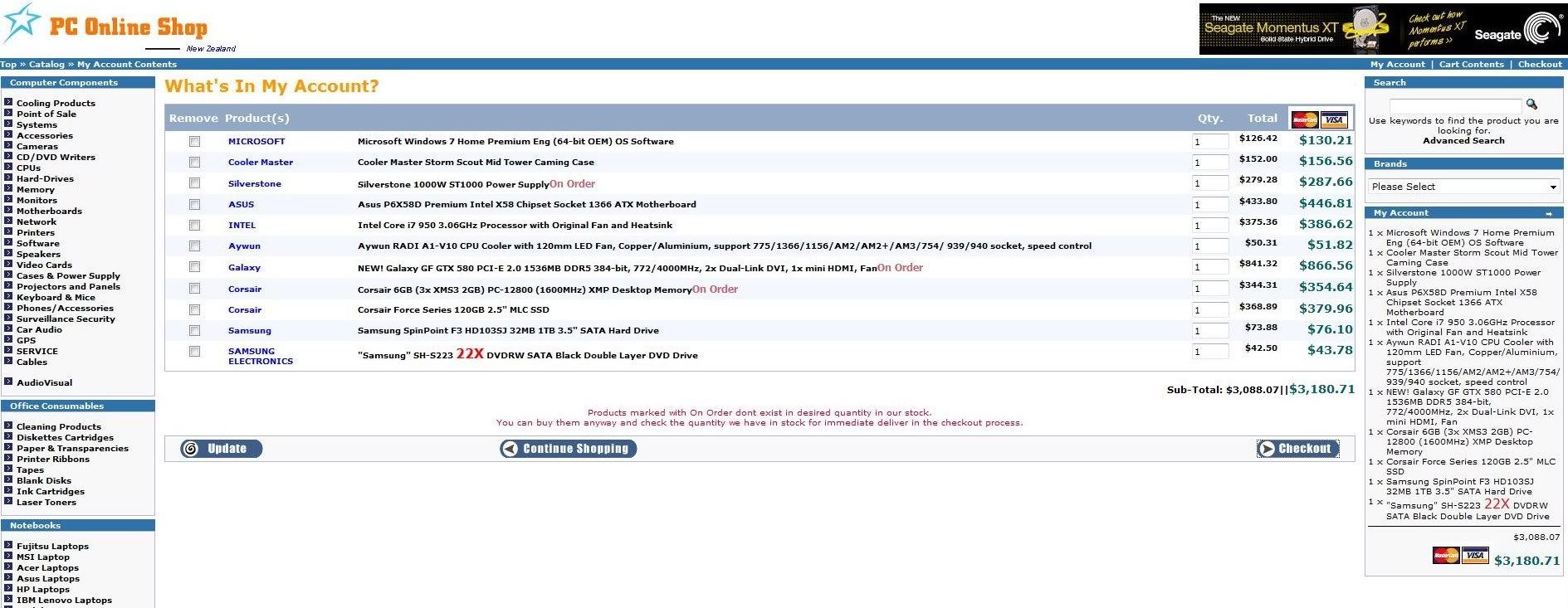
With HitekSystems including GST
$4324.00 NZDI can save about $1k. But then the cost of him building it, installing os, testing etc which I don't know how much it is.
What do you guys think? Worth it?
Hitek Systems Ltd has a Technical Services division available to perform Labour / Technical Services to you seperately, so if you are wanting us to build up your new gaming system, or diagnose your faulty PC etc then feel free to contact us and we'd be only too happy to assist. Our daytime charge out rate for Technicial Services is $100 + GST Per Hour.
http://www.hiteksystems.co.nz/about-us?zen...674ce58ab415337
Last edited by Nzeddy on Fri Dec 03, 2010 9:09 am, edited 1 time in total.
- Eddy
-
Nzeddy - Sim-holic
- Topic author
- Joined: Thu Jun 12, 2008 7:52 pm
- Posts: 866
34 posts
• Page 1 of 2 • 1, 2
Who is online
Users browsing this forum: No registered users and 22 guests