Robin,
I ran into something interesting installing the VLC Library + South Island Airfields: The Installer claimed that I didn't have my VLC patched to version 1.01, even though I only purchased it last week and the windowlight site claims I downloaded the 1.01 version.
My System:
Windows 7 Ultimate 64 bit
FSX Gold (Delux + Acceleration Pack)
Any idea's what could be screwing up the version detection?
I also have seen a few buildings where the roof texture is "flickering" between a roof and white. Not sure if this is a VLC issue, a general FSX issue or an interaction between sceneries. I tried to catch a screenshot but it came out normal.
Thanks, Niels
Vector Land Class Libraries + South Island Airfield Pack
38 posts
• Page 2 of 2 • 1, 2
 by nalbers » Wed Jan 19, 2011 8:51 pm
Niels Albers: Flying unskillfully with MS Flight simulator since version 1...

David Gunson on Soviet ATC: "They have a super system there. When you want to fly from say Moscow to Leningrad, you are give three things: A height, a route and a speed. If you deviate from any of these three things you are joined by two MIG's on each wing and you land at the nearest available airfield. The passengers continue by coach, and the crew are never seen again. ... It's a super system, they don't get repetitive faults...
David Gunson on Soviet ATC: "They have a super system there. When you want to fly from say Moscow to Leningrad, you are give three things: A height, a route and a speed. If you deviate from any of these three things you are joined by two MIG's on each wing and you land at the nearest available airfield. The passengers continue by coach, and the crew are never seen again. ... It's a super system, they don't get repetitive faults...
- nalbers
- Member
- Joined: Thu Apr 03, 2008 2:26 am
- Posts: 59
- Location: Driebergen, The Netherlands
by toprob » Wed Jan 19, 2011 9:04 pm
nalbers wrote:QUOTE (nalbers @ Jan 19 2011, 09:51 PM) <{POST_SNAPBACK}>Robin,
I ran into something interesting installing the VLC Library + South Island Airfields: The Installer claimed that I didn't have my VLC patched to version 1.01, even though I only purchased it last week and the windowlight site claims I downloaded the 1.01 version.
My System:
Windows 7 Ultimate 64 bit
FSX Gold (Delux + Acceleration Pack)
Any idea's what could be screwing up the version detection?
I also have seen a few buildings where the roof texture is "flickering" between a roof and white. Not sure if this is a VLC issue, a general FSX issue or an interaction between sceneries. I tried to catch a screenshot but it came out normal.
Thanks, Niels
Some good feedback there, Niels, thanks for that!
I'll check the version-checking code, but in the meantime could you just do a quick version check for me? Go to Control Panel: Programs: Uninstall a Program (just for a look, not to uninstall it!) and check the VLC version? Not just the name, which includes the version number, but also scroll across to the Version column.
A screenshot of the flickering building would certainly help, not that I need to see it flickering, but it would be good to see what sort of building it is. I think this is a few default rural autogen objects, in which case I think this is an issue with the default -- which is one reason why I eventually want to replace all the rural autogen.
-

toprob - NZFF Pro
- Topic author
- Joined: Sat Apr 29, 2006 4:56 pm
- Posts: 6741
- Location: Upper Hutt
by ZK-DWF » Wed Jan 19, 2011 9:13 pm
kcgb wrote:QUOTE (kcgb @ Jan 19 2011, 01:04 PM) <{POST_SNAPBACK}>This is only for the south island, it should not affect hawkes bay.
Yeah, looks like mythe Hastings09 scenery has a few incompabilities with the base VLC. Almost makes the aerodrome look like part of the Bridge Pa Golf Course next door ... plenty of bunkers, or should I say hazards!
-

ZK-DWF - Forum Addict
- Joined: Tue May 02, 2006 1:12 pm
- Posts: 271
- Location: Hastings, NZ
by nalbers » Wed Jan 19, 2011 9:56 pm
toprob wrote:QUOTE (toprob @ Jan 19 2011, 10:04 AM) <{POST_SNAPBACK}>Some good feedback there, Niels, thanks for that!
I'll check the version-checking code, but in the meantime could you just do a quick version check for me? Go to Control Panel: Programs: Uninstall a Program (just for a look, not to uninstall it!) and check the VLC version? Not just the name, which includes the version number, but also scroll across to the Version column.
A screenshot of the flickering building would certainly help, not that I need to see it flickering, but it would be good to see what sort of building it is. I think this is a few default rural autogen objects, in which case I think this is an issue with the default -- which is one reason why I eventually want to replace all the rural autogen.
I'll post the screenshot and check the version the next time I'm behind my FS PC. I'm planning to make a number of flights from each new airfield to check issues, since this is a Beta I figure you can use all the feedback you can get (I work for a programming team in real life so I take this sort of thing seriously).Niels Albers: Flying unskillfully with MS Flight simulator since version 1...
David Gunson on Soviet ATC: "They have a super system there. When you want to fly from say Moscow to Leningrad, you are give three things: A height, a route and a speed. If you deviate from any of these three things you are joined by two MIG's on each wing and you land at the nearest available airfield. The passengers continue by coach, and the crew are never seen again. ... It's a super system, they don't get repetitive faults...
- nalbers
- Member
- Joined: Thu Apr 03, 2008 2:26 am
- Posts: 59
- Location: Driebergen, The Netherlands
by nalbers » Fri Jan 21, 2011 9:51 am
nalbers wrote:QUOTE (nalbers @ Jan 19 2011, 10:56 AM) <{POST_SNAPBACK}>I'll post the screenshot and check the version the next time I'm behind my FS PC. I'm planning to make a number of flights from each new airfield to check issues, since this is a Beta I figure you can use all the feedback you can get (I work for a programming team in real life so I take this sort of thing seriously).
Okay. First the version number. It looks like I was offered Vector Land Class version 1.0 instead of 1.01. At least that's what Programs and Features in the Control panel is reporting.
Strange.
I logged into the store, but it shows I downloaded version 1.01.
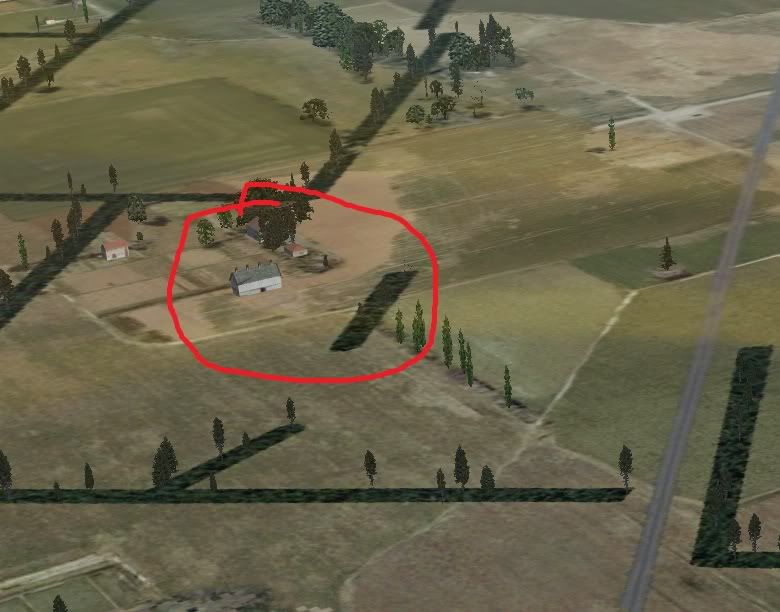
Second, the flashy building texture thing: I found another one near Ashburton and caught it in a screenshot:
The roof was flickering between this colour and brown tile
Any ideas what could be causing this?Niels Albers: Flying unskillfully with MS Flight simulator since version 1...
David Gunson on Soviet ATC: "They have a super system there. When you want to fly from say Moscow to Leningrad, you are give three things: A height, a route and a speed. If you deviate from any of these three things you are joined by two MIG's on each wing and you land at the nearest available airfield. The passengers continue by coach, and the crew are never seen again. ... It's a super system, they don't get repetitive faults...
- nalbers
- Member
- Joined: Thu Apr 03, 2008 2:26 am
- Posts: 59
- Location: Driebergen, The Netherlands
by toprob » Fri Jan 21, 2011 1:49 pm
nalbers wrote:QUOTE (nalbers @ Jan 21 2011, 10:51 AM) <{POST_SNAPBACK}>Okay. First the version number. It looks like I was offered Vector Land Class version 1.0 instead of 1.01. At least that's what Programs and Features in the Control panel is reporting.
Strange.
I logged into the store, but it shows I downloaded version 1.01.
Second, the flashy building texture thing: I found another one near Ashburton and caught it in a screenshot:
The roof was flickering between this colour and brown tile
Any ideas what could be causing this?
Thanks for getting back. The version issue is very strange -- your order definitely says it served up 1.01. Can you do just one more check, and run the installer again, just to view the first screen? Just cancel it once you've seen the version number. I'll try to figure out a definitive way to determine whether you are actually seeing 1.01.
The screenshot shows a default rural autogen object, and I have this myself -- it is a default FSX issue, and is as I said it is one of the reasons why there will eventually be a completely new NZ autogen set.frostynz wrote:QUOTE (frostynz @ Jan 21 2011, 12:39 AM) <{POST_SNAPBACK}>Great work again Robin .... well done.
Its probably my system, but I did notice trees on the X-wind Rwy at Hokitika for what its worth
Best Regards Dave
Thanks, at the moment I'm working on a new Hoki, so the initial release was temporary. However since I've dismantled my Hoki and started to rebuild, it was tricky to test it in it's basic state. I'll get a fix out.
Another rough airfield is Taieri, which is the least finished of all -- this will be dealt with in the next update, it is usable, just unfinished. (I would like to do something better with the F&P plant, but it may or may not happen.) I do notice that one of the default buildings has been left in the middle of the road, very council-worker of me....
toprob- NZFF Pro
- Topic author
- Joined: Sat Apr 29, 2006 4:56 pm
- Posts: 6741
- Location: Upper Hutt
by MurrayH » Sat Jan 22, 2011 7:50 am
nalbers wrote:QUOTE (nalbers @ Jan 25 2011, 10:51 PM) <{POST_SNAPBACK}>Okay. First the version number. It looks like I was offered Vector Land Class version 1.0 instead of 1.01. At least that's what Programs and Features in the Control panel is reporting.
Strange.
I logged into the store, but it shows I downloaded version 1.01.
Second, the flashy building texture thing: I found another one near Ashburton and caught it in a screenshot:
The roof was flickering between this colour and brown tile
Any ideas what could be causing this?
I get the same flickering roof tile texture, with the same building model. The flickering deminishes as I get closer to the building.
Is this a default model or a VLC one? It could be a problem that can be fixed?
- MurrayH
- Member
- Joined: Tue Jan 23, 2007 8:54 am
- Posts: 50
by nalbers » Sat Jan 22, 2011 9:30 am
toprob wrote:QUOTE (toprob @ Jan 21 2011, 02:49 AM) <{POST_SNAPBACK}>Thanks for getting back. The version issue is very strange -- your order definitely says it served up 1.01. Can you do just one more check, and run the installer again, just to view the first screen? Just cancel it once you've seen the version number. I'll try to figure out a definitive way to determine whether you are actually seeing 1.01.
The screenshot shows a default rural autogen object, and I have this myself -- it is a default FSX issue, and is as I said it is one of the reasons why there will eventually be a completely new NZ autogen set.
Okay Robin, the strangeness is now complete. I extracted the zipfile I downloaded from the store, filename VLC101Install.zip, ran the installer, and got the following dialog:
[attachment=436:InstallerDialog.gif]
Looks like somehow the wrong version of the installer has been packaged into the download. Unless the installer always says that it is version 1.0?MurrayH wrote:QUOTE (MurrayH @ Jan 21 2011, 08:50 PM) <{POST_SNAPBACK}>I get the same flickering roof tile texture, with the same building model. The flickering deminishes as I get closer to the building.
Is this a default model or a VLC one? It could be a problem that can be fixed?
See Robin's earlier reply to me: This is a default FSX autogen object. Not a lot to be done about that. Except for not using default autogen, which he is apparently considering.Niels Albers: Flying unskillfully with MS Flight simulator since version 1...
David Gunson on Soviet ATC: "They have a super system there. When you want to fly from say Moscow to Leningrad, you are give three things: A height, a route and a speed. If you deviate from any of these three things you are joined by two MIG's on each wing and you land at the nearest available airfield. The passengers continue by coach, and the crew are never seen again. ... It's a super system, they don't get repetitive faults...
- nalbers
- Member
- Joined: Thu Apr 03, 2008 2:26 am
- Posts: 59
- Location: Driebergen, The Netherlands
by toprob » Sat Jan 22, 2011 12:48 pm
nalbers wrote:QUOTE (nalbers @ Jan 22 2011, 10:30 AM) <{POST_SNAPBACK}>Okay Robin, the strangeness is now complete. I extracted the zipfile I downloaded from the store, filename VLC101Install.zip, ran the installer, and got the following dialog:
Stranger than that even... It seems that I ended up uploading the unpatched version again. I think this was caused by me messing around with my backup software, and zigging when I should have zagged. If you wish, you can redownload (give me half an hour to check the new file) or I'll give you a link to the patch. This goes for everyone who purchased VLC since the patch, but I'll be in touch via email to sort this out.
I'm sorry about that, I do have a number of safe-guards, but there's no safe-guard against me pressing the wrong button sometimes...
EDIT: there should be no problem with reinstalling over the old version, just ignore the already-installed warning, you don't need to uninstall first.Last edited by toprob on Sat Jan 22, 2011 12:50 pm, edited 1 time in total.
-
toprob - NZFF Pro
- Topic author
- Joined: Sat Apr 29, 2006 4:56 pm
- Posts: 6741
- Location: Upper Hutt
by nalbers » Sat Jan 22, 2011 6:26 pm
toprob wrote:QUOTE (toprob @ Jan 22 2011, 01:48 AM) <{POST_SNAPBACK}>Stranger than that even... It seems that I ended up uploading the unpatched version again. I think this was caused by me messing around with my backup software, and zigging when I should have zagged. If you wish, you can redownload (give me half an hour to check the new file) or I'll give you a link to the patch. This goes for everyone who purchased VLC since the patch, but I'll be in touch via email to sort this out.
I'm sorry about that, I do have a number of safe-guards, but there's no safe-guard against me pressing the wrong button sometimes...
EDIT: there should be no problem with reinstalling over the old version, just ignore the already-installed warning, you don't need to uninstall first.
No problem, things like this can happen to the best of us. I'll redownload tonight. Thanks for working out what was going on.Niels Albers: Flying unskillfully with MS Flight simulator since version 1...
David Gunson on Soviet ATC: "They have a super system there. When you want to fly from say Moscow to Leningrad, you are give three things: A height, a route and a speed. If you deviate from any of these three things you are joined by two MIG's on each wing and you land at the nearest available airfield. The passengers continue by coach, and the crew are never seen again. ... It's a super system, they don't get repetitive faults...
- nalbers
- Member
- Joined: Thu Apr 03, 2008 2:26 am
- Posts: 59
- Location: Driebergen, The Netherlands

by toprob » Sun Jan 23, 2011 9:27 am
SgtPepper wrote:QUOTE (SgtPepper @ Jan 23 2011, 08:32 AM) <{POST_SNAPBACK}>Ah yeah Gidday,
Just wondering if these addons are still considered to be in the beta stage?
I just want to tidy up Hokitika when I get back to work Monday, but bear mind mind that this project won't be 'finished' for a long time, if ever, so the idea is you can dive in at any stage, and update occasionally.

-
toprob - NZFF Pro
- Topic author
- Joined: Sat Apr 29, 2006 4:56 pm
- Posts: 6741
- Location: Upper Hutt

by toprob » Mon Jan 24, 2011 1:36 pm
nalbers wrote:QUOTE (nalbers @ Jan 22 2011, 07:26 PM) <{POST_SNAPBACK}>No problem, things like this can happen to the best of us. I'll redownload tonight. Thanks for working out what was going on.
Just to make this clear, it is just the version number which is incorrect, if you purchased VLC after the update, you do in fact have the updated scenery, it just isn't properly reported as 1.01. I imagine that this will be an issue for some, who are unsure of which version you have, but basically if you installed from a ZIP file with '101' in the name, or from a CD with 'Version 1.01' on the cover, then you have the update.
Niels -- thanks for your help with this, I hope this explains it fully. However this doesn't explain your issue with Forest Field -- did you ever find a duplicate scenery? I'd like to put together a list of things like this to go with the final Airfield release, so that anyone with duplicates will know what to look for.
-
toprob - NZFF Pro
- Topic author
- Joined: Sat Apr 29, 2006 4:56 pm
- Posts: 6741
- Location: Upper Hutt
by nalbers » Mon Jan 24, 2011 11:07 pm
toprob wrote:QUOTE (toprob @ Jan 24 2011, 02:36 AM) <{POST_SNAPBACK}>Just to make this clear, it is just the version number which is incorrect, if you purchased VLC after the update, you do in fact have the updated scenery, it just isn't properly reported as 1.01. I imagine that this will be an issue for some, who are unsure of which version you have, but basically if you installed from a ZIP file with '101' in the name, or from a CD with 'Version 1.01' on the cover, then you have the update.
Niels -- thanks for your help with this, I hope this explains it fully. However this doesn't explain your issue with Forest Field -- did you ever find a duplicate scenery? I'd like to put together a list of things like this to go with the final Airfield release, so that anyone with duplicates will know what to look for.
Robin,
Thanks for the help, and the explanation is fully understood, so thanks for that too! Forest Field is sorted. The problem was an AFCAD file delivered by the version of Christchurch airport that can be downloaded from snowman's FS site (NZCH 1.3 I think). It also had an AFCAD for West Melton that will almost certainly be wrong. A friend of mine in the business (Andrew McGregor, who is working on a NZ mesh for X-plane) pointed out that there was a problem with older geographical data-sets that placed a lot of objects precisely 86 meters to the south of where they should be. This matches exactly with what I saw happening at NZFF. The data NZCH 1.3 is based on is pretty old.Niels Albers: Flying unskillfully with MS Flight simulator since version 1...
David Gunson on Soviet ATC: "They have a super system there. When you want to fly from say Moscow to Leningrad, you are give three things: A height, a route and a speed. If you deviate from any of these three things you are joined by two MIG's on each wing and you land at the nearest available airfield. The passengers continue by coach, and the crew are never seen again. ... It's a super system, they don't get repetitive faults...
- nalbers
- Member
- Joined: Thu Apr 03, 2008 2:26 am
- Posts: 59
- Location: Driebergen, The Netherlands
by toprob » Thu Jan 27, 2011 12:21 pm
Ok, I've moved these over to the VectorLandClass website.
If you've downloaded these from here, you should get the 'official' downloads once I go public with this. If anyone has any more issues with the 'beta', please let me know as soon as. I've done a bit of a tidyup at Hokitika, included in the latest download.
If you've downloaded these from here, you should get the 'official' downloads once I go public with this. If anyone has any more issues with the 'beta', please let me know as soon as. I've done a bit of a tidyup at Hokitika, included in the latest download.
-
toprob - NZFF Pro
- Topic author
- Joined: Sat Apr 29, 2006 4:56 pm
- Posts: 6741
- Location: Upper Hutt
by Naki » Thu Jan 27, 2011 12:34 pm
Just noted that Hokitika will now get Bombardier Q300 flights...and so will Paraparaumu later in the year (another Realnz airport)
http://3rdlevelnz.blogspot.com/
http://3rdlevelnz.blogspot.com/
-

Naki - NZFF Pro
- Joined: Sat Aug 05, 2006 10:03 pm
- Posts: 7175
- Location: Tauranga
38 posts
• Page 2 of 2 • 1, 2
Who is online
Users browsing this forum: No registered users and 15 guests