Technical Issues

A forum specifically to discuss the latest and greatest of all flight simulators

Postby Barrington » Thu Jan 27, 2011 7:16 pm

dry.gif For some reason, all of a sudden when I load a flight plan, new flight or when I reload an already saved flight,
I have no engines running................
Can anyone shed any light on the problem or suggest what to check or do.
Any assistance would be much appreciated.
Image
Barrington
Forum Addict
 
Topic author
Joined: Thu Jul 13, 2006 11:42 pm
Posts: 215
Location: Levin New Zealand

Postby toprob » Thu Jan 27, 2011 7:41 pm

Have you saved a default flight lately?
User avatar
toprob
NZFF Pro
 
Joined: Sat Apr 29, 2006 4:56 pm
Posts: 6711
Location: Upper Hutt

Postby mfraser » Thu Jan 27, 2011 9:46 pm

As Rob said - if you've saved a default flight with the engines off then that would be a likely cause. Loading a new flightplan shouldn't cause the engines to shut down unless you check the 'Go to departure airport' box in which case it will use the default saved flight parameters - much like if you just changed the free flight details on startup.

If your engines are already started, try moving to the departure airfield first and then create the flightplan without checking that checkbox...

Let us know how you get on.
Regards,
Mat
Last edited by mfraser on Thu Jan 27, 2011 9:48 pm, edited 1 time in total.
mfraser
Sim-holic
 
Joined: Sun May 04, 2008 4:23 pm
Posts: 537
Location: Auckland, New Zealand

Postby Barrington » Fri Jan 28, 2011 1:44 pm

mfraser wrote:
QUOTE (mfraser @ Feb 1 2011, 09:46 AM) <{POST_SNAPBACK}>
As Rob said - if you've saved a default flight with the engines off then that would be a likely cause. Loading a new flightplan shouldn't cause the engines to shut down unless you check the 'Go to departure airport' box in which case it will use the default saved flight parameters - much like if you just changed the free flight details on startup.

If your engines are already started, try moving to the departure airfield first and then create the flightplan without checking that checkbox...

Let us know how you get on.
Regards,
Mat


Thanks Guys, will try your suggestions
Image
Barrington
Forum Addict
 
Topic author
Joined: Thu Jul 13, 2006 11:42 pm
Posts: 215
Location: Levin New Zealand

Postby Barrington » Wed Feb 02, 2011 5:53 pm

Hi Mat
unsure.gif I tried what you suggested but unfortunately with no luck.
Also I note that regardless of aircraft selection, all engines shut down a few seconds after opening a 'fly now'' screen - this is whether a flight plan is selected from the start or loading a saved flight or just selecting an airport to fly from.
Don't know where to go from here but wonder if I have l lost something from my FSX.cfg file? Any other suggestion please...................
Many thanks
Image
Barrington
Forum Addict
 
Topic author
Joined: Thu Jul 13, 2006 11:42 pm
Posts: 215
Location: Levin New Zealand

Postby Chairman » Wed Feb 02, 2011 6:12 pm

Maybe a joystick or yoke lever that controls the mixture, and it's set to cutoff ?
Last edited by Chairman on Wed Feb 02, 2011 6:12 pm, edited 1 time in total.
The above post is in the public domain and is guaranteed by the manufacturer to contain no references to anything illegal or discussion of piracy, although this signature may contain traces of nuts.
Chairman
Sim-holic
 
Joined: Wed Feb 13, 2008 8:07 pm
Posts: 912

Postby mfraser » Wed Feb 02, 2011 7:33 pm

Hmmmm..... okay....... you might need to resave your default flight - the cfg file is unlikely to be the problem. Try using CTRL-E to start your engines and once started, save the flight with DEFAULT as the title and ensure that the 'Default Flight' box is checked. As Chairman says, it might be worth checking the joystick assignments to make sure they're not creating any mischief!
mfraser
Sim-holic
 
Joined: Sun May 04, 2008 4:23 pm
Posts: 537
Location: Auckland, New Zealand

Postby Rotordude » Wed Feb 02, 2011 7:56 pm

make sure fsx is not running open your fsx.cfg and remove this line
SITUATION=C:\whatever else \is\written\in\here
save the config
restart sim
Regards always
Pete
Rotordude
Sim-holic
 
Joined: Wed Mar 25, 2009 3:50 pm
Posts: 508
Location: Huntly, NZ

Postby Barrington » Mon Feb 07, 2011 1:38 pm

mfraser wrote:
QUOTE (mfraser @ Feb 7 2011, 08:33 AM) <{POST_SNAPBACK}>
Hmmmm..... okay....... you might need to resave your default flight - the cfg file is unlikely to be the problem. Try using CTRL-E to start your engines and once started, save the flight with DEFAULT as the title and ensure that the 'Default Flight' box is checked. As Chairman says, it might be worth checking the joystick assignments to make sure they're not creating any mischief!


Many thanks for the input - not sure which suggestion did it but up and running properly again..........
cheers
Barrington
Image
Barrington
Forum Addict
 
Topic author
Joined: Thu Jul 13, 2006 11:42 pm
Posts: 215
Location: Levin New Zealand

Postby ngatimozart » Sat Sep 24, 2011 5:47 pm

Barrington wrote:
QUOTE (Barrington @ Jan 27 2011,7:16 PM) <{POST_SNAPBACK}>
dry.gif For some reason, all of a sudden when I load a flight plan, new flight or when I reload an already saved flight,
I have no engines running................
Can anyone shed any light on the problem or suggest what to check or do.
Any assistance would be much appreciated.


I have a similar problem except it is only with my piston engined aircraft - all of them. the turbo props & jets are fine. I have red the suggestions you guys have suggested for Barrington but I can't find my fsx.cfg file. And I have looked. I am running FSX Acceleration on a quad core 3.2 ghz 64 bit system with 8gb of ram and Windows & OS. Any suggestions would be greatly appreciated.

Barrington wrote:
QUOTE (Barrington @ Jan 27 2011,7:16 PM) <{POST_SNAPBACK}>
dry.gif For some reason, all of a sudden when I load a flight plan, new flight or when I reload an already saved flight,
I have no engines running................
Can anyone shed any light on the problem or suggest what to check or do.
Any assistance would be much appreciated.


I have a similar problem except it is only with my piston engined aircraft - all of them. the turbo props & jets are fine. I have red the suggestions you guys have suggested for Barrington but I can't find my fsx.cfg file. And I have looked. I am running FSX Acceleration on a quad core 3.2 ghz 64 bit system with 8gb of ram and Windows & OS. Any suggestions would be greatly appreciated.
ngatimozart
Member
 
Joined: Wed Feb 16, 2011 7:15 pm
Posts: 15
Location: Christchurch, New Zealand

Postby creator2003 » Sun Sep 25, 2011 9:37 am

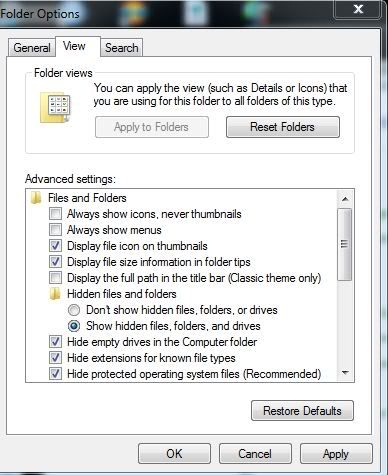
Go to win7 control panel and select folder options and select show hidden folders .


Once you have done this your fsx.cfg will be located in the posted path " C:\Users\ngatimozart\AppData\Roaming\Microsoft\FSX\fsx.cfg ."
Last edited by creator2003 on Sun Sep 25, 2011 9:38 am, edited 1 time in total.
User avatar
creator2003
NZFF Pro
 
Joined: Fri Jun 16, 2006 12:08 am
Posts: 4633
Location: Cant U C im LOCO

Postby ngatimozart » Sun Sep 25, 2011 10:42 am

creator2003 wrote:
QUOTE (creator2003 @ Sep 25 2011,9:37 AM) <{POST_SNAPBACK}>
Go to win7 control panel and select folder options and select show hidden folders .


Once you have done this your fsx.cfg will be located in the posted path " C:\Users\ngatimozart\AppData\Roaming\Microsoft\FSX\fsx.cfg ."


Thanks, I already have done that and it still doesn't show. I did a search using fsx.cfg as the search term and no hits. The odd thing is that it only affects piston engined aircraft. As another issue I turned off the overspeed warning and can't turn that back on and hae had a few sleeps since then so can't remember how I did it.
ngatimozart
Member
 
Joined: Wed Feb 16, 2011 7:15 pm
Posts: 15
Location: Christchurch, New Zealand

Postby toprob » Sun Sep 25, 2011 12:40 pm

You should be able to go directly to the folder which contains the FSX.cfg file by copy/pasting this into your Windows Explorer address bar:
%AppData%\Microsoft\FSX

Then at least you know that if you can't see your FSX.cfg file then it's a folder display setting which is hiding it.
User avatar
toprob
NZFF Pro
 
Joined: Sat Apr 29, 2006 4:56 pm
Posts: 6711
Location: Upper Hutt

Postby ngatimozart » Sun Sep 25, 2011 1:07 pm

toprob wrote:
QUOTE (toprob @ Sep 25 2011,12:40 PM) <{POST_SNAPBACK}>
You should be able to go directly to the folder which contains the FSX.cfg file by copy/pasting this into your Windows Explorer address bar:
%AppData%\Microsoft\FSX

Then at least you know that if you can't see your FSX.cfg file then it's a folder display setting which is hiding it.

Beauty, thanks mate found a backup copy. I had additpro but it would run on my system so I'll drop the backup in. Much appreciated.
ngatimozart
Member
 
Joined: Wed Feb 16, 2011 7:15 pm
Posts: 15
Location: Christchurch, New Zealand

Postby ngatimozart » Sun Sep 25, 2011 1:13 pm

ngatimozart wrote:
QUOTE (ngatimozart @ Sep 25 2011,1:07 PM) <{POST_SNAPBACK}>
Beauty, thanks mate found a backup copy. I had additpro but it would run on my system so I'll drop the backup in. Much appreciated.

That didn't work. They still don't start. Ah well will have a think.
ngatimozart
Member
 
Joined: Wed Feb 16, 2011 7:15 pm
Posts: 15
Location: Christchurch, New Zealand


Return to All Flight Simulators

Who is online

Users browsing this forum: No registered users and 4 guests