VLC
19 posts
• Page 1 of 1
 by Olderndirt » Sat Mar 26, 2011 7:13 am
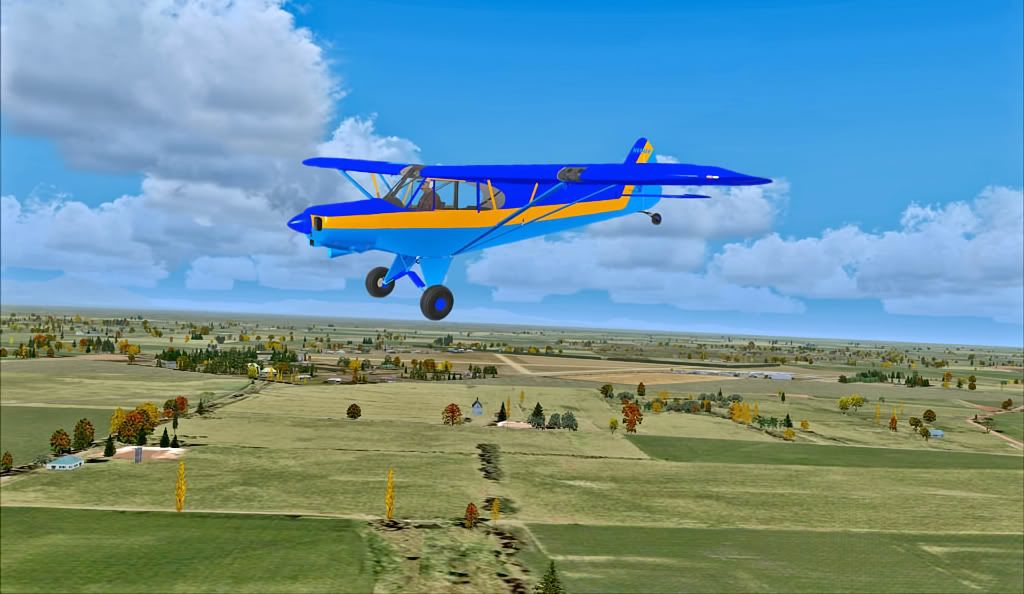
Jointly owned by yours truly and Wells Fargo Card Services, my new VLC. This, of course, is the Ashburton Airport with my trusty FR cub.
Last edited by Olderndirt on Sat Mar 26, 2011 7:19 am, edited 1 time in total.

-

Olderndirt - Senior Member
- Topic author
- Joined: Wed Jan 05, 2011 2:36 pm
- Posts: 1774
- Location: Rochester, Washington USA
by scaber » Sat Mar 26, 2011 8:24 am
Ah, nostalgia strikes! I spent a number of happy years in my late kitten-hood living in Ashburton, enjoyed my time there greatly. Spent some time at the airport and was most surprised when i went back there a few years back to see how much it had changed. Thanks for this fresh reminder of those happy times. 

|---------- Virtual Tour and Panoramic Photography ---------|
|-------------------- greg mckenzie, Christchurch -------------------|
-

scaber - Senior Member
- Joined: Mon Feb 08, 2010 9:51 am
- Posts: 1417
- Location: Christchurch
by Ian Warren » Sat Mar 26, 2011 11:10 am
Congratulations Dave you now be able to enjoy all the addons incoming for your VLC
you now be able to enjoy all the addons incoming for your VLC
-

Ian Warren - NZFF Pro
- Joined: Fri May 05, 2006 5:23 pm
- Posts: 41187
- Location: AREA 51
by Olderndirt » Sat Mar 26, 2011 12:48 pm
First question. What's the preferred priority level in 'scenery library', reference other sceneries i.e. FTX, UTX, Tongass and assorted individual airports? Hopefully I've done something incorrectly, but I found Mt Cook, close up, disappointingly like default - a large lump of poorly defined 'mouuntain' and the snow textures underwhelming.
-
Olderndirt - Senior Member
- Topic author
- Joined: Wed Jan 05, 2011 2:36 pm
- Posts: 1774
- Location: Rochester, Washington USA
by Ian Warren » Sat Mar 26, 2011 12:57 pm
Dave , already mentioned this is using the default texture , the VLC is a very super accurate Land Class and with the Mesh its now a constant job off tweaking and building , nice thing we can group into dedicated areas , a huge canvas to work on .
, already mentioned this is using the default texture , the VLC is a very super accurate Land Class and with the Mesh its now a constant job off tweaking and building , nice thing we can group into dedicated areas , a huge canvas to work on .Last edited by Ian Warren on Sat Mar 26, 2011 12:58 pm, edited 1 time in total.
-
Ian Warren - NZFF Pro
- Joined: Fri May 05, 2006 5:23 pm
- Posts: 41187
- Location: AREA 51
by toprob » Sat Mar 26, 2011 1:38 pm
Olderndirt wrote:QUOTE (Olderndirt @ Mar 26 2011,1:48 PM) <{POST_SNAPBACK}>First question. What's the preferred priority level in 'scenery library', reference other sceneries i.e. FTX, UTX, Tongass and assorted individual airports? Hopefully I've done something incorrectly, but I found Mt Cook, close up, disappointingly like default - a large lump of poorly defined 'mouuntain' and the snow textures underwhelming.
There's some tips on priority in the manual, but really most of the areas you mentioned are not really relevant -- VLC covers New Zealand only, so there won't be any conflict with airports outside NZ. You would need to be careful with any scenery which includes landclass or mesh for NZ, or which changes default textures globally. However in this case scenery priority isn't the issue. I would think that provided you follow the procedure to un-FTX etc, you won't get too much conflict. I don't know how UTX works, but I suspect this might be a global texture change -- in which case, the textures may not be suitable for use with VLC. As mentioned, this isn't a priority issue, you may need to switch off conflicting addons.
As a landclass scenery, VLC isn't designed to replace textures, although it does include a few which overcome the main default limitations in NZ -- native bush and pine plantations. However VLC landclass texture changes are confined to NZ only. Global texture changes are confined to a handful of autogen textures, which is controlled by the VLC config tool.
Provided you have the VLC mesh activated, you should see a big different to the shape of Mt Cook, but textures will remain pretty much the same.
-

toprob - NZFF Pro
- Joined: Sat Apr 29, 2006 4:56 pm
- Posts: 6719
- Location: Upper Hutt
by Timmo » Sat Mar 26, 2011 2:02 pm
Olderndirt wrote:QUOTE (Olderndirt @ Mar 26 2011,1:48 PM) <{POST_SNAPBACK}>First question. What's the preferred priority level in 'scenery library', reference other sceneries i.e. FTX, UTX, Tongass and assorted individual airports? Hopefully I've done something incorrectly, but I found Mt Cook, close up, disappointingly like default - a large lump of poorly defined 'mouuntain' and the snow textures underwhelming.
If you could post a screen shot, that may help me figure out what may be going on? (otherwise send me an email at vectorlandclass@gmail.com)
Also, please confirm if you are using the Red Baron Mesh/Topo that these are completely switched off in the scenery library.
- Timmo
- NZFF Pro
- Joined: Wed Oct 25, 2006 6:28 pm
- Posts: 2056
- Location: Tauranga
by Olderndirt » Sun Mar 27, 2011 6:02 am
Timmo wrote:QUOTE (Timmo @ Mar 25 2011,7:02 PM) <{POST_SNAPBACK}>If you could post a screen shot, that may help me figure out what may be going on? (otherwise send me an email at vectorlandclass@gmail.com)No Red Baron Mesh/Topo. One thing I noticed - in my Windows Explorer file list, under Microsoft Flight Simulator X, are seven Vector Land Class entries, of which, two folders don't appear in the scenery library - VECTOR LAND CLASS and VECTOR LAND CLASS_DTM. Should they be there and how is that done? In the VLC config, I have ALL ROADS/MAIN LIGHTS ONLY/MINOR STREAMS ON and the three items are ticked, lower left. I click APPLY then EXIT. The ORBX files were set to default when I installed VLC then swiched back to North America and they automatically placed themselves on top. Here's a couple of shots of what I'm seeing. It looks a lot like default to me
Also, please confirm if you are using the Red Baron Mesh/Topo that these are completely switched off in the scenery library.Last edited by Olderndirt on Sun Mar 27, 2011 6:15 am, edited 1 time in total.


-
Olderndirt - Senior Member
- Topic author
- Joined: Wed Jan 05, 2011 2:36 pm
- Posts: 1774
- Location: Rochester, Washington USA
by Timmo » Sun Mar 27, 2011 8:26 am
Hmmm It doesn't look like VLC is installed at all! Nor wonder you are underwhelmed!
There may be other 'VLCxxxx' folders associated with airfields and libraries (such as VLC_Airfields) but you should only have two 'VectorLandClass' folders- That is: 'VectorLandClass' and 'VectorLandClass_DTM'....so if you have more than these two then something has gone wrong somewhere along the line. These will also need to be added to your scenery library list- The installer would have offered to do this automatically but if that failed for any reason, you will need to do this manually, the same as any other scenery. Let me know if you need a hand with this
If I understand you correctly and you have more than two 'vectorlandclass' folders, and if you are comfortable manually removing the duplicates, then go ahead (if you could let me know what the others are called?!) otherwise you will need to uninstall VLC, check that no 'VectorLandClass' and 'VectorLandClass_DTM' folders exist in your FSX installation path and then re-install.
There may be other 'VLCxxxx' folders associated with airfields and libraries (such as VLC_Airfields) but you should only have two 'VectorLandClass' folders- That is: 'VectorLandClass' and 'VectorLandClass_DTM'....so if you have more than these two then something has gone wrong somewhere along the line. These will also need to be added to your scenery library list- The installer would have offered to do this automatically but if that failed for any reason, you will need to do this manually, the same as any other scenery. Let me know if you need a hand with this
If I understand you correctly and you have more than two 'vectorlandclass' folders, and if you are comfortable manually removing the duplicates, then go ahead (if you could let me know what the others are called?!) otherwise you will need to uninstall VLC, check that no 'VectorLandClass' and 'VectorLandClass_DTM' folders exist in your FSX installation path and then re-install.
- Timmo
- NZFF Pro
- Joined: Wed Oct 25, 2006 6:28 pm
- Posts: 2056
- Location: Tauranga
by Olderndirt » Sun Mar 27, 2011 9:00 am
Timmo wrote:QUOTE (Timmo @ Mar 26 2011,1:26 PM) <{POST_SNAPBACK}>Hmmm It doesn't look like VLC is installed at all! Nor wonder you are underwhelmed!If it's a regular 'addon scenery' install, no problem. I misled you, no duplicates - here are my seven folders. VECTOR LAND CLASS/VECTOR LAND CLASS_DTM/VLC_Airfields/VLC_Libraries/VLCGodzoneAshburton/VLCGodzoneKaikoura/VLCGodzoneKaipouraFlats - all but the first two are in 'scenery library'. It appears those files from your supplementals page downloaded and went to scenery library whereas the download from the purchase page didn't.
There may be other 'VLCxxxx' folders associated with airfields and libraries (such as VLC_Airfields) but you should only have two 'VectorLandClass' folders- That is: 'VectorLandClass' and 'VectorLandClass_DTM'....so if you have more than these two then something has gone wrong somewhere along the line. These will also need to be added to your scenery library list- The installer would have offered to do this automatically but if that failed for any reason, you will need to do this manually, the same as any other scenery. Let me know if you need a hand with this
If I understand you correctly and you have more than two 'vectorlandclass' folders, and if you are comfortable manually removing the duplicates, then go ahead (if you could let me know what the others are called?!) otherwise you will need to uninstall VLC, check that no 'VectorLandClass' and 'VectorLandClass_DTM' folders exist in your FSX installation path and then re-install.Last edited by Olderndirt on Sun Mar 27, 2011 9:02 am, edited 1 time in total.
-
Olderndirt - Senior Member
- Topic author
- Joined: Wed Jan 05, 2011 2:36 pm
- Posts: 1774
- Location: Rochester, Washington USA
by toprob » Sun Mar 27, 2011 9:33 am
Olderndirt wrote:QUOTE (Olderndirt @ Mar 27 2011,10:00 AM) <{POST_SNAPBACK}>If it's a regular 'addon scenery' install, no problem. I misled you, no duplicates - here are my seven folders. VECTOR LAND CLASS/VECTOR LAND CLASS_DTM/VLC_Airfields/VLC_Libraries/VLCGodzoneAshburton/VLCGodzoneKaikoura/VLCGodzoneKaipouraFlats - all but the first two are in 'scenery library'. It appears those files from your supplementals page downloaded and went to scenery library whereas the download from the purchase page didn't.
This is from the manual:QUOTEThe installer will also offer to automatically activate this scenery in the FSX Scenery Library. This is your choice -- some users prefer to activate any new scenery themselves, either by using the Scenery Library option within FSX, or by some other method. If you are happy to allow the installer to do this for you, select the check box. This checkbox is unselected by default.[/quote]
If you choose not to let the installer add the entries, you need to follow the instructions from the manual -- "Manual Addition of VLC (Skip this step if you allowed the installer to automatically add VLC to the library)"
I'd certainly recommend a read through of the manual at least once, there's some interesting stuff there.
toprob- NZFF Pro
- Joined: Sat Apr 29, 2006 4:56 pm
- Posts: 6719
- Location: Upper Hutt
by SgtPepper » Sun Mar 27, 2011 9:37 am
Gidday Oldendirt,
Of course i'm no expert but what it looks like to me is that you didn't check the box that automatically installs the first two files into the scenery library.
I did this once, I found it easier to uninstall VLC then reinstall it making sure I check the box that installs those folders into the library. Have a good look through the install instructions it's mentioned there.
Oh ship looks like Rob has already said basically the same thing.
Of course i'm no expert but what it looks like to me is that you didn't check the box that automatically installs the first two files into the scenery library.
I did this once, I found it easier to uninstall VLC then reinstall it making sure I check the box that installs those folders into the library. Have a good look through the install instructions it's mentioned there.
Oh ship looks like Rob has already said basically the same thing.
Last edited by SgtPepper on Sun Mar 27, 2011 9:39 am, edited 1 time in total.
- SgtPepper
- Forum Addict
- Joined: Thu Sep 16, 2010 11:13 pm
- Posts: 272
- Location: Cook Strait
by Ian Warren » Sun Mar 27, 2011 10:02 am
SgtPepper wrote:QUOTE (SgtPepper @ Mar 27 2011,10:37 AM) <{POST_SNAPBACK}>Oh ship
Section is in , now were did 'Trolly' post that wicked photo off the QM2

-
Ian Warren - NZFF Pro
- Joined: Fri May 05, 2006 5:23 pm
- Posts: 41187
- Location: AREA 51
by Olderndirt » Sun Mar 27, 2011 11:25 am
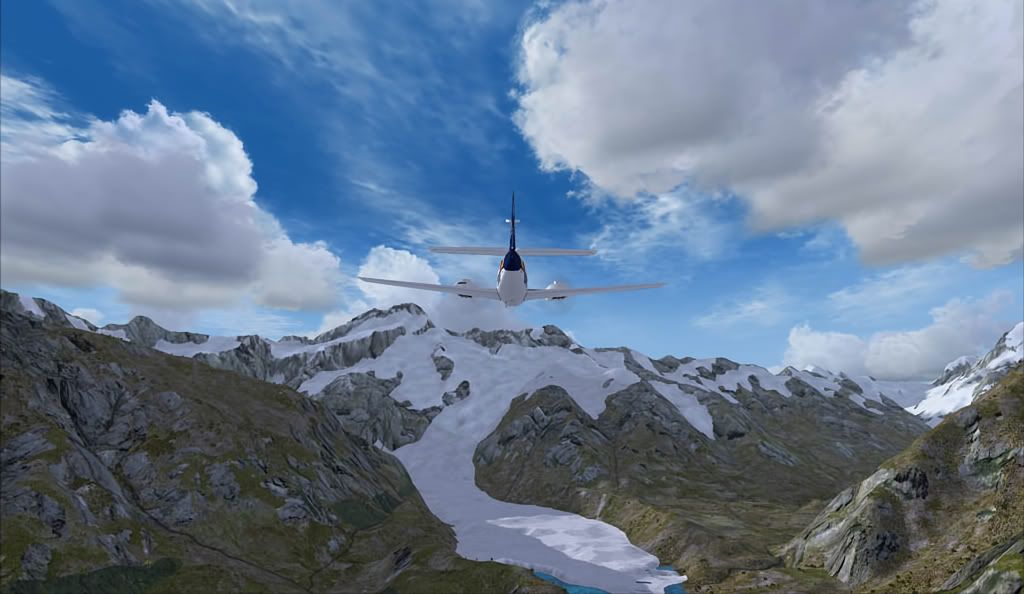
Looking back on the installation, I don't recall the question. Having installed a few sceneries, manual and installer, over the years - surprised to have overlooked something so apparently obvious. Anyhoo, problem solved - thanks Timmo - pasted two missing, main folders to addon scenery and VOILA - don't tell me this ain't it .

.-
Olderndirt - Senior Member
- Topic author
- Joined: Wed Jan 05, 2011 2:36 pm
- Posts: 1774
- Location: Rochester, Washington USA
by Ian Warren » Sun Mar 27, 2011 11:42 am
Dave , It appears you still have a texture package overwriting the VLC .
-
Ian Warren - NZFF Pro
- Joined: Fri May 05, 2006 5:23 pm
- Posts: 41187
- Location: AREA 51
by Olderndirt » Sun Mar 27, 2011 1:24 pm
Timmo wrote:QUOTE (Timmo @ Mar 26 2011,4:44 PM) <{POST_SNAPBACK}>That looks betterOther than a few 'local freebies', all I've downloaded is NZFSX.zip, an addon terrain mesh, by a gent named Harris - two .bgl files, one for north the other for south island. They're an improvement over default.
I see you are using non-default textures...which can sometimes make things look 'non kiwi'- But in your case, those are pretty good- Which textures are they?Last edited by Olderndirt on Sun Mar 27, 2011 1:25 pm, edited 1 time in total.
-
Olderndirt - Senior Member
- Topic author
- Joined: Wed Jan 05, 2011 2:36 pm
- Posts: 1774
- Location: Rochester, Washington USA
by AndrewJamez » Sun Mar 27, 2011 1:29 pm
I saw you mentioned UTX in an earlier post, I used GenX and UTX etc ages ago and found that they overwrote the default landclass on more than one ocassion. when i started using the older NZ landclass/roads and rivers and the early FTX sceney I binned it because it continually overwrote landclass files on more than 1 ocassion. Probably due to my lack of knowledge at the time? I dint know but scince I stopped using it I have had no more problems with landclass files.
- AndrewJamez
- Sim-holic
- Joined: Sun Feb 14, 2010 5:04 pm
- Posts: 766
- Location: Hamilton
by Olderndirt » Sun Mar 27, 2011 1:44 pm
AndrewJamez wrote:QUOTE (AndrewJamez @ Mar 26 2011,6:29 PM) <{POST_SNAPBACK}>I saw you mentioned UTX in an earlier post, I used GenX and UTX etc ages ago and found that they overwrote the default landclass on more than one ocassion. when i started using the older NZ landclass/roads and rivers and the early FTX sceney I binned it because it continually overwrote landclass files on more than 1 ocassion. Probably due to my lack of knowledge at the time? I dint know but scince I stopped using it I have had no more problems with landclass files.Thanks Andrew. Since ORBX, most of my UTX is disabled but I do have UTXAlaska selected - will try disabling that.
-
Olderndirt - Senior Member
- Topic author
- Joined: Wed Jan 05, 2011 2:36 pm
- Posts: 1774
- Location: Rochester, Washington USA
19 posts
• Page 1 of 1
Who is online
Users browsing this forum: No registered users and 19 guests