Hi all.
I have recently purchased Christian Stock's wonderful NZ Mountains Roads and Rivers Scenery for FS2004.
Am really blown away by how much it has improved my sim, however I have discovered one problem: Around Tauranga there is a large hump of land that extends into the sea(it looks very much like the old default mesh/coastline). However all other parts of coastline and mesh seem to be fine.
I had searched through the forums but have not found a fix yet.
I checked my FS2004/Scenery/ocen/scenery, as in another post it was mentioned that the original bgl's can be left after install which affects the coastlines. All relevant bgl's seem th be changed to bglx.
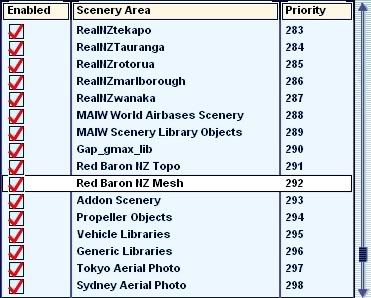
I had been fiddling with my Scenery Library in order to make my RealNZ Wellington work, the current order is:
20m Mesh
NZ Topo
RealNZ Wellington.
I will post a few screens when I can, but I may need somebody to please explain how to post these.
cheers
Casey
Mesh problem around Tauranga using Geographx Combo Topo Scenery
3 posts
• Page 1 of 1
 by caseybowden123 » Sun May 01, 2011 11:01 am
- caseybowden123
- Newbie
- Topic author
- Joined: Mon Apr 25, 2011 11:21 am
- Posts: 5
- Location: Wellington, NZ
by Ian Warren » Sun May 01, 2011 11:18 am
There is a nice little 8 step tutorial here http://nzff.org/forum/viewtopic.php?t=13
Last edited by Ian Warren on Sun May 01, 2011 11:21 am, edited 1 time in total.

-

Ian Warren - NZFF Pro
- Joined: Fri May 05, 2006 5:23 pm
- Posts: 41187
- Location: AREA 51

3 posts
• Page 1 of 1
Who is online
Users browsing this forum: No registered users and 18 guests