Your Cockpit?

A place to converse about the general aspects of flight simulation in New Zealand

Postby zkcav » Sat Sep 17, 2011 11:34 pm

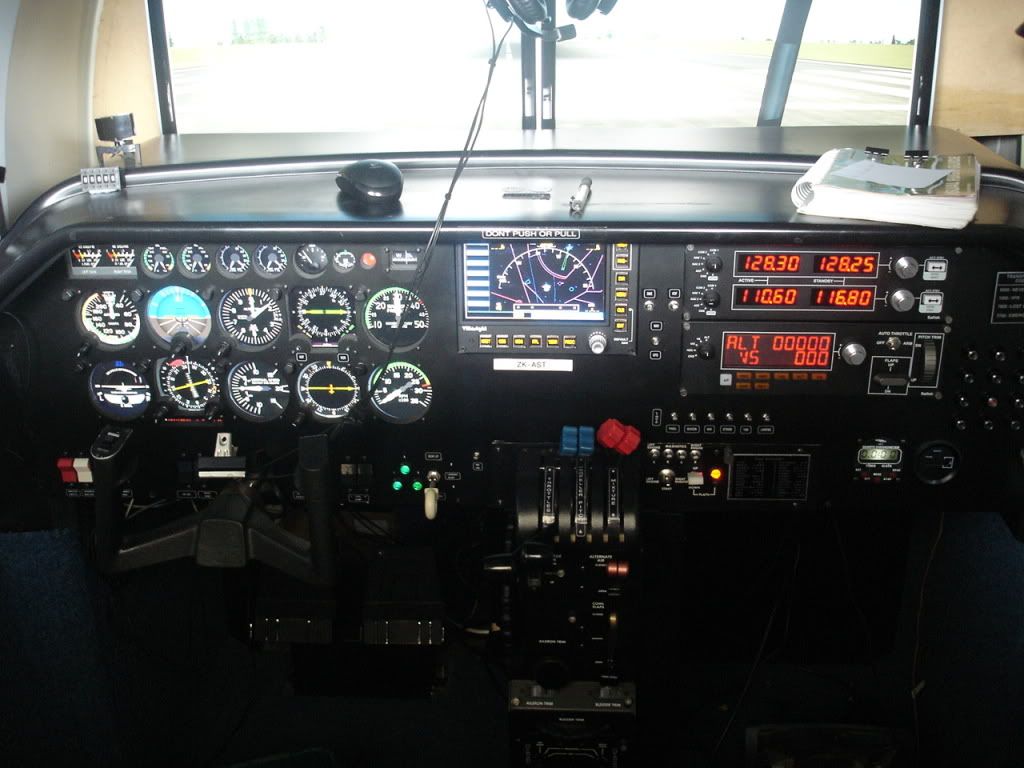
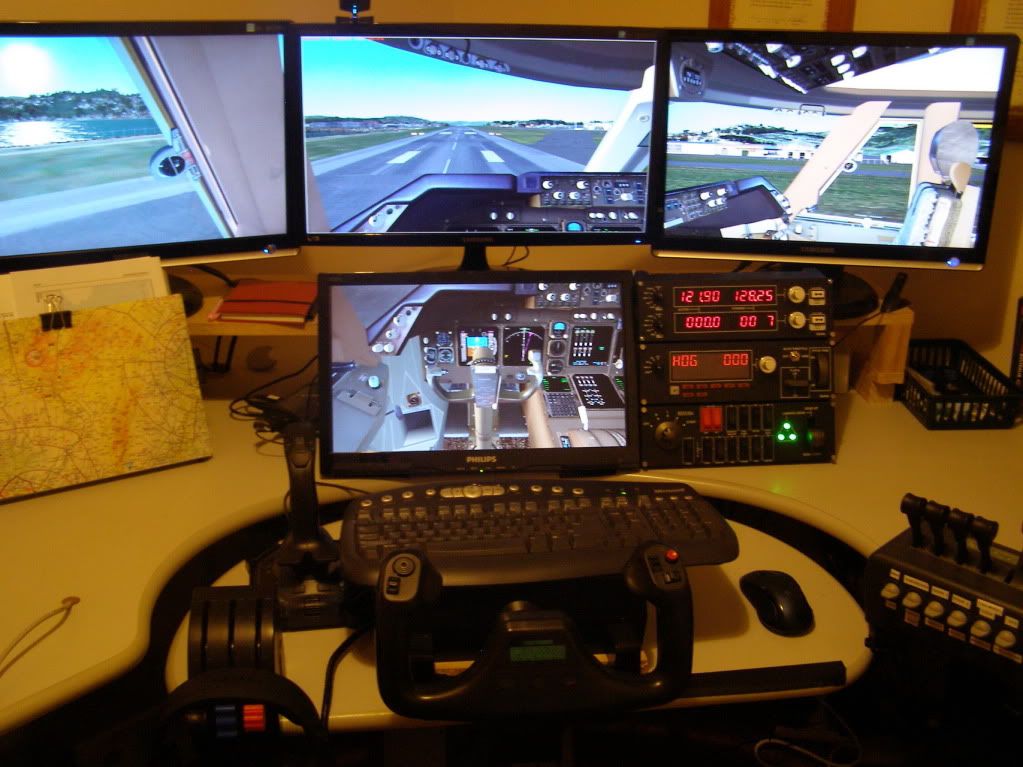
I've revecied a PM about my set-up so thought I'd flick a photo up of my pit and ask others to share photos of their cockpits also


PMDG 747 at Real NZ WN

Cheers Paul
Takeoff's are optional. Landings are mandatory.
User avatar
zkcav
Forum Addict
 
Topic author
Joined: Fri Jul 30, 2010 8:58 pm
Posts: 401
Location: NZPM

Postby deeknow » Sun Sep 18, 2011 12:09 am

Jeeze Paul, noones gonna post a pic of their rig now you've set the benchmark that high biggrin.gif
Seriously though, nice setup mate, my wife would kill me if I had a rig like that
Deans repaints: http://www.deeknow.com/
X570 Mini-ITX m/b - Ryzen7 5700X3D (8c/16t) - RTX 2060-super - 32GB 3600MHz DDR4 - Win10 - P3Dv5.3
User avatar
deeknow
NZFF Pro
 
Joined: Tue Sep 18, 2007 10:15 pm
Posts: 4465
Location: NZHN

Postby Olderndirt » Sun Sep 18, 2011 4:39 am

A beautiful setup and so tidy.
Image
User avatar
Olderndirt
Senior Member
 
Joined: Wed Jan 05, 2011 2:36 pm
Posts: 1774
Location: Rochester, Washington USA

Postby Ian Warren » Sun Sep 18, 2011 8:41 am

That s so lovely brings tears to my eyes biggrin.gif
Image
User avatar
Ian Warren
NZFF Pro
 
Joined: Fri May 05, 2006 5:23 pm
Posts: 41187
Location: AREA 51

Postby mfraser » Sun Sep 18, 2011 8:42 am


A photo of my home cockpit taken a couple of weeks ago. Its currently running FS9 until I find time to upgrade my hardware and software (Sadly a number of the addons I love aren't and will not be made FSX compatible).

Once FS9 is loaded and the windows are docked to the appropriate monitor there is little to no need to touch the mouse or keyboard unless tinkering with the FMC/CDU.

Future plans are to modify the desk to allow the monitors to be lined up straight and to add a small touchscreen LCD monitor to the right of the throttle to act as an FMC/CDU.

PC
AMD64x2 6400+ - 4GB Ram - 2x 8800GTX - Matrox Triplehead2Go -
3x LG 22" Widescreen LCD's (Outside view) - 1x Benq 19" LCD (Panel view)

FS Software
FS9 - FSUIPC - RealityXP gauges - ISG FMC - Aircraft (Carenado C172, C182-RG, C206, PA34 -
Wilco C208 - PMDG B1900, B737's - Majestic DH8C-Q300 - Flight1 ATR - CLS B747, B767 -
QualityWings B757 - POSKY B777's - CaptainSim C130)

FS Hardware
3x GoFlight T8's, 3x GoFlight RP48's, 1x GoFlight GF-46, 1x GoFlight TQ6, 1x GoFlight LGT,
2x AP4000 Elite NAV/Com, 1x Elite AP4000 Transponder, 1x Hagstom KE-USB36, 1x DIY Switch Panel, CH Yoke, CH Pedals
Last edited by mfraser on Sun Sep 18, 2011 8:52 am, edited 1 time in total.
mfraser
Sim-holic
 
Joined: Sun May 04, 2008 4:23 pm
Posts: 537
Location: Auckland, New Zealand

Postby Ian Warren » Sun Sep 18, 2011 8:48 am

That,s it .. when i grow up , im going to make up a setup like you guys biggrin.gif
Image
User avatar
Ian Warren
NZFF Pro
 
Joined: Fri May 05, 2006 5:23 pm
Posts: 41187
Location: AREA 51

Postby mfraser » Sun Sep 18, 2011 8:57 am

deeknow wrote:
QUOTE (deeknow @ Sep 18 2011,12:09 AM) <{POST_SNAPBACK}>
Jeeze Paul, noones gonna post a pic of their rig now you've set the benchmark that high biggrin.gif
Seriously though, nice setup mate, my wife would kill me if I had a rig like that

TowerGuy was building a sim awhile back and I've also been in contact with Triford who has made a really impressive sim out of an old AST shell!!

Surely there's other addicts out there!
Last edited by mfraser on Sun Sep 18, 2011 8:58 am, edited 1 time in total.
mfraser
Sim-holic
 
Joined: Sun May 04, 2008 4:23 pm
Posts: 537
Location: Auckland, New Zealand

Postby deeknow » Sun Sep 18, 2011 9:42 am

Great stuff Matt. Whats the LCD panel of gauges in the middle?
There's some nice MCPs about but seems like the Nav and Comms gauges are probably used just as much. What sort of order did you guys buy this stuff in? Which do you think is *most* useful to begin with
Last edited by deeknow on Sun Sep 18, 2011 9:43 am, edited 1 time in total.
Deans repaints: http://www.deeknow.com/
X570 Mini-ITX m/b - Ryzen7 5700X3D (8c/16t) - RTX 2060-super - 32GB 3600MHz DDR4 - Win10 - P3Dv5.3
User avatar
deeknow
NZFF Pro
 
Joined: Tue Sep 18, 2007 10:15 pm
Posts: 4465
Location: NZHN

Postby Bazza » Sun Sep 18, 2011 9:52 am

Ian Warren wrote:
QUOTE (Ian Warren @ Sep 18 2011,8:48 AM) <{POST_SNAPBACK}>
That,s it .. when i grow up , im going to make up a setup like you guys biggrin.gif


HaHa, well said Ian.... biggrin.gif

Unfortunately, I think I've made it maturity wise but there's still two problems..

A. My pension won't run to that level,

B. Even if it did, my technology skill levels wouldn't.

At least I have a wide screen.... unsure.gif
Image
User avatar
Bazza
Sim-holic
 
Joined: Sat Jul 15, 2006 1:44 pm
Posts: 983
Location: Tauranga

Postby mfraser » Sun Sep 18, 2011 11:00 am

deeknow wrote:
QUOTE (deeknow @ Sep 18 2011,9:42 AM) <{POST_SNAPBACK}>
Great stuff Matt. Whats the LCD panel of gauges in the middle?
There's some nice MCPs about but seems like the Nav and Comms gauges are probably used just as much. What sort of order did you guys buy this stuff in? Which do you think is *most* useful to begin with


On the Benq 19" square LCD I use a combination of RealityXP gauges (FlightlineN, FlightlineT, Jetline2 and Jetline4). They're the best out there but sadly the Jetline series is only compatible with FS9 and will not be updated.

I started accumulating my hardware slowly over the course of 15 years - and its only at a point now where I'm satisfied to sit down to fly and not tinker with it!! I bought the yoke and pedals first, which started the bug. Then half of the GoFlight modules which allowed me to open and close doors, start the aircraft etc. Then the Elite radio's. Then the last of the hardware for controlling the autopilot/FMC/MCP. I honestly don't know (Read don't WANT to know) how much I've spent, but if I did it again I believe I could keep it under $5000 (Not including the PC and monitors).

I've actually been researching the cost of building a small desktop sim for my brother. Thoughts are either to use a few remote GoFlight modules or a keyboard encoder with a DIY switch panel to control the essential aircraft functions (Basically park brake, open/close doors, start (All engines), lights, flaps, gear, autopilot functions, view functions, radio tuning). With careful programming thru FSUIPC I believe it can be achieved for less than NZD$200. I'll document my progress and post it here for others interest.

Ultimately it all depends on how much time and $$$ you can devote to it - most of mine came before I married and had kids!!
mfraser
Sim-holic
 
Joined: Sun May 04, 2008 4:23 pm
Posts: 537
Location: Auckland, New Zealand

Postby AlisterC » Sun Sep 18, 2011 11:45 am

Wow, they really are some very nice set ups you guys have there. Big clap for you, congratulations on such good work biggrin.gif
Image
User avatar
AlisterC
NZFF Pro
 
Joined: Thu Jul 20, 2006 11:13 am
Posts: 2543
Location: Nelson, NZ

Postby Triford » Sat Oct 29, 2011 1:27 pm


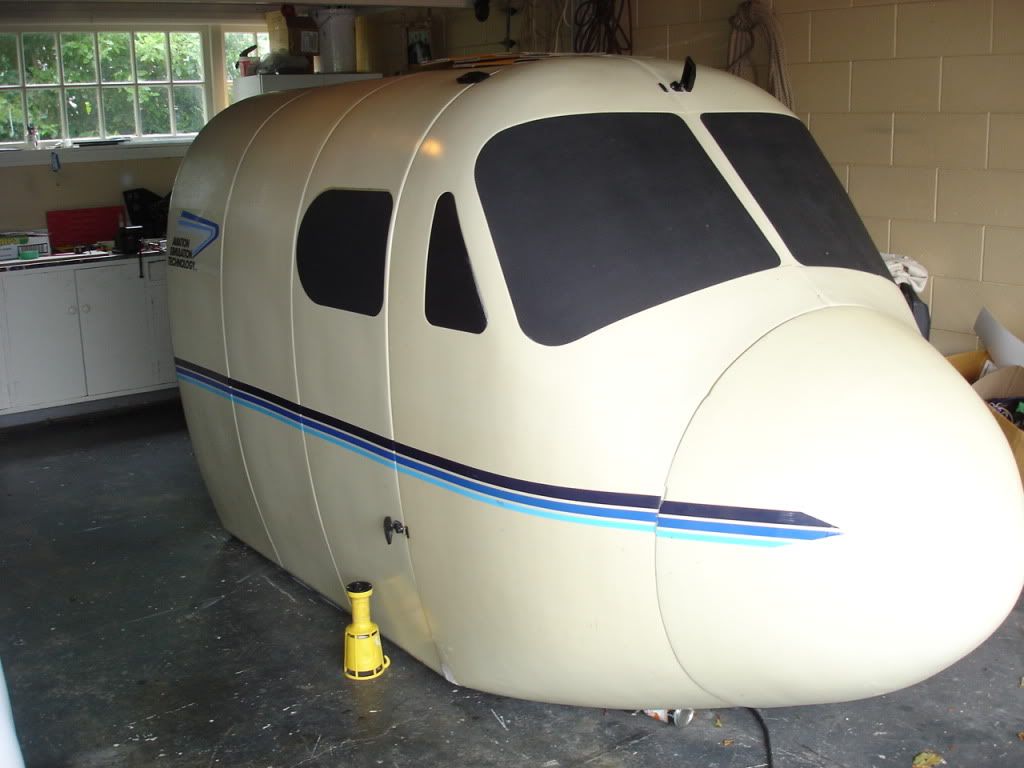
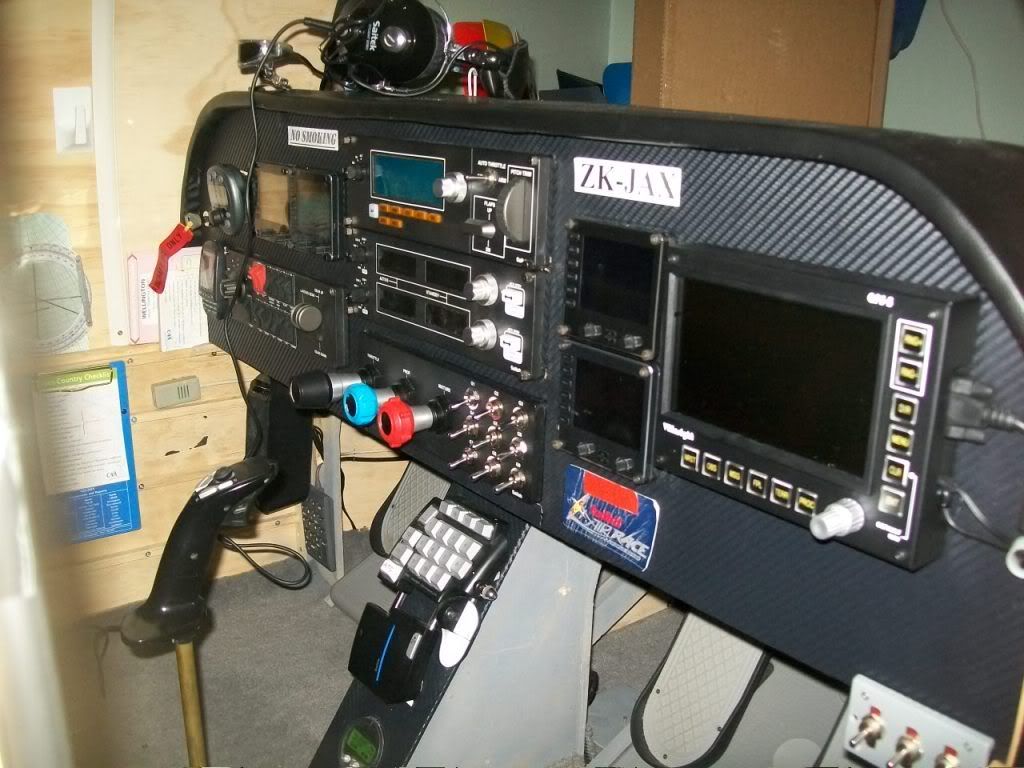
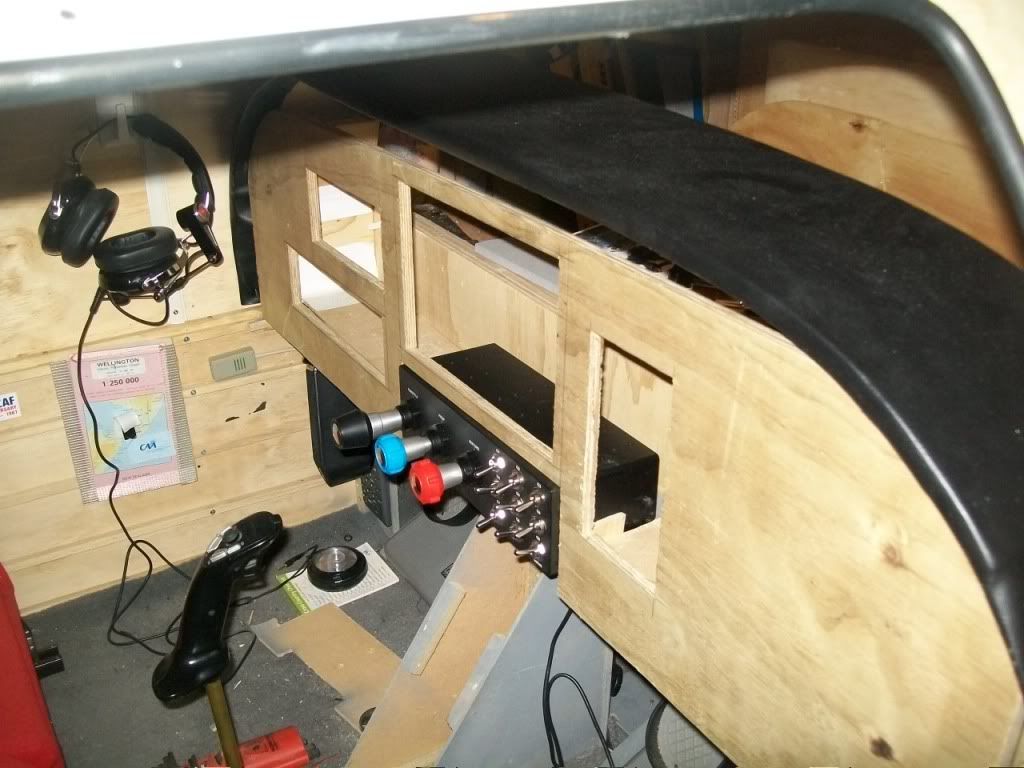
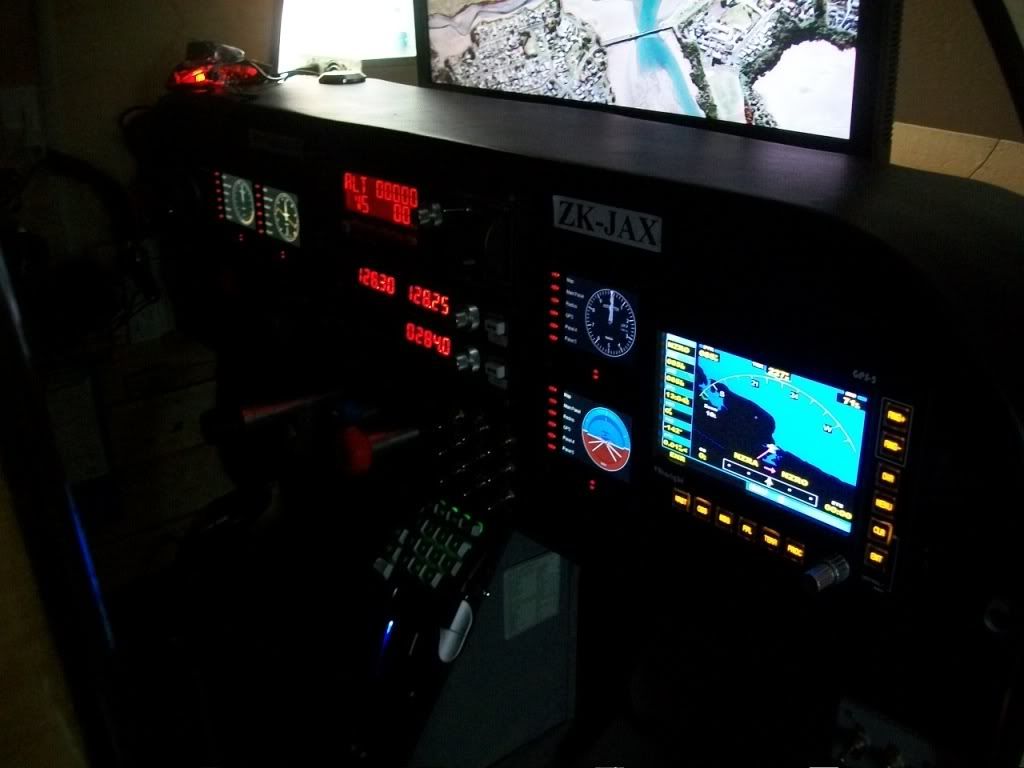
MY Cockpit

Since I got a mention on the forum re my simulator I thought I would give a short run down on it
AST300 simulator to FSX conversion two seater which I use a Beechbaron with after market sound pack

Main PC for FSX
Aywun G Series Case
Aywun 750watt Power Supply
Intel Core i7 2600K 3.40GHz Quad Core 8M LGA1155 Processor
Asus P8P67 Intel P67 ATX Socket 1155 Motherboard
8GB RAM - Kingston 4GB 1333MHz DDR3 Non-ECC CL9 DIMM
1TB Western Digital Caviar Blue SATA3
DVD-Writer
Windows 7 Home Premium 64bit
2GB Asus HD 6950 DDR5 PCI-E Video Card
1 2,210.00 2,210.00
MC Saphire Active Display Port Adapter
MC 1GB ATI HD5450 Graphics Card

Second PC drives the instruments Plan G etc
Intel ®core ™2 CP 6600@2.40GHZ 2.4GHZ
350 MB Ram
32 Bit
Nivida 8800GTS
Vista
Etc basically an old gaming PC

FS Software
FSX
New Zealand Scenery only
Plan G
FSUIPC (wide client, wide server)
Piex software for the instruments
Active sky, x graphics,
( Vox atc, My Traffic x , It Your Plane, Flight Sim Commander and many more including a hanger full of add on aircraft I have refrained from installing) I’m trying to keep it generic and simple


FS Hardware
Vrinsight GPS 5
Saiteck Multi Panel
Saiteck Radio Panel
Track IR (Trackclip pro)
Hagstrom Keusb108 X2 one for each PC converts keyboard commands to switches

Hagstrom Rotary 5 Switch interface this along with one keusb108 allows the full control of the below through rotary and micro switches on the instrument panel
TAS correction in airspeed
Artificial horizon
Kollsman value
Gyro drift in hsi
Heading bug in hsi
Heading bug in adf
Needle source change rmi (vor –adf1) micro switch
Needle source change rmi(vor2-adf2) micro switch

Hastrom Kead6 x2 Potentiometer interface boards which converts keyboard commands through FSUIPC to control the throttles, pitch, mixture, alt air, cowl flaps, aileron trim, brakes and rudder trim

Hagstrom 10x36 Breakout boards x3 allows the miles of wires it required to connect the switches to interface with the keusb108 boards

Custom interface board to interface led’s for parking brake, landing gear and flaps (new one getting made to give 3 flap positions with three colours) Made by Milton Hartley from M.B.D.D.S

The panel after my templates were finished I had water jet cut from 2mm aluminium the instrument depth water jet cut from 4mm black poly carbonate slightly smaller to give a bezel finish and 2mm clear poly carbonate sandwiched in between to give the panel a real instrument look everything you see on the panels is operational.
Mechanical and electric trim
Masters
Avionic masters
De-ice
Pitot heat
Left and fight fuel pumps
Landing gear
Prop sync
Dme
Adf
Nav/ gps
Lights- panel, beacon, nav, strobe, taxi, landing
Magnetos left engine left &right
Magnetos right engine left & right
Flaps 3 position manual down auto up function
Chronometer
Engine hours
16 programmable fuses for fsx failures
Fuel selector switches 3 way left & right
Vr insight GPS5 and Saitek radio and autopilot and all of there functions
Pug in head set mic function

It has considerable more functions than the original AST and is very stable, it requires the two computers to run it one for fsx and the other which communicates wirelessly through FSUIPC wide client to operate the instruments rotary encoders and mico switch functions. Yet to finish is new carpet and recovering of the seats for cosmetics and a decent visual system I am considering a short throw projector but if any one has ideas let me know .The main pc has two video cards one for the GPS 5 and the other which is eyefinity allowing 3 monitors I may have to ditch the shell to allow better visuals. I have written a manual on the build and where every colour coded wire has gone and how it was programmed through FSUIPC and hagstom software just in case I develope a problem or sell it. The quadrant, yoke, trim and rudder controls are all quality original AST and are well machined and feel very realistic the only change being toe brakes I have manufactured and programmed with potentiometers. The computer was built by Matt at VR Concepts here in Palmerston North for the sim and does the job extremely well. I have loads of photos of the build and the wiring if anyone is interested.
Last edited by Triford on Sat Oct 29, 2011 1:59 pm, edited 1 time in total.
Triford
Member
 
Joined: Sun Dec 14, 2008 2:05 pm
Posts: 49
Location: Palmerston north

Postby zkcav » Sat Oct 29, 2011 3:05 pm

WOW Triford.... What more can I say?
Takeoff's are optional. Landings are mandatory.
User avatar
zkcav
Forum Addict
 
Topic author
Joined: Fri Jul 30, 2010 8:58 pm
Posts: 401
Location: NZPM

Postby deeknow » Sat Oct 29, 2011 4:05 pm

Jeeze I reckon, thats the last of the show-us-your-cockpit shots after seeing that one .. tongue.gif
Very, very, very cool
Deans repaints: http://www.deeknow.com/
X570 Mini-ITX m/b - Ryzen7 5700X3D (8c/16t) - RTX 2060-super - 32GB 3600MHz DDR4 - Win10 - P3Dv5.3
User avatar
deeknow
NZFF Pro
 
Joined: Tue Sep 18, 2007 10:15 pm
Posts: 4465
Location: NZHN

Postby Splitpin » Sat Oct 29, 2011 5:58 pm

unsure.gif no way Im showing you my mouse!! winkyy.gif ........bloody hell....awesome set ups.
User avatar
Splitpin
NZFF Pro
 
Joined: Mon Aug 03, 2009 12:15 pm
Posts: 21381
Location: Christchurch NZ

Postby Nosecone » Sat Oct 29, 2011 6:07 pm

Fantastic setup Triford love it. Here is my on going MD500e sim build hoping to have it finished soon

User avatar
Nosecone
Forum Addict
 
Joined: Thu Jan 31, 2008 9:22 am
Posts: 234
Location: Upper Hutt

Postby fai2 » Sun Oct 30, 2011 2:04 pm

This is toatly AWESOME Don , l wish i had a set up like that but for the price i could buy a real plane smile.gif
Last edited by fai2 on Sun Oct 30, 2011 2:05 pm, edited 1 time in total.
fai2
Newbie
 
Joined: Tue Feb 16, 2010 6:48 am
Posts: 1
Location: Hamilton

Postby Olderndirt » Sun Oct 30, 2011 2:10 pm

Very impressive - you guys are serious. My main concern is the gimballed beverage holder so that nothing spills during 'unusual attitudes' rolleyes.gif.
Image
User avatar
Olderndirt
Senior Member
 
Joined: Wed Jan 05, 2011 2:36 pm
Posts: 1774
Location: Rochester, Washington USA

Postby Ian Warren » Sun Oct 30, 2011 2:18 pm

Olderndirt wrote:
QUOTE (Olderndirt @ Oct 30 2011,3:10 PM) <{POST_SNAPBACK}>
Very impressive - you guys are serious. My main concern is the gimballed beverage holder so that nothing spills during 'unusual attitudes' rolleyes.gif.

And here in Christchurch Dave , we go one better , light , moderate to very server turbulence for our desktop F/sims . thumbup1.gif
Image
User avatar
Ian Warren
NZFF Pro
 
Joined: Fri May 05, 2006 5:23 pm
Posts: 41187
Location: AREA 51

Postby Triford » Tue Nov 01, 2011 8:14 pm


check out this sim Marcel from Hamilton has been building
Triford
Member
 
Joined: Sun Dec 14, 2008 2:05 pm
Posts: 49
Location: Palmerston north

Next

Return to General

Who is online

Users browsing this forum: No registered users and 6 guests