Hi guys,
Is there any way to make small VLC airstrips appear on the map/GPS in FSX? I know that it's a landclass definition and there aren't separate BGL files for them, but I thought I'd ask anyway. It would be most useful.
Thanks
VLC airstrips
15 posts
• Page 1 of 1
 by Adamski » Wed Feb 08, 2012 3:11 pm
Timmo wrote:QUOTE (Timmo @ Feb 8 2012,3:57 PM) <{POST_SNAPBACK}>Hmm maybe...it would require some processing of the data into airport XML but I think it could be possibleI can't guarantee anything but I'll have a look
If you're using any aircraft that use any of the AIRAC nav data, you could manually add them to the airports.txt <?> file. I think there's a runways file as well. It's possible that the AIRAC data already has them in. You'd need to remember to re-apply the fixes if you subscribe/update your AIRAC data though. I've done that in the past for Great Barrier airports.
EDIT: Please ignore this useless info (above) ... it will only work for airfields with existing ICAO codes, I thinkLast edited by Adamski on Thu Feb 09, 2012 1:26 am, edited 1 time in total.


-

Adamski - NZFF Pro
- Joined: Thu Nov 01, 2007 2:22 am
- Posts: 5072
- Location: Birkenhead, Auckland
by Timmo » Wed Feb 08, 2012 6:15 pm
Does anyone know if those small strips have any kind of standardized/formal naming convention? Obviously they aren't ICAO but does Airways track/list them in any way?
Edit- I've successfully created the script in Python which will read my file (a point file containing 3D centroids of each airstrip polygon in VLC) and spit out the correct XML for compilation. This can then be placed in a active scenery directory and will show in the GPS and Map
The issue i have is that the identification of each airstrip is limited to 4 characters but I have around 3500 airstrips. This means I can't prefix with the usual 'NZxx' as I won't have enough combinations.....so just need to figure that out, clean the data a bit and then test a bit more.
Edit- I've successfully created the script in Python which will read my file (a point file containing 3D centroids of each airstrip polygon in VLC) and spit out the correct XML for compilation. This can then be placed in a active scenery directory and will show in the GPS and Map
The issue i have is that the identification of each airstrip is limited to 4 characters but I have around 3500 airstrips. This means I can't prefix with the usual 'NZxx' as I won't have enough combinations.....so just need to figure that out, clean the data a bit and then test a bit more.
Last edited by Timmo on Wed Feb 08, 2012 8:45 pm, edited 1 time in total.
- Timmo
- NZFF Pro
- Joined: Wed Oct 25, 2006 6:28 pm
- Posts: 2056
- Location: Tauranga
by Rotordude » Wed Feb 08, 2012 8:57 pm
Tim the information is already there, some how FSWidgets Gmap server for android pulls all the locations of strips and cabins in VLC or NZSI and displays them as a green box with a white plane, so far this info has been bang on. So there must be a way of extracting that info some how..

Regards always
Pete
Pete
- Rotordude
- Sim-holic
- Joined: Wed Mar 25, 2009 3:50 pm
- Posts: 508
- Location: Huntly, NZ
by Timmo » Wed Feb 08, 2012 9:13 pm
What is each strip called though? I have all the location information I need, it's just according to the SDK docs I can't give an identification (which is a mandatory piece of information) string longer than 4 characters (although I just actually tested this assumption and can get 5 characters in there, that helps) So, I need to come up with a naming system for them.
The other 'proper' airports in NZ can all fit into this ICAO scheme (i.e. NZWK, NZAA) because there aren't too many of them and the 2 remaining letters after 'NZ' have enough combinations (325 of them).
However, given that I probably want to keep 'NZ' as the first two letters, this means, at best I have a combination of 3 remaining letters from the 26 letters of the alphabet which is 2600 combinations.....about half of what I need to name them all.
Edit: I'm tired! No idea why I thought I could only use letters of the alphabet...I can use numbers as well! So 39 combinations from 3 remaining letters = 7140 combinations
The other 'proper' airports in NZ can all fit into this ICAO scheme (i.e. NZWK, NZAA) because there aren't too many of them and the 2 remaining letters after 'NZ' have enough combinations (325 of them).
However, given that I probably want to keep 'NZ' as the first two letters, this means, at best I have a combination of 3 remaining letters from the 26 letters of the alphabet which is 2600 combinations.....about half of what I need to name them all.
Edit: I'm tired! No idea why I thought I could only use letters of the alphabet...I can use numbers as well! So 39 combinations from 3 remaining letters = 7140 combinations
Last edited by Timmo on Wed Feb 08, 2012 9:16 pm, edited 1 time in total.
- Timmo
- NZFF Pro
- Joined: Wed Oct 25, 2006 6:28 pm
- Posts: 2056
- Location: Tauranga
by Timmo » Thu Feb 09, 2012 8:47 am
Ok I've done the naming convention so each strip will be prefixed with a NZ and then 2 alphas and a number i.e. NZAA0, NZAA1......NZAB0, NZAB1 etc
Apart from some cleaning to remove duplicates with proper airfields and some tweaking (below), this is ready for testing.
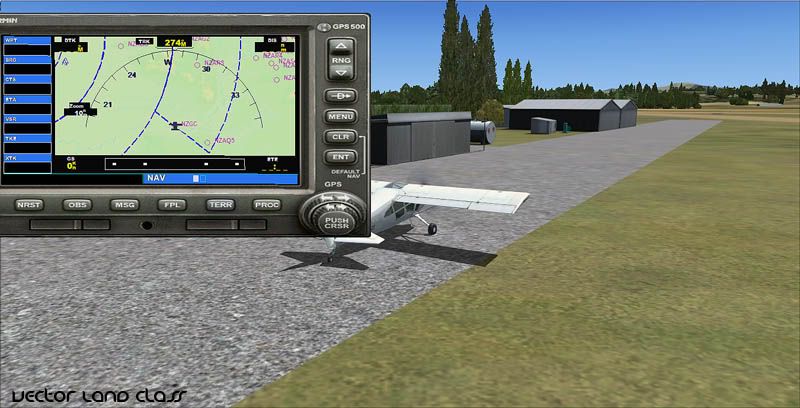
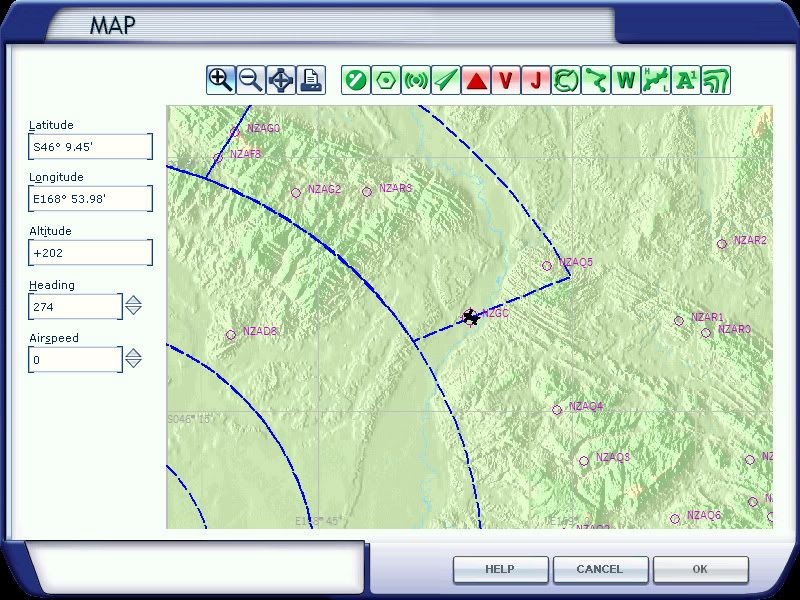
Some further questions to help me make it more useful: The default airports don't have their 'Region' set (i.e. Rotorua can't be found by going to 'Bay of Plenty' but it can be found by choosing the city) but I can do this with these airstrips- Would it be useful? (i.e. would you start from these strips or slew/fly to them?) It could mean you could choose from a list of airstrips in your local district (I would use NZ districts rather than regions to narrow the number of strips for each menu choice)
Since there are a number of them (~3500) they will be included on the Airport list in the Free Flight dialogue box...which could make choosing a 'normal' airport a bit daunting. Would giving them a 'City' tag of 'Rural' make it easier to narrow the list?
???
Apart from some cleaning to remove duplicates with proper airfields and some tweaking (below), this is ready for testing.
Some further questions to help me make it more useful: The default airports don't have their 'Region' set (i.e. Rotorua can't be found by going to 'Bay of Plenty' but it can be found by choosing the city) but I can do this with these airstrips- Would it be useful? (i.e. would you start from these strips or slew/fly to them?) It could mean you could choose from a list of airstrips in your local district (I would use NZ districts rather than regions to narrow the number of strips for each menu choice)
Since there are a number of them (~3500) they will be included on the Airport list in the Free Flight dialogue box...which could make choosing a 'normal' airport a bit daunting. Would giving them a 'City' tag of 'Rural' make it easier to narrow the list?
???
Last edited by Timmo on Thu Feb 09, 2012 9:23 am, edited 1 time in total.
- Timmo
- NZFF Pro
- Joined: Wed Oct 25, 2006 6:28 pm
- Posts: 2056
- Location: Tauranga
by dart15 » Wed Feb 22, 2012 9:05 pm
Has this advanced any further?
I think adding a "Rural" tag would be of help!
I think adding a "Rural" tag would be of help!
Dart 15


Asus P6X58D Premium | i7 930 @2.8 OC 4.2 Ghz | Radeon 5850 | 3x2 GB Corsair Dominator DDR3 1600 7-8-7-7-20 |
OCZ Vertex3 120GB SSD | Corsair H50 | Corsair HX650W | Cooler Master Gladiator 600 | Win7 x64 | FSX Acceleration
Asus P6X58D Premium | i7 930 @2.8 OC 4.2 Ghz | Radeon 5850 | 3x2 GB Corsair Dominator DDR3 1600 7-8-7-7-20 |
OCZ Vertex3 120GB SSD | Corsair H50 | Corsair HX650W | Cooler Master Gladiator 600 | Win7 x64 | FSX Acceleration
- dart15
- Forum Addict
- Joined: Mon Jul 26, 2010 11:54 am
- Posts: 181
- Location: Christchurch
by Ian Warren » Wed Feb 22, 2012 10:28 pm
Go Gojo , Dan the man , nah its good , one question , what happens when NZNI turns up on the door Tim ?

-

Ian Warren - NZFF Pro
- Joined: Fri May 05, 2006 5:23 pm
- Posts: 41187
- Location: AREA 51
by gojozoom » Thu Feb 23, 2012 7:52 am
Hi guys,
I'm in front of a major career change, so it's is all about interviews, ties and smiles for me nowadays, hence I didn't have much time to test it yet. However, I'll come back to you with the results and some screenshots around this weekend.
Dan
I'm in front of a major career change, so it's is all about interviews, ties and smiles for me nowadays, hence I didn't have much time to test it yet. However, I'll come back to you with the results and some screenshots around this weekend.
Dan

-
gojozoom - Sim-holic
- Topic author
- Joined: Fri Dec 21, 2007 10:37 am
- Posts: 947
- Location: Wellington
by Timmo » Mon Feb 27, 2012 1:20 pm
Just an update to this:
The strips have been named with a 'Z' prefix- This is to sort the list better when you are setting up a flight as the (multitude!) of ag strips will be at the end of the list and the 'real' airports will be at the start. They will appear on the list as "Z AgStrip JM1"
There was also an issue with my code which has no been fixed and GoJoZoom is now testing again
The strips have been named with a 'Z' prefix- This is to sort the list better when you are setting up a flight as the (multitude!) of ag strips will be at the end of the list and the 'real' airports will be at the start. They will appear on the list as "Z AgStrip JM1"
There was also an issue with my code which has no been fixed and GoJoZoom is now testing again
Last edited by Timmo on Mon Feb 27, 2012 1:24 pm, edited 1 time in total.
- Timmo
- NZFF Pro
- Joined: Wed Oct 25, 2006 6:28 pm
- Posts: 2056
- Location: Tauranga
by scaber » Mon Feb 27, 2012 2:39 pm
Timmo wrote:QUOTE (Timmo @ Feb 27 2012,2:20 PM) <{POST_SNAPBACK}>Just an update to this:
The strips have been named with a 'Z' prefix- This is to sort the list better when you are setting up a flight as the (multitude!) of ag strips will be at the end of the list and the 'real' airports will be at the start. They will appear on the list as "Z AgStrip JM1"
There was also an issue with my code which has no been fixed and GoJoZoom is now testing again
Good new, I'm looking forward to this release.Last edited by scaber on Tue Feb 28, 2012 9:06 pm, edited 1 time in total.
|---------- Virtual Tour and Panoramic Photography ---------|
|-------------------- greg mckenzie, Christchurch -------------------|
-

scaber - Senior Member
- Joined: Mon Feb 08, 2010 9:51 am
- Posts: 1417
- Location: Christchurch
by gojozoom » Tue Feb 28, 2012 11:23 am
FYI - I'll be uploading a post with screenshots later this afternoon, covering flights between these strips using Tim's VLC GPS data.
EDIT: Flight uploaded here.
EDIT: Flight uploaded here.
Last edited by gojozoom on Tue Feb 28, 2012 5:19 pm, edited 1 time in total.
-
gojozoom - Sim-holic
- Topic author
- Joined: Fri Dec 21, 2007 10:37 am
- Posts: 947
- Location: Wellington
15 posts
• Page 1 of 1
Who is online
Users browsing this forum: No registered users and 19 guests