Uiautomation... Again
25 posts
• Page 1 of 2 • 1, 2
 by chopper_nut » Thu Apr 11, 2013 3:58 pm
I'm just about to give up on FS. Since I've started flying bigger aircraft again, the dreaded ctd has cropped up with uiautomation.dll. I never noticed it before because I didn't need to switch views with the menus but the last 4 flights I've done have ended when I've gone for the pressurisation panel or something. I've done some testing with the default aircraft and after about 20 view changes by right clicking, it crashes. I've replaced the dll file with the previous version and mucked around in cmd with it as recommended, installed fsuipc4, reinstalled .net4. Searched the Internet for hours for other fixes. I'm really on the verge of giving up with it and moving on to other hobbies. Any other advise would be appreciated.


-

chopper_nut - NZFF Pro
- Topic author
- Joined: Wed Oct 25, 2006 9:58 pm
- Posts: 2980
- Location: Wherever the work is

by Ian Warren » Thu Apr 11, 2013 4:35 pm
Have you tried a reinstall of FSX directly over the top existing file this keep all file s and save in order but repairs anything that may corrupted .
Other thing to do is to first i guess is delete the the Fsx cfg. file in the AppData/roaming - then restart FSX and let it build a new file .
Other thing to do is to first i guess is delete the the Fsx cfg. file in the AppData/roaming - then restart FSX and let it build a new file .

-

Ian Warren - NZFF Pro
- Joined: Fri May 05, 2006 5:23 pm
- Posts: 41187
- Location: AREA 51
by chopper_nut » Thu Apr 11, 2013 4:46 pm
Reinstalling over the top now, ill let you know how I get on
-
chopper_nut - NZFF Pro
- Topic author
- Joined: Wed Oct 25, 2006 9:58 pm
- Posts: 2980
- Location: Wherever the work is
by chopper_nut » Thu Apr 11, 2013 5:56 pm
Tried to repair, the sim crashed on startup. Uninstalled everything properly, trying to reinstall and I can't. It doesn't even come up with an install option, only remove and repair. I used the proper uninstaller, restarted the computer. I'm completely over this.
-
chopper_nut - NZFF Pro
- Topic author
- Joined: Wed Oct 25, 2006 9:58 pm
- Posts: 2980
- Location: Wherever the work is
by Ian Warren » Thu Apr 11, 2013 6:06 pm
chopper_nut wrote:QUOTE (chopper_nut @ Apr 11 2013,6:56 PM) <{POST_SNAPBACK}>only remove and repair.
Yip you use that , during it ask if your want to save current files , just and it will install leaving all your aircraft and scenery altho will require activating some files again .Last edited by Ian Warren on Thu Apr 11, 2013 6:07 pm, edited 1 time in total.
-
Ian Warren - NZFF Pro
- Joined: Fri May 05, 2006 5:23 pm
- Posts: 41187
- Location: AREA 51
by chopper_nut » Thu Apr 11, 2013 6:09 pm
No I uninstalled it completely and now I can't install it again
-
chopper_nut - NZFF Pro
- Topic author
- Joined: Wed Oct 25, 2006 9:58 pm
- Posts: 2980
- Location: Wherever the work is
by Ian Warren » Thu Apr 11, 2013 6:13 pm
If had that before , what i did was leave the Disk1 in the PC turn it off ... then restart .. explore the disk and copy the contents to the HD , from there you should click on exe.install and it will start installing.
-
Ian Warren - NZFF Pro
- Joined: Fri May 05, 2006 5:23 pm
- Posts: 41187
- Location: AREA 51
by chopper_nut » Thu Apr 11, 2013 6:41 pm
Yeh I worked it out eventually. Base install no addons, still get ctd. Applied the new dll file, same thing.
-
chopper_nut - NZFF Pro
- Topic author
- Joined: Wed Oct 25, 2006 9:58 pm
- Posts: 2980
- Location: Wherever the work is
by Ian Warren » Thu Apr 11, 2013 6:51 pm
Brand new install no addons ? ... ctd ? ...... I wonder if i delete everything on the laptop .. little or nothing and send you files across to you
Last edited by Ian Warren on Thu Apr 11, 2013 6:53 pm, edited 1 time in total.
-
Ian Warren - NZFF Pro
- Joined: Fri May 05, 2006 5:23 pm
- Posts: 41187
- Location: AREA 51
by chopper_nut » Thu Apr 11, 2013 7:39 pm
Don't worry. After all this I'm going to give fs a break and concentrate on orbiter and my music.
-
chopper_nut - NZFF Pro
- Topic author
- Joined: Wed Oct 25, 2006 9:58 pm
- Posts: 2980
- Location: Wherever the work is
by Ian Warren » Thu Apr 11, 2013 7:48 pm
Found the Ui file and others , ill take off the laptop and few other and send thru tomorrow .
-
Ian Warren - NZFF Pro
- Joined: Fri May 05, 2006 5:23 pm
- Posts: 41187
- Location: AREA 51
by chopper_nut » Sat Apr 13, 2013 9:36 am
Ill give it a go but I dont think it'll make any difference.
-
chopper_nut - NZFF Pro
- Topic author
- Joined: Wed Oct 25, 2006 9:58 pm
- Posts: 2980
- Location: Wherever the work is
by Ian Warren » Sat Apr 13, 2013 9:52 am
You me send the file thru ? I get the laptop out , could get to PM me with your email .
-
Ian Warren - NZFF Pro
- Joined: Fri May 05, 2006 5:23 pm
- Posts: 41187
- Location: AREA 51
by jeansy » Sun Apr 14, 2013 11:49 pm
Hate to interrupt
But it's not a well not fact there's a 32bit and 64bit version of this file
I was having errors no matter how many times I would replace it, I did a search and found a thread about a 64bit version and that fixed everything
If you want the 64bit version let me know and I can email it to you
But it's not a well not fact there's a 32bit and 64bit version of this file
I was having errors no matter how many times I would replace it, I did a search and found a thread about a 64bit version and that fixed everything
If you want the 64bit version let me know and I can email it to you
Last edited by jeansy on Sun Apr 14, 2013 11:50 pm, edited 1 time in total.
- jeansy

-
chopper_nut - NZFF Pro
- Topic author
- Joined: Wed Oct 25, 2006 9:58 pm
- Posts: 2980
- Location: Wherever the work is
-
chopper_nut - NZFF Pro
- Topic author
- Joined: Wed Oct 25, 2006 9:58 pm
- Posts: 2980
- Location: Wherever the work is
by chopper_nut » Mon Apr 15, 2013 9:33 pm
It just showed up. Cheers for that, I'll give it a go tomorrow.
-
chopper_nut - NZFF Pro
- Topic author
- Joined: Wed Oct 25, 2006 9:58 pm
- Posts: 2980
- Location: Wherever the work is
by chopper_nut » Tue Apr 16, 2013 10:08 am
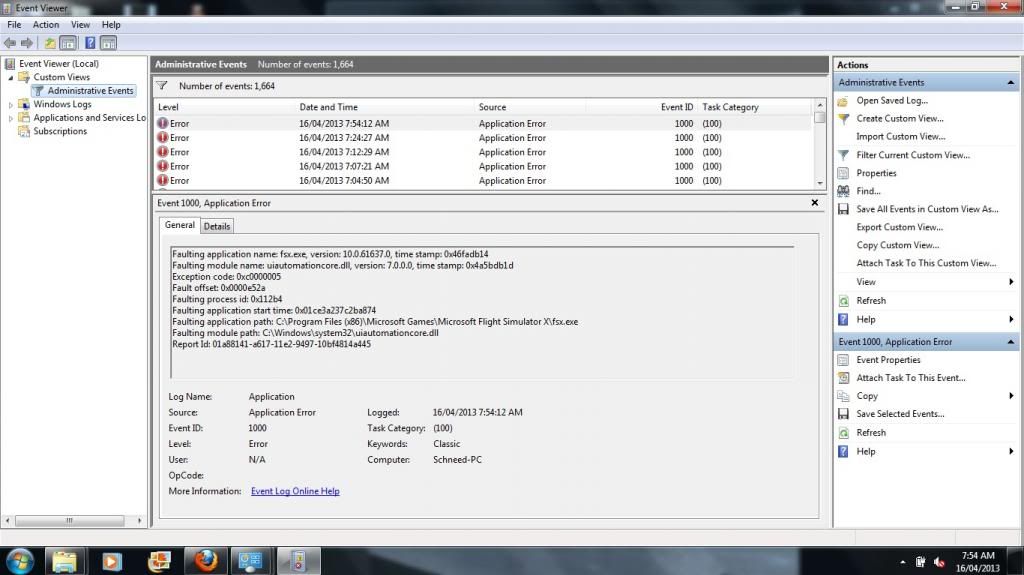
Right. First the control, with no uiautomation file in the FSX directory.
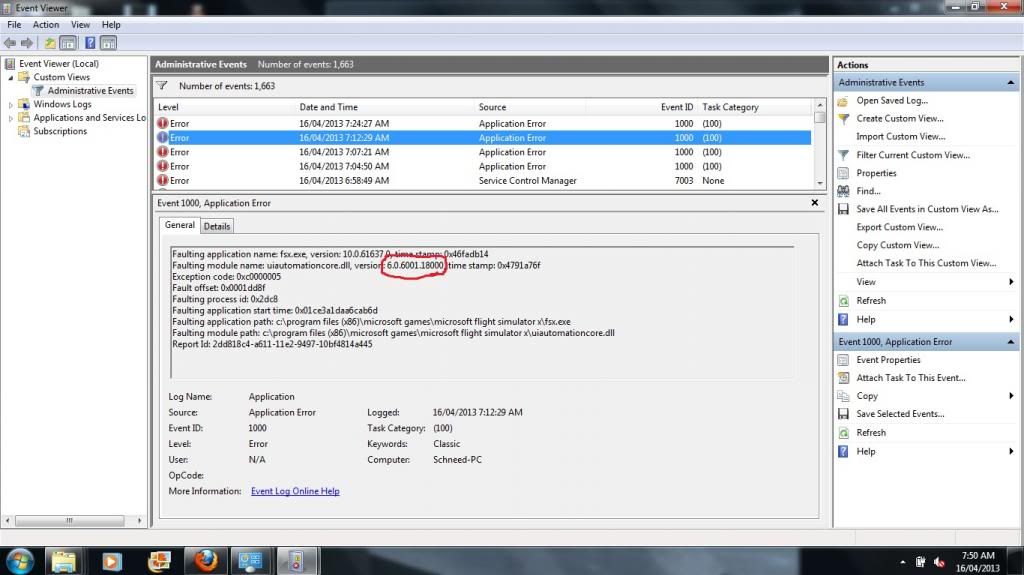
Now the version that is commonly available as a fix.
And now the version that Jeansy sent me.
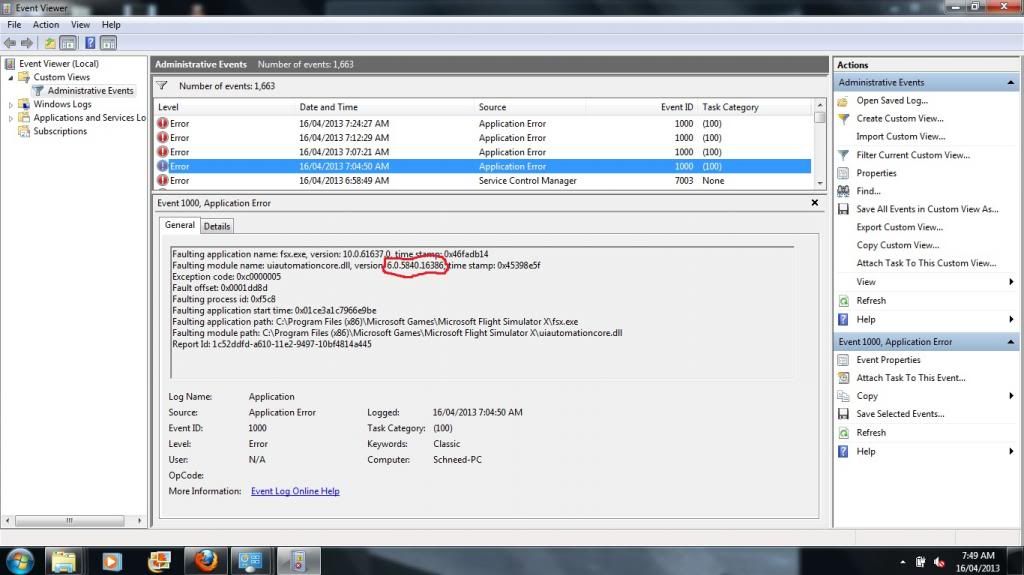
Note the three different version numbers and on the second two, the faulting module is in the FSX directory. So I'm back to square one here.
Now the version that is commonly available as a fix.
And now the version that Jeansy sent me.
Note the three different version numbers and on the second two, the faulting module is in the FSX directory. So I'm back to square one here.
-
chopper_nut - NZFF Pro
- Topic author
- Joined: Wed Oct 25, 2006 9:58 pm
- Posts: 2980
- Location: Wherever the work is
25 posts
• Page 1 of 2 • 1, 2
Who is online
Users browsing this forum: No registered users and 18 guests