MSFS 2024 beta 3

A place to converse about the general aspects of flight simulation in New Zealand

MSFS 2024 beta 3

Postby toprob » Wed May 21, 2025 12:31 pm

I was keen this time to use the beta, as I'm still hoping for a solution to my background image problem. Actually, this morning there was a message from Asobo saying that they have a likely fix, so I'm pretty pleased.
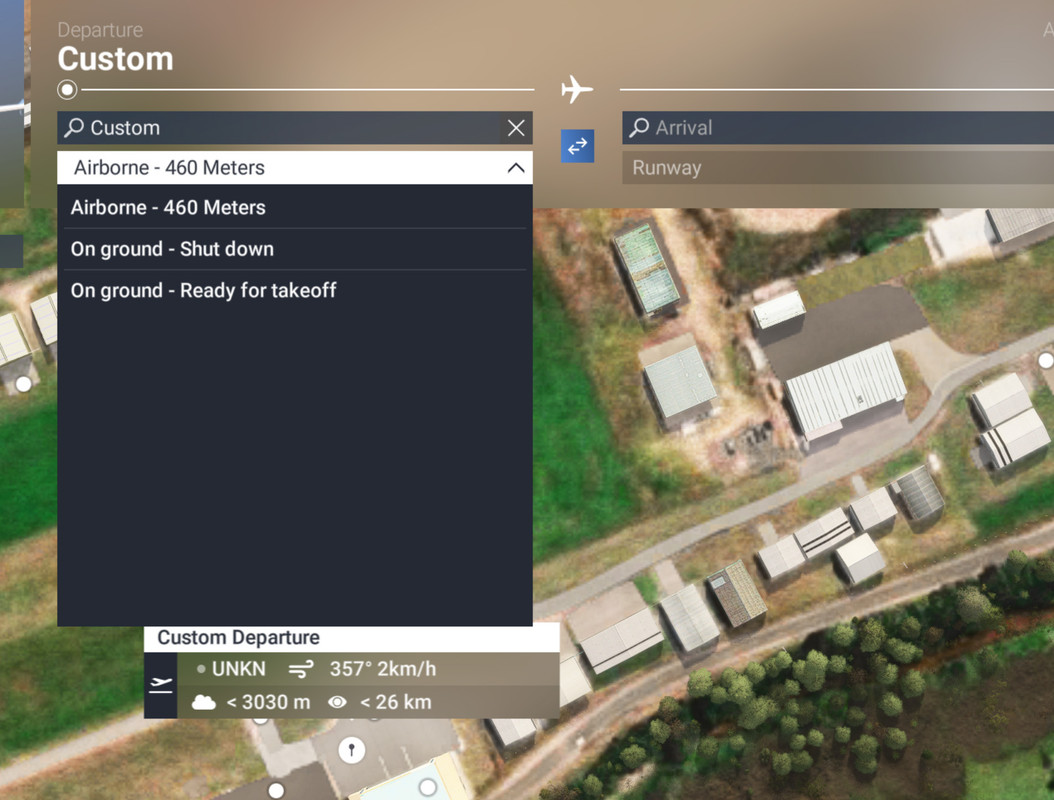
One thing I like about the beta is the ability to choose your start state. Before, the only choice you had when starting on the ground was to choose a parking spot, then spawn outside your aircraft for a walkaround, having to click on all the awkward click spots to remove bits and pieces before you could get in the aircraft. Now, if you choose a parking spot things are pretty much the same, but if you choose any location other than a parking space -- such as just beside a parking space -- then you get to choose how you start:
Image

I tend to choose 'Ready for takeoff' to bypass all that fiddly stuff. Although it does tend to start with the parking brake off, so I have to be pretty quick on the brake button.

And of course now you can download and install any part of the sim which would normally be streamed -- I don't have the disc space, mainly because I've reserved most of it for astrophotography, but some people are going to love this feature.

The sim is looking ok, I'm pleased with the performance, but still sooooo many issues to be fixed in the future.
User avatar
toprob
NZFF Pro
 
Topic author
Joined: Sat Apr 29, 2006 4:56 pm
Posts: 6711
Location: Upper Hutt

Re: MSFS 2024 beta 3

Postby Johnwag » Wed May 21, 2025 4:04 pm

I’m keen to hear more about your ‘adventures’ with MSFS 2024 beta 3…..

I’ve been holding off moving up to MSFS2024 - mainly because my internet is snail-paced so I expect I’d be very disappointed with the results, particularly so because I’m getting really good performance in MSFS 2020.

But, I see that beta 3 will bring the ability to download a lot of content that would otherwise be streamed - I presume this feature will make a huge difference to the performance I could expect as there would be much less streaming. Fortunately, I expect that I’ve got plenty of disk space to d/l the regions and aircraft I normally fly in.

A couple of questions I’d like to ask you if I may please regarding you comments…

Perhaps I misunderstood your comment, but with beta 3, are you now able to start a flight anywhere on an airfield in C&D state? So, you could start your flight from the same position that you finished your last flight - not on one of the specified parking positions?

And, you commented that there are still sooooo many issues to be fixed in the future - could I ask if you tell me what are the 2 or 3 most annoying issues you’re experiencing? I’m mainly interested in low-level GA flying issues.

Thanks
John
Johnwag
Member
 
Joined: Thu Jan 16, 2014 5:57 pm
Posts: 25

Re: MSFS 2024 beta 3

Postby toprob » Wed May 21, 2025 7:05 pm

Yes, you can start anywhere cold and dark. Although I do think that if you land, record a few seconds of flight then save it, you should be able to start up next time by loading that saved flight and clicking on 'take control'. I'll have to test that.
I'll have to wait and see what sort of results people are getting from downloading a lot of stuff, it's kind of unproven at the moment.
Really, there isn't much I can complain about with 2024, I'm a lot like you, low and slow, and that is a great experience. I'm just comparing it to 2020, which became a very polished sim in the end, and sometimes I'm happy to just load it up and fly like the old days. Except that 2024 loads much faster. We're still in the early development phase, and things will change too often, things stop working and then need to get fixed, and features get removed just as you get to like them. Unless you are really keen, you may want to stick with 2020 until we have a few more updates under our belt. Speaking of which, there's an update coming for 2020, with a beta starting now.
User avatar
toprob
NZFF Pro
 
Topic author
Joined: Sat Apr 29, 2006 4:56 pm
Posts: 6711
Location: Upper Hutt

Re: MSFS 2024 beta 3

Postby Johnwag » Wed May 21, 2025 9:23 pm

Thanks for those comments.

I think I’ll take your advice and wait a bit longer….

Happy flying - and star gazing….

Cheers
John
Johnwag
Member
 
Joined: Thu Jan 16, 2014 5:57 pm
Posts: 25

Re: MSFS 2024 beta 3

Postby cowpatz » Thu May 22, 2025 10:32 am

You do have to wonder sometimes as to how Asobo can get it so wrong. To only be able to start up outside the aircraft on a gate is bizarre. The fact that there has been complaints about this from the start and it is still not sorted is astounding. Surely a simple selection in the start menu GUI……another weakness. Being able to download stuff onto a hard drive will be great and a step in the right direction. Of course that will mean longer load times I guess. For me MS2020 is going OK, but the ground physics are very annoying.
User avatar
cowpatz
NZFF Pro
 
Joined: Wed Mar 07, 2007 3:28 pm
Posts: 3739

Re: MSFS 2024 beta 3

Postby toprob » Thu May 22, 2025 11:41 am

Just watching this morning's dev stream, a couple of points so far -- first, they are finally adding '(2020)' to the MSFS title, as apparently people are horrendously confused by the name, even after all this time.
MSFS (2020) is getting a scenery update which will include a lot of 2024 data, all the new aerials and dem, and new topo data to improve some aspects such as tree coverage and rivers.
A new 2024 beta 3 update this morning, but doesn't fix my problem yet. Loads quicker than the last update, although I did get a crash loading into NZPM. I'll try later and see if it was a one-off. I did download and install the payware NZPM to test the download process.
User avatar
toprob
NZFF Pro
 
Topic author
Joined: Sat Apr 29, 2006 4:56 pm
Posts: 6711
Location: Upper Hutt

Re: MSFS 2024 beta 3

Postby cowpatz » Fri May 23, 2025 10:08 am

Does the Map enhancement tool addon load the 2024 scenery when the “latest Bing map” is selected?
User avatar
cowpatz
NZFF Pro
 
Joined: Wed Mar 07, 2007 3:28 pm
Posts: 3739

Re: MSFS 2024 beta 3

Postby toprob » Fri May 23, 2025 12:57 pm

I have no idea what the tool does.
User avatar
toprob
NZFF Pro
 
Topic author
Joined: Sat Apr 29, 2006 4:56 pm
Posts: 6711
Location: Upper Hutt

Re: MSFS 2024 beta 3

Postby cowpatz » Fri May 23, 2025 2:48 pm

toprob wrote:I have no idea what the tool does.

It’s very good. It enables selection of the latest Bing maps (whatever that might be), Google and many other maps, some of which are subscription. All from a simple drop down selection.
User avatar
cowpatz
NZFF Pro
 
Joined: Wed Mar 07, 2007 3:28 pm
Posts: 3739

Re: MSFS 2024 beta 3

Postby toprob » Fri May 23, 2025 3:25 pm

Sounds good, we seem to be forever waiting for Bing updates.

Just a quick report on using FCR to 'save' a flight, including starting where you left off. Flight Control Replay is a third party tool, but is now part of MSFS 2024. Basically it records your flight how ever long you want, and you can save it for later. The idea is to be able to replay a flight, but as it gives the ability to 'take control' at any point it is a useful way to replicate the old 'save flight' from the old days. You just record a few seconds and save it. This can be sitting on the ground waiting to continue your journey at a later date.

There are a couple of issues I noticed, first you start with electrics on even if you turned them off when you saved. And you need to take care that you are not too far away from your intended start position, otherwise the landscape will still be forming as you spawn, throwing your aircraft into the air which doesn't do it any good. But with a bit of care, this is an easy and effective way to save a flight.
User avatar
toprob
NZFF Pro
 
Topic author
Joined: Sat Apr 29, 2006 4:56 pm
Posts: 6711
Location: Upper Hutt

Re: MSFS 2024 beta 3

Postby FlyingKiwi » Fri May 23, 2025 6:53 pm

It's not quite the same thing I realise, but I do like that 2024 allows you to start on the ground from any location. I often do GA trips to strips that aren't in the FS database so being able to resume from those is nice, although there is always the risk of selecting your start point and finding it's directly on top of a large rock or a tree!
User avatar
FlyingKiwi
Senior Member
 
Joined: Mon May 29, 2006 4:17 pm
Posts: 1688
Location: Auckland


Return to General

Who is online

Users browsing this forum: No registered users and 11 guests