Is anyone else here having issues with the SU16 update for MS2020, specifically if you uploaded the New Zealand points of interest update?
When flying between NZWN and NZCH I get a loss of sound followed by a CTD when abeam Kaikōura. This happens in both the Fenix A320 and iFly 737 MAX. Other users are having issues in the upper South Island region. CTDs at NZNS etc. The common denominator seems to be the NZ POI update. When I (and others) remove it then all is fine.
I’m not sure if this is happening in 2024, but if it is, try the NZ POI.
MS2020 SU16 NZ POI CTD issue
15 posts
• Page 1 of 1
MS2020 SU16 NZ POI CTD issue
 by cowpatz » Thu Aug 07, 2025 5:21 pm
Last edited by cowpatz on Sat Aug 09, 2025 9:36 am, edited 1 time in total.
-

cowpatz - NZFF Pro
- Topic author
- Joined: Wed Mar 07, 2007 3:28 pm
- Posts: 3773
Re: MS2020 SU16 NZ POI CTD issue
by Charl » Thu Aug 07, 2025 8:47 pm
Just loaded the sim at Kaikoura and yes, CTD.
I'll take out the offending addon, thanks for the pointer, CP
I'll take out the offending addon, thanks for the pointer, CP
-

Charl - NZFF Pro
- Joined: Mon May 01, 2006 8:28 am
- Posts: 9800
- Location: Auckland
Re: MS2020 SU16 NZ POI CTD issue
by cowpatz » Fri Aug 08, 2025 7:56 am
Was that with 2020 or 2024?
If you can be bothered maybe you could log it as a bug with the Microsoft zendesk.
If you can be bothered maybe you could log it as a bug with the Microsoft zendesk.
-
cowpatz - NZFF Pro
- Topic author
- Joined: Wed Mar 07, 2007 3:28 pm
- Posts: 3773
Re: MS2020 SU16 NZ POI CTD issue
by Charl » Fri Aug 08, 2025 8:18 am
2020
I removed this folder from the Steam Directory:
\microsoft-newzealand-point-of-interest
and it works fine.
I"ve never interacted with M$ as there are no humans there, do you have a link?
EDIT:
I just started the sim and there's an update which purports to fix CTD "when visiting certain parts of the world", so presumably they're on it.
EDIT2:
I put the folder back after the update and CTD.
SO either the update does not address NZ, or it needed to modify the NZ POI folder which wasn't present at the time!
It's a classic Catch-22.
There's no end to human creativity, and Machine stupidity
I removed this folder from the Steam Directory:
\microsoft-newzealand-point-of-interest
and it works fine.
I"ve never interacted with M$ as there are no humans there, do you have a link?
EDIT:
I just started the sim and there's an update which purports to fix CTD "when visiting certain parts of the world", so presumably they're on it.
EDIT2:
I put the folder back after the update and CTD.
SO either the update does not address NZ, or it needed to modify the NZ POI folder which wasn't present at the time!
It's a classic Catch-22.
There's no end to human creativity, and Machine stupidity
-
Charl - NZFF Pro
- Joined: Mon May 01, 2006 8:28 am
- Posts: 9800
- Location: Auckland
Re: MS2020 SU16 NZ POI CTD issue
by cowpatz » Fri Aug 08, 2025 10:12 am
This bug report site might be best.
https://forums.flightsimulator.com/c/bugs/200
https://forums.flightsimulator.com/c/bugs/200
-
cowpatz - NZFF Pro
- Topic author
- Joined: Wed Mar 07, 2007 3:28 pm
- Posts: 3773
Re: MS2020 SU16 NZ POI CTD issue
by cowpatz » Fri Aug 08, 2025 10:31 am
After an update It has been suggested to Delete the scenery index and reset the cache if used.
I’ve reset most things except deleting the scenery index so I’ll try that on my next session.
I’ve reset most things except deleting the scenery index so I’ll try that on my next session.
-
cowpatz - NZFF Pro
- Topic author
- Joined: Wed Mar 07, 2007 3:28 pm
- Posts: 3773
Re: MS2020 SU16 NZ POI CTD issue
by toprob » Fri Aug 08, 2025 10:40 am
This has been reported here:
https://forums.flightsimulator.com/t/su ... th-nz-pois
Give it a vote.
This didn't affect me initially, but after this morning's patch I wasn't able to load a flight anywhere in NZ. Removing the POIs fixed it for the moment.
https://forums.flightsimulator.com/t/su ... th-nz-pois
Give it a vote.
This didn't affect me initially, but after this morning's patch I wasn't able to load a flight anywhere in NZ. Removing the POIs fixed it for the moment.
-

toprob - NZFF Pro
- Joined: Sat Apr 29, 2006 4:56 pm
- Posts: 6741
- Location: Upper Hutt
Re: MS2020 SU16 NZ POI CTD issue
by Johnwag » Fri Aug 08, 2025 12:54 pm
Sorry, but where do I find the NZ POI in order to delete them?
Or do I need to delete the whole World Update XII: New Zealand via the Content Manager? (which I haven’t yet downloaded and installed the latest update)
Thanks
John
Or do I need to delete the whole World Update XII: New Zealand via the Content Manager? (which I haven’t yet downloaded and installed the latest update)
Thanks
John
- Johnwag
- Member
- Joined: Thu Jan 16, 2014 5:57 pm
- Posts: 25
Re: MS2020 SU16 NZ POI CTD issue
by Charl » Fri Aug 08, 2025 1:48 pm
If you are on Steam as I am, the folder should be here:
"C:\Users\<Username>\AppData\Roaming\Microsoft Flight Simulator\Packages\Official\Steam\microsoft-newzealand-point-of-interest"
"C:\Users\<Username>\AppData\Roaming\Microsoft Flight Simulator\Packages\Official\Steam\microsoft-newzealand-point-of-interest"
-
Charl - NZFF Pro
- Joined: Mon May 01, 2006 8:28 am
- Posts: 9800
- Location: Auckland
Re: MS2020 SU16 NZ POI CTD issue
by Johnwag » Fri Aug 08, 2025 2:39 pm
Ahh, thank you. I’m on store version but your reply gives me the clue as to where to find it.
- Johnwag
- Member
- Joined: Thu Jan 16, 2014 5:57 pm
- Posts: 25
Re: MS2020 SU16 NZ POI CTD issue
by cowpatz » Fri Aug 08, 2025 2:48 pm
You don’t need to delete the whole NZ update. Just the one Charl has indicated.
-
cowpatz - NZFF Pro
- Topic author
- Joined: Wed Mar 07, 2007 3:28 pm
- Posts: 3773
Re: MS2020 SU16 NZ POI CTD issue
by toprob » Fri Aug 08, 2025 2:57 pm
You can delete just the POIs using the Content Manager, just expand the SU12 entry and you'll see all the individual components.
-
toprob - NZFF Pro
- Joined: Sat Apr 29, 2006 4:56 pm
- Posts: 6741
- Location: Upper Hutt
Re: MS2020 SU16 NZ POI CTD issue
by Johnwag » Fri Aug 08, 2025 4:10 pm
Ahhhh…. That’s what that little round thingy at the end of the line does …shows all the individual components…..learn something new about this sim everyday….
Got it….
Thanks people….
Got it….
Thanks people….
- Johnwag
- Member
- Joined: Thu Jan 16, 2014 5:57 pm
- Posts: 25
Re: MS2020 SU16 NZ POI CTD issue
by toprob » Fri Aug 08, 2025 5:15 pm
Yeah, sorry, I knew it was tricky to find, but I didn't do the work of loading up the sim and checking:)
-
toprob - NZFF Pro
- Joined: Sat Apr 29, 2006 4:56 pm
- Posts: 6741
- Location: Upper Hutt
Re: MS2020 SU16 NZ POI CTD issue
by cowpatz » Sat Aug 09, 2025 11:14 am
Disregard the post as it’s back to CTDs. 
It's been interesting observing pilots on Vatspy disappearing from the screens when they encounter the "Marlborough triangle" and disappear.
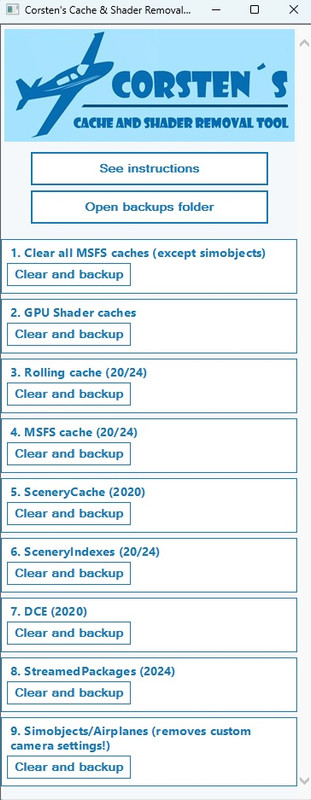
I think that I may have sorted the issue. I used Corsten's cache removal tool (in the UI mode) and selected items 1 to 6 in the list. I had done this previously (after a new GPU driver release and after the update) However I did not use item 6 ...clearing the scenery index. Since doing this I have successfully spawned and flown at NZNS and completed a NZWN to NZCH flight that caused CTDs previously. I am a tuber so I havent got "down and dirty" to check out if the POI's are actually there or not, but i did reinstall the NZ POI update prior to running Corstens tool.
It's early days but it does seem to be working so far for me.
The tool is available on Flightsim.to
Corsten's cache removal tool
It's been interesting observing pilots on Vatspy disappearing from the screens when they encounter the "Marlborough triangle" and disappear.
I think that I may have sorted the issue. I used Corsten's cache removal tool (in the UI mode) and selected items 1 to 6 in the list. I had done this previously (after a new GPU driver release and after the update) However I did not use item 6 ...clearing the scenery index. Since doing this I have successfully spawned and flown at NZNS and completed a NZWN to NZCH flight that caused CTDs previously. I am a tuber so I havent got "down and dirty" to check out if the POI's are actually there or not, but i did reinstall the NZ POI update prior to running Corstens tool.
It's early days but it does seem to be working so far for me.
The tool is available on Flightsim.to
Corsten's cache removal tool
-
cowpatz - NZFF Pro
- Topic author
- Joined: Wed Mar 07, 2007 3:28 pm
- Posts: 3773
15 posts
• Page 1 of 1
Who is online
Users browsing this forum: No registered users and 21 guests