FS9 don't wanna play

The place to ask for help or solve each others technical issues and discuss hardware

Postby Syncop8r » Sun Mar 28, 2010 10:02 am

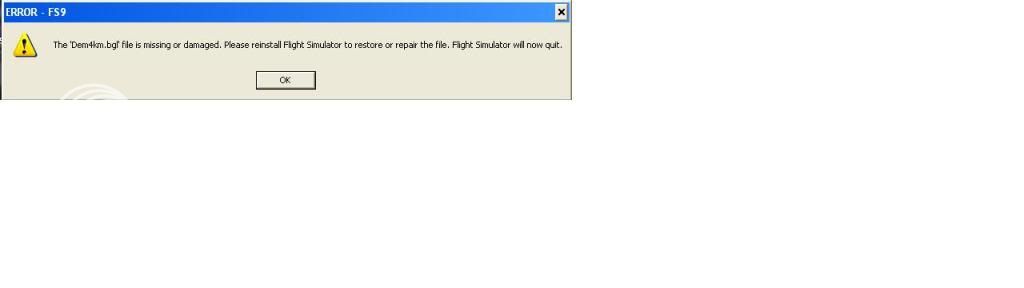
Upon startup:


I REALLY don't want to have to reinstall... sad.gif
Syncop8r
Forum Addict
 
Topic author
Joined: Sun Nov 11, 2007 11:28 pm
Posts: 206

Postby ZK-MAT » Sun Mar 28, 2010 11:11 am

I'll see where it is on my Pc. Will PM ya
User avatar
ZK-MAT
Senior Member
 
Joined: Sun Apr 30, 2006 11:41 pm
Posts: 1690
Location: Papamoa

Postby ZK-MAT » Sun Mar 28, 2010 11:22 am

Give it a go replacing it with the one I directed you to, a quick Google search reveals that it doesn't always work, a reinstall / fix up install should replace corrupt system files only and leave your sceneries etc untouched, if the replacement doesn't work.

Good luck
User avatar
ZK-MAT
Senior Member
 
Joined: Sun Apr 30, 2006 11:41 pm
Posts: 1690
Location: Papamoa

Postby creator2003 » Sun Mar 28, 2010 5:43 pm

Try removing the FS9 cfg ,and let it rebuild another,, its worked for many problems ive had with fs ,its in a hidden folder so that would have to be switched off ,under folder setting in control panel tab/hidden folders so you see the file ..
the fs9 cfg is here:C:\Documents and Settings\___"username"____\Application Data\Microsoft\fs9\fs9.cfg
User avatar
creator2003
NZFF Pro
 
Joined: Fri Jun 16, 2006 12:08 am
Posts: 4633
Location: Cant U C im LOCO

Postby Syncop8r » Sun Mar 28, 2010 10:19 pm

Thanks Splatty.

When I went into my Scenery folder I found it to be empty!
Looks like I need to reinstall :-/

Must be the same thing that hit my IL2.
Syncop8r
Forum Addict
 
Topic author
Joined: Sun Nov 11, 2007 11:28 pm
Posts: 206

Postby ZK-MAT » Sun Mar 28, 2010 11:09 pm

Duh! Yeah, an empty folder will be a problem ... it would have probably created a separate error message for each file, one at a time lol.
User avatar
ZK-MAT
Senior Member
 
Joined: Sun Apr 30, 2006 11:41 pm
Posts: 1690
Location: Papamoa

Postby Syncop8r » Thu Apr 22, 2010 10:24 am

I tried reinstalling FS9 last night after backing it up to another location.
I went through the uninstall on add/remove programs... but when I clicked on FS9 it it said it was the Hurricane I installed a while back, which I removed anyway.
There is now no FS9 on the add/remove programs list but it is still on my computer.
When I put the disc in nothing happens.
I removed the exe file, still nothing.
unsure.gif
Last edited by Syncop8r on Thu Apr 22, 2010 10:28 am, edited 1 time in total.
Syncop8r
Forum Addict
 
Topic author
Joined: Sun Nov 11, 2007 11:28 pm
Posts: 206

Postby ZK-LGD » Thu Apr 22, 2010 11:46 am

Howdy,

Most likely another addon installer has overwritten your FS9 (or FS9.1) uninstaller with its own uninstall programme. Have had this happen way tooo many times in the past so I now remove the FS9 uninstall.exe and keep it safe in a backup folder within FS9.

Check your Registry to see if FS9 is still installed there and that the correct exe path is named. If the .exe path is not the same, download the FS Toolkit from www.visualflight.co.uk and read the instructions on how to use it. This tool will rewrite your new .exe path to the registry.

If there is no registry entry ... you have two options: you can simply delete your existing FS9 install and reinstall again. Or, run FS Toolkit, repair your Registry entry, and insert FS9 disk 1, and, when prompted, opt for the repair option.

Hope this is of some small assistance.
Regards,
Dorian
User avatar
ZK-LGD
Sim-holic
 
Joined: Fri Apr 28, 2006 3:34 pm
Posts: 742
Location: Springfield, Canterbury

Postby Syncop8r » Thu Apr 22, 2010 12:10 pm

Thanks!
Ummmm.... which bit is the Registry?

Oh yeah there is an uninstaller in the FS9 folder, but it says its for the Hurricane. Sounds exactly like what you are saying.
Last edited by Syncop8r on Thu Apr 22, 2010 12:12 pm, edited 1 time in total.
Syncop8r
Forum Addict
 
Topic author
Joined: Sun Nov 11, 2007 11:28 pm
Posts: 206

Postby ZK-LGD » Thu Apr 22, 2010 3:30 pm

QUOTE
Ummmm.... which bit is the Registry?[/quote]

laugh.gif

Okay (working with XP here; should be reasonably similar for Vista or Win 7).

Anywho, go to: Start > Run > type in "regedit" (in lower case and without the quote marks) and hit Okay. That brings you into your Registry Entry. There are two entries for FS contained in here. First entry, look for: HKEY_CURRENT_USER > Software > Microsoft > Microsoft Games > Flight Simulator > 9.0. Make sure the Exe Path points to your current install. (As you say the uninstall.exe looks to have been overwritten, there should be an entry in here.)

Next, look for: HKEY_LOCAL_MACHINE > Software > Microsoft > Microsoft Games > Flight Simulator > 9.0. Do the same as above (just check the Exe Path is where FS is installed).

If there are no entries in either USER or MACHINE, then FS is no longer registered and you can simply consign the entire folder to the Trash Can.

If there are entries, you may consider renaming your original FS9 (something like FS9.original) and reinstall from the disks again. Then copy (or add) whatever you had installed in your original install over to the new copy. Remember to save things like your fs9.cfg, scenery.cfg, et cetera before reinstalling.

With luck, going down this road may provide you with the FS9 repair option (but I don't think so, unfortunately).

Good luck.
Regards,
Dorian
User avatar
ZK-LGD
Sim-holic
 
Joined: Fri Apr 28, 2006 3:34 pm
Posts: 742
Location: Springfield, Canterbury

Postby Syncop8r » Thu Apr 22, 2010 10:40 pm

There was no path to the .exe in HKEY_CURRENT_USER but there was in HKEY_LOCAL_MACHINE.
I deleted them and the game folder ready for a fresh install, but still I put the disc in and nothing happens.
Tried it in my partner's laptop, nothing happens there either - maybe the disc is dirty.
Syncop8r
Forum Addict
 
Topic author
Joined: Sun Nov 11, 2007 11:28 pm
Posts: 206


Return to Technical Issues

Who is online

Users browsing this forum: No registered users and 3 guests