North Shore Aerodrome

Read and report on flightsim developers progress of upcoming or completed products

Postby Nzeddy » Thu Jul 01, 2010 11:38 pm

North Shore Aerodrome is now released on Flightsim.co.nz and Avsim. biggrin.gif

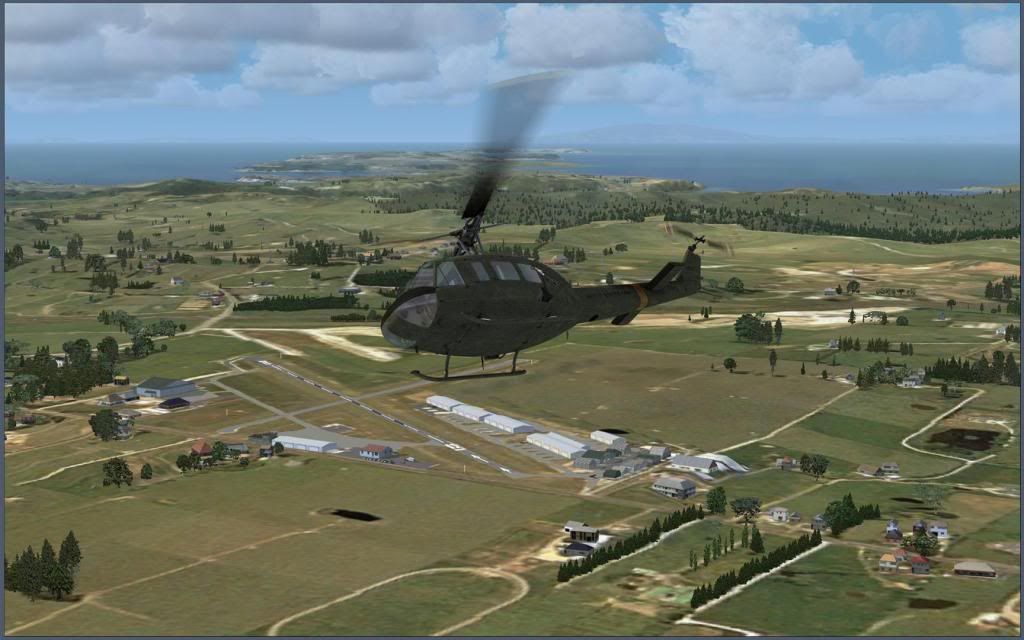
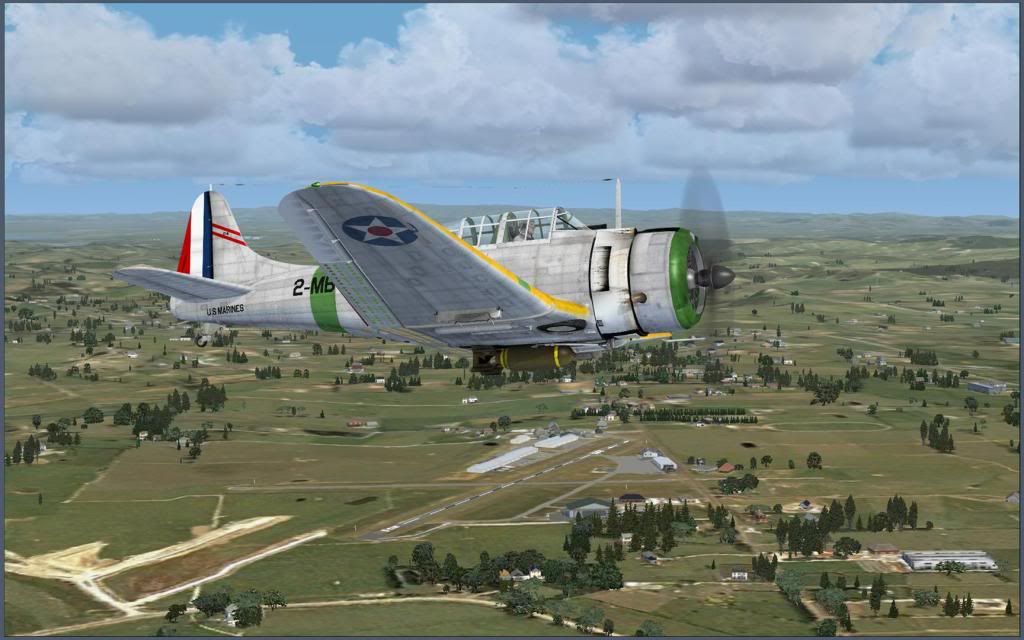
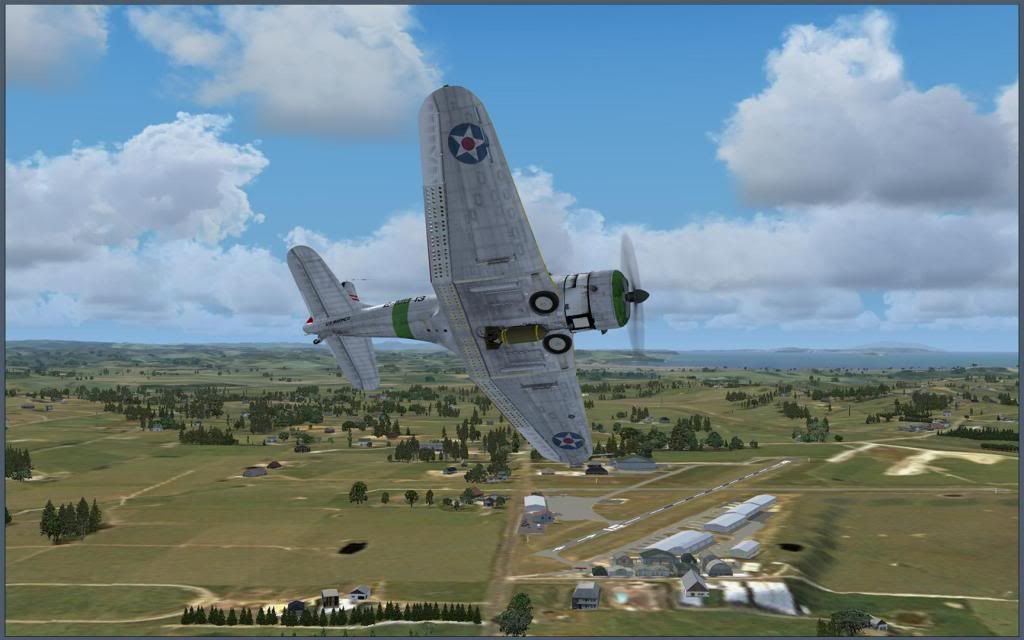
Edward Boyte (many may know him has NZEddy from the ARNZX and other forums) has reached a personal milestone in scenery design with his first public release and his rendition of NZNE (North Shore Aerodrome). This is a comprehensive scenery designed to compliment Real NZ Super city, but is just as effective with FSX default scenery as well. Click the image to download.

North Shore Aerodrome AFCAD file features more default taxiways, runways, more parking, fuel parking, buildings, cars, people, fences, static aircraft, etc to make it look more realistic.
This will work with default FSX scenery but was designed to fit in with RealNZ Supercity X and the freeware 75m mesh.

Screenshots:
With SupercityX and Default.

Download (234kb) here.

Avsim Filename: northshorev1.00.zip

- Eddy
User avatar
Nzeddy
Sim-holic
 
Topic author
Joined: Thu Jun 12, 2008 7:52 pm
Posts: 866

Postby Ian Warren » Thu Jul 01, 2010 11:53 pm

Edward ' Eddy ' clapping.gif thumbup1.gif , Going to Auckland directly and get a plane to North Shore Aerodrome

Image
User avatar
Ian Warren
NZFF Pro
 
Joined: Fri May 05, 2006 5:23 pm
Posts: 41187
Location: AREA 51

Postby creator2003 » Thu Jul 01, 2010 11:55 pm

Good job man winkyy.gif hope to see more from ya thumbup1.gif
User avatar
creator2003
NZFF Pro
 
Joined: Fri Jun 16, 2006 12:08 am
Posts: 4633
Location: Cant U C im LOCO

Postby Ian Warren » Fri Jul 02, 2010 3:39 am

OK I really checked this .. Aerodrome out ! .. . Edward , a Superb Job ! ... layout and scale , winkyy.gif Many are going to enjoy your eye for detail .

I consider this work so well done to look at the 'do' the AGN , now, this area Hmm i viewed some results, and here they are , not much editing but still a little work to be done , restricted 'TOP SECRET' ... no more said ninja.gif

For release this will require the permission off our friend , Mentor , Robin , I will probable loose my job here ,............ huh.gif Nah .. no one would hire me anyway .

EDDY thumbup1.gif
plane.gif
Last edited by Ian Warren on Fri Jul 02, 2010 4:03 am, edited 1 time in total.
Image
User avatar
Ian Warren
NZFF Pro
 
Joined: Fri May 05, 2006 5:23 pm
Posts: 41187
Location: AREA 51

Postby Venge » Fri Jul 02, 2010 5:09 am

** Not tested with SP1 or SP2. Use this file at your own risk. **

Let me know how it goes with the above SP's installed.
Image

Chris
Near Whangarei


Image
User avatar
Venge
Forum Addict
 
Joined: Fri Apr 23, 2010 10:36 am
Posts: 257
Location: Whangarei, New Zealand

Postby Ian Warren » Fri Jul 02, 2010 12:57 pm

Venge wrote:
QUOTE (Venge @ Jul 2 2010, 06:09 AM) <{POST_SNAPBACK}>
Let me know how it goes with the above SP's installed.

Chris , works fine ... no issues at all
Last edited by Ian Warren on Fri Jul 02, 2010 12:57 pm, edited 1 time in total.
Image
User avatar
Ian Warren
NZFF Pro
 
Joined: Fri May 05, 2006 5:23 pm
Posts: 41187
Location: AREA 51

Postby Nzeddy » Fri Jul 02, 2010 1:00 pm

Venge wrote:
QUOTE (Venge @ Jul 2 2010, 05:09 AM) <{POST_SNAPBACK}>
** Not tested with SP1 or SP2. Use this file at your own risk. **

Let me know how it goes with the above SP's installed.

I have FSX Acceleration and it works very well.

Thanks guys! cool.gif
- Eddy
User avatar
Nzeddy
Sim-holic
 
Topic author
Joined: Thu Jun 12, 2008 7:52 pm
Posts: 866

Postby Bazza » Fri Jul 02, 2010 3:11 pm

Nzeddy wrote:
QUOTE (Nzeddy @ Jul 2 2010, 01:00 PM) <{POST_SNAPBACK}>
I have FSX Acceleration and it works very well.

Thanks guys! cool.gif


Me too - good stuff.
Image
User avatar
Bazza
Sim-holic
 
Joined: Sat Jul 15, 2006 1:44 pm
Posts: 983
Location: Tauranga

Postby BigBird » Fri Jul 02, 2010 4:00 pm

Awesome! Well done on this notworthy.gif
BigBird
Forum Addict
 
Joined: Mon Nov 10, 2008 6:15 pm
Posts: 422

Postby Nzeddy » Fri Jul 02, 2010 4:20 pm

Thankyou.. again. tongue.gif

Now, what next? rolleyes.gif
- Eddy
User avatar
Nzeddy
Sim-holic
 
Topic author
Joined: Thu Jun 12, 2008 7:52 pm
Posts: 866

Postby Ian Warren » Fri Jul 02, 2010 4:30 pm

Nzeddy wrote:
QUOTE (Nzeddy @ Jul 2 2010, 05:20 PM) <{POST_SNAPBACK}>
Now, what next? rolleyes.gif

I'm sure the cry's would be for ARDMORE ohmy.gif .......... winkyy.gif
Image
User avatar
Ian Warren
NZFF Pro
 
Joined: Fri May 05, 2006 5:23 pm
Posts: 41187
Location: AREA 51

Postby Nzeddy » Fri Jul 02, 2010 4:37 pm

Ian Warren wrote:
QUOTE (Ian Warren @ Jul 2 2010, 04:30 PM) <{POST_SNAPBACK}>
I'm sure the cry's would be for ARDMORE ohmy.gif .......... winkyy.gif

Ardmore has already been done by alot of FS Simmers/Developers so I'll probably skip NZAR unless you guys really want me to do NZAR?

It's on Avsim - Ardmore Experience by Scott (Scon).
- Eddy
User avatar
Nzeddy
Sim-holic
 
Topic author
Joined: Thu Jun 12, 2008 7:52 pm
Posts: 866

Postby Ian Warren » Fri Jul 02, 2010 4:47 pm

Hecks , Missed Scotty,s work ohmy.gif , best i d/oad and check it out biggrin.gif .... how many more ... ? in this area , 2 maybe
Image
User avatar
Ian Warren
NZFF Pro
 
Joined: Fri May 05, 2006 5:23 pm
Posts: 41187
Location: AREA 51

Postby Adamski » Fri Jul 02, 2010 8:48 pm

Great stuff Eddy!! Here's to prove it works in SP1 + SP2 + Supercity + DX10 thumbup1.gif


Next please ... NZWP NZWP NZWP NZWP NZWP NZWP NZWP NZWP NZWP NZWP winkyy.gif
Image
User avatar
Adamski
NZFF Pro
 
Joined: Thu Nov 01, 2007 2:22 am
Posts: 5029
Location: Birkenhead, Auckland

Postby Nzeddy » Sat Jul 03, 2010 1:43 pm

I see the flatten works for Adamski but it's weird for you Ian.

What's your mesh sliders at Ian? Mine are at 5m and is working perfectly. Or is VLC causing the problem?

Anyway, thankyou Adamski. Im happy to do NZWP unless someone else wants to do NZWP?
Last edited by Nzeddy on Sat Jul 03, 2010 1:44 pm, edited 1 time in total.
- Eddy
User avatar
Nzeddy
Sim-holic
 
Topic author
Joined: Thu Jun 12, 2008 7:52 pm
Posts: 866

Postby toprob » Sat Jul 03, 2010 2:46 pm

Nzeddy wrote:
QUOTE (Nzeddy @ Jul 3 2010, 01:43 PM) <{POST_SNAPBACK}>
I see the flatten works for Adamski but it's weird for you Ian.


Had a look at this last night, Eddy, great work! I understand that Ian is tidying up the Supercity autogen around the area, so maybe best if I forward it to you for release in conjunction with this.

The flatten issue is due to the 20 metre mesh.

By the way, why not SP1? FSX was a real dog without SP1...
User avatar
toprob
NZFF Pro
 
Joined: Sat Apr 29, 2006 4:56 pm
Posts: 6711
Location: Upper Hutt

Postby Venge » Sat Jul 03, 2010 4:50 pm

I think I am running into Win7 weirdness again with this install. When I copy and paste those files into addon scenery/scenery they do not show up as viewable files when i fire up FSX and try to Add Area. Pretty sure I have all my view files and folder options set to be visible too.
Image

Chris
Near Whangarei


Image
User avatar
Venge
Forum Addict
 
Joined: Fri Apr 23, 2010 10:36 am
Posts: 257
Location: Whangarei, New Zealand

Postby toprob » Sat Jul 03, 2010 4:53 pm

Venge wrote:
QUOTE (Venge @ Jul 3 2010, 04:50 PM) <{POST_SNAPBACK}>
I think I am running into Win7 weirdness again with this install. When I copy and paste those files into addon scenery/scenery they do not show up as viewable files when i fire up FSX and try to Add Area. Pretty sure I have all my view files and folder options set to be visible too.


My impression from the install instructions is that the files go directly into Addon Scenery\Scenery, so no activation required.
However I put them in their own folder to keep things tidy, but of course you'd need to create a Scenery folder as well.
User avatar
toprob
NZFF Pro
 
Joined: Sat Apr 29, 2006 4:56 pm
Posts: 6711
Location: Upper Hutt

Postby Nzeddy » Sat Jul 03, 2010 4:53 pm

toprob wrote:
QUOTE (toprob @ Jul 3 2010, 02:46 PM) <{POST_SNAPBACK}>
Had a look at this last night, Eddy, great work! I understand that Ian is tidying up the Supercity autogen around the area, so maybe best if I forward it to you for release in conjunction with this.

The flatten issue is due to the 20 metre mesh.

By the way, why not SP1? FSX was a real dog without SP1...

Thanks Rob! Sounds good, just pm or email me the file when ever it's done.

Hmm, I'll see if there's a way to fix the flatten issue with VLC's 20m mesh.

I didn't know if it would work with SP1 as I only have FSX Acceleration. But I see it still works with SP1.

EDIT: 112 downloads already?!?
Last edited by Nzeddy on Sat Jul 03, 2010 5:14 pm, edited 1 time in total.
- Eddy
User avatar
Nzeddy
Sim-holic
 
Topic author
Joined: Thu Jun 12, 2008 7:52 pm
Posts: 866

Postby pilotgallagher01 » Sat Jul 03, 2010 5:51 pm

Good work mate, looks like the real thing!
Image
pilotgallagher01
Forum Addict
 
Joined: Fri Jul 10, 2009 1:54 pm
Posts: 317
Location: Tauranga

Next

Return to Announcements

Who is online

Users browsing this forum: No registered users and 11 guests