Strictly FSX
 by Olderndirt » Sun Jun 17, 2012 2:11 pm

-

Olderndirt - Senior Member
- Topic author
- Joined: Wed Jan 05, 2011 2:36 pm
- Posts: 1774
- Location: Rochester, Washington USA
by Adamski » Sun Jun 17, 2012 2:24 pm
Olderndirt wrote:QUOTE (Olderndirt @ Jun 17 2012,2:11 PM) <{POST_SNAPBACK}>Downloaded and installed Aerosoft's 'Cheyenne' and now FSX loads only to the splash screen then 'fatal error'. Whether or not there's a relationship is still a question (on the Aerosoft forum) but Google did reveal another having the identical problem. I've uninstalled the 'Cheyenne' but no change. The problem areas listed in the error message are all located in C:\Documents and Settings\Owner\Application Data\Microsoft\FSX - fsx.cfg/scenery.cfg/dxdiag/fdr.dat/DLL.xml. Ran FSX repair - nothing. Tried deleting the .cfg and generating a new one - nothing. OS-xp/FSXgold.
Ooooh dear. Bad luck
Seeing as dxdiag is mentioned in that error message ... have you tried re-installing your GFX drivers? Probably the only thing you *haven't* tried
Also - try running dxdiag from the Windows "run" menu. It could throw up a problem (or not!).


-

Adamski - NZFF Pro
- Joined: Thu Nov 01, 2007 2:22 am
- Posts: 5072
- Location: Birkenhead, Auckland
by Ian Warren » Sun Jun 17, 2012 2:39 pm

-

Ian Warren - NZFF Pro
- Joined: Fri May 05, 2006 5:23 pm
- Posts: 41187
- Location: AREA 51
by Adamski » Sun Jun 17, 2012 3:17 pm
Ian Warren wrote:QUOTE (Ian Warren @ Jun 17 2012,2:39 PM) <{POST_SNAPBACK}>I'll had a FSX crash yesterday afternoon and last night with a similar error , every was running perfect and only 80Gb installed so far , i had 36 saved flights , on removing those WX files it also include 36 fsx.exe files , i defraged using UD3 started a new flight saving it as default ... Flightsim is up and running again .
I think you're onto something there. The Cheyenne maybe tried to set itself as the default startup flight (and got its knickers in a twist)? Wouldn't a brand new fsx.cfg solve that one though?
Any ideas as to what caused your crash, Ian?
-
Adamski - NZFF Pro
- Joined: Thu Nov 01, 2007 2:22 am
- Posts: 5072
- Location: Birkenhead, Auckland
by Ian Warren » Sun Jun 17, 2012 3:30 pm
Adamski wrote:QUOTE (Adamski @ Jun 17 2012,4:17 PM) <{POST_SNAPBACK}>Any ideas as to what caused your crash, Ian?
Installing the CS777 SP03 , i had a few 777 flights saved , another thing that is playing up is the Goflight autopilot module - may also be due to the CS test fly setup , then to finish me off install some software for tonights MP , i believe its the first - installing the CS777 that the cause .
I did have had some new payware years back do the same issue as Dave's , recall i did the same fix .Last edited by Ian Warren on Sun Jun 17, 2012 3:30 pm, edited 1 time in total.
-
Ian Warren - NZFF Pro
- Joined: Fri May 05, 2006 5:23 pm
- Posts: 41187
- Location: AREA 51
by Ian Warren » Mon Jun 18, 2012 12:07 am
-
Ian Warren - NZFF Pro
- Joined: Fri May 05, 2006 5:23 pm
- Posts: 41187
- Location: AREA 51
by Olderndirt » Mon Jun 18, 2012 3:50 am
Ian Warren wrote:QUOTE (Ian Warren @ Jun 16 2012,7:39 PM) <{POST_SNAPBACK}>I'll had a FSX crash yesterday afternoon and last night with a similar error , every was running perfect and only 80Gb installed so far , i had 36 saved flights , on removing those WX files it also include 36 fsx.exe files , i defraged using UD3 started a new flight saving it as default ... Flightsim is up and running again .Only got a small part of that Ian - spell it out for me, slowly.
-
Olderndirt - Senior Member
- Topic author
- Joined: Wed Jan 05, 2011 2:36 pm
- Posts: 1774
- Location: Rochester, Washington USA
by Ian Warren » Mon Jun 18, 2012 11:35 am
When you restart FSX it would say 'corrupt flight' then require you the start a new default , you will not have any flights to choose from .
Personally i scrap flights , this is what i did and now working fine now .
If you have any payware folders : example i have three
AerosoftAirbus
AerosoftBronco
AerosoftHuey
Ok to leave them in the Flight Simulator X Files folder .
-
Ian Warren - NZFF Pro
- Joined: Fri May 05, 2006 5:23 pm
- Posts: 41187
- Location: AREA 51
by Olderndirt » Mon Jun 18, 2012 1:07 pm
Ian Warren wrote:QUOTE (Ian Warren @ Jun 17 2012,4:35 PM) <{POST_SNAPBACK}>Dave , go to My Documents , go to your Flight Simulator X Files , select all files and delete them or put into a new folder in case you want to keep a flight .The only thing in that folder was 'Logbook.BIN' - deleted that, no change.
When you restart FSX it would say 'corrupt flight' then require you the start a new default , you will not have any flights to choose from .
Personally i scrap flights , this is what i did and now working fine now .
If you have any payware folders : example i have three
AerosoftAirbus
AerosoftBronco
AerosoftHuey
Ok to leave them in the Flight Simulator X Files folder .
-
Olderndirt - Senior Member
- Topic author
- Joined: Wed Jan 05, 2011 2:36 pm
- Posts: 1774
- Location: Rochester, Washington USA
by Ian Warren » Mon Jun 18, 2012 1:45 pm
-
Ian Warren - NZFF Pro
- Joined: Fri May 05, 2006 5:23 pm
- Posts: 41187
- Location: AREA 51
by Olderndirt » Tue Jun 19, 2012 4:11 am
Ian Warren wrote:QUOTE (Ian Warren @ Jun 17 2012,6:45 PM) <{POST_SNAPBACK}>Could you do a search for WX files , I run FSX on D drive , my logbook files get logged on C ... best i look for my 'Logbook.BIN' files , might shed some light on the prob.Ian - the only file with 'WX' in it is in the FSX 'hidden' folder and it's Prevwx.BIN. Those .BIN files are unreadable to me.
-
Olderndirt - Senior Member
- Topic author
- Joined: Wed Jan 05, 2011 2:36 pm
- Posts: 1774
- Location: Rochester, Washington USA
by Ian Warren » Tue Jun 19, 2012 11:05 am
This is the saved flight from last night ,
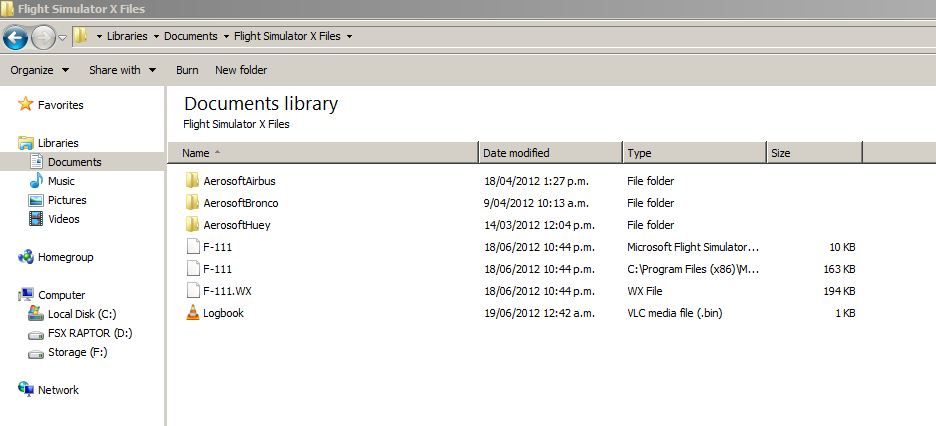
The first file is ..... Microsoft Flight Simulation Application
The second is ..... C:\Program Files (x86)\MicrosoftGames\Microsoft Flight Simulator X\fsx.exe
The third WX ......
Logbook , like you cannot access but sure thats for part of FS were people can check log within the FSX program .
-
Ian Warren - NZFF Pro
- Joined: Fri May 05, 2006 5:23 pm
- Posts: 41187
- Location: AREA 51
by Olderndirt » Tue Jun 19, 2012 1:19 pm
Ian Warren wrote:QUOTE (Ian Warren @ Jun 18 2012,4:05 PM) <{POST_SNAPBACK}>Strange , same program but places file into different places , again had another lockup , so again deleted only files and away the FSX started running again.Different OS - mine's XPpro.
This is the saved flight from last night ,
The first file is ..... Microsoft Flight Simulation Application
The second is ..... C:\Program Files (x86)\MicrosoftGames\Microsoft Flight Simulator X\fsx.exe
The third WX ......
Logbook , like you cannot access but sure thats for part of FS were people can check log within the FSX program .
-
Olderndirt - Senior Member
- Topic author
- Joined: Wed Jan 05, 2011 2:36 pm
- Posts: 1774
- Location: Rochester, Washington USA
by toprob » Tue Jun 19, 2012 2:25 pm
Olderndirt wrote:QUOTE (Olderndirt @ Jun 19 2012,1:19 PM) <{POST_SNAPBACK}>Different OS - mine's XPpro.
Just a couple of observations from Ian's screenshot. FSX saves flights to the 'Flight Simulator X Files' folder in 'My Documents' for XP, or 'Documents' for Windows 7 -- same location, just a different name. Ian has known file extensions hidden, which might be a bit confusing for comparing two different systems. Windows Explorer may appear differently on your system.
It is worthwhile tracking down these saved files, though, as they are a very common cause of loading problems. I'd just sort the Saved Flights into date order and delete the latest one to see if this is the issue. If you regularly save flights, you should be able to test this first by loading an earlier flight from the Flight | Load menu.
-

toprob - NZFF Pro
- Joined: Sat Apr 29, 2006 4:56 pm
- Posts: 6741
- Location: Upper Hutt
by Olderndirt » Wed Jun 20, 2012 3:13 am
toprob wrote:QUOTE (toprob @ Jun 18 2012,7:25 PM) <{POST_SNAPBACK}>Just a couple of observations from Ian's screenshot. FSX saves flights to the 'Flight Simulator X Files' folder in 'My Documents' for XP, or 'Documents' for Windows 7 -- same location, just a different name. Ian has known file extensions hidden, which might be a bit confusing for comparing two different systems. Windows Explorer may appear differently on your system.Other than Log.Bin, there was nothing in my C:\My Documents\Flight Simulator X. Deleted the Log.bin so now it's empty.
It is worthwhile tracking down these saved files, though, as they are a very common cause of loading problems. I'd just sort the Saved Flights into date order and delete the latest one to see if this is the issue. If you regularly save flights, you should be able to test this first by loading an earlier flight from the Flight | Load menu.
-
Olderndirt - Senior Member
- Topic author
- Joined: Wed Jan 05, 2011 2:36 pm
- Posts: 1774
- Location: Rochester, Washington USA
by toprob » Wed Jun 20, 2012 10:37 am
Olderndirt wrote:QUOTE (Olderndirt @ Jun 20 2012,3:13 AM) <{POST_SNAPBACK}>Other than Log.Bin, there was nothing in my C:\My Documents\Flight Simulator X. Deleted the Log.bin so now it's empty.
Do you ever save a flight? You won't find any Saved Flights if you've never saved any, I guess. Although a corrupt Save Flight is very common, if you don't have any then it must be something else:)
You did say that you didn't find any 'WX' files at all, but there should be a few at least -- they would be in the FSX\Flights folder, a few Kiosk flights and some default flights. It is possible that an installer has saved something there, so it is worthwhile looking to see if there's a recent addition -- the Kiosk and default flight files are probably dated 2006, so if you have one dated 2012 then it might be the problem.
-
toprob - NZFF Pro
- Joined: Sat Apr 29, 2006 4:56 pm
- Posts: 6741
- Location: Upper Hutt
by Adamski » Wed Jun 20, 2012 2:16 pm
toprob wrote:QUOTE (toprob @ Jun 20 2012,10:37 AM) <{POST_SNAPBACK}>Do you ever save a flight? You won't find any Saved Flights if you've never saved any, I guess. Although a corrupt Save Flight is very common, if you don't have any then it must be something else:)
But the default flight would be there, Shirley?
Dave - have you got "show extensions" enabled in your Explorer window? You should have trios of flights: XXX.FLT, XXX.FSSAVE and XXX.WX ... in flights/kiosk/other ... apart from any ones of your own you may have added (in "My Documents" - or wherever your OS puts them).
-
Adamski - NZFF Pro
- Joined: Thu Nov 01, 2007 2:22 am
- Posts: 5072
- Location: Birkenhead, Auckland
by Ian Warren » Wed Jun 20, 2012 3:05 pm
Adamski wrote:QUOTE (Adamski @ Jun 20 2012,3:16 PM) <{POST_SNAPBACK}>But the default flight would be there, Shirley?
Who the hell is Shirley ?
One thing Rob pointed out last visit here was 'Previous Flight' option in my , the menu for flights - this option has not appeared since my last complete re-install off FSX ? .. I do remember the same instance when FSX in XP and was easier to find a saved flight .
I wonder , create a flight and save it with a unique file name , you would be able to backtrack asking the PC to search the file thus finding all the earlier logged flights .Last edited by Ian Warren on Wed Jun 20, 2012 3:06 pm, edited 1 time in total.
-
Ian Warren - NZFF Pro
- Joined: Fri May 05, 2006 5:23 pm
- Posts: 41187
- Location: AREA 51
by Adamski » Wed Jun 20, 2012 3:17 pm
Ian Warren wrote:QUOTE (Ian Warren @ Jun 20 2012,3:05 PM) <{POST_SNAPBACK}>I wonder , create a flight and save it with a unique file name , you would be able to backtrack asking the PC to search the file thus finding all the earlier logged flights .
Aaah ... but grasshoppa ... he can't even get FSX to run
-
Adamski - NZFF Pro
- Joined: Thu Nov 01, 2007 2:22 am
- Posts: 5072
- Location: Birkenhead, Auckland
by toprob » Wed Jun 20, 2012 3:24 pm
Ian Warren wrote:QUOTE (Ian Warren @ Jun 20 2012,3:05 PM) <{POST_SNAPBACK}>Who the hell is Shirley ?
One thing Rob pointed out last visit here was 'Previous Flight' option in my , the menu for flights - this option has not appeared since my last complete re-install off FSX ? .. I do remember the same instance when FSX in XP and was easier to find a saved flight .
I wonder , create a flight and save it with a unique file name , you would be able to backtrack asking the PC to search the file thus finding all the earlier logged flights .
Yes, I went looking for some info on why this was available on your FSX but not mine -- this is actually part of the autosave option available in FSUIPC.
-
toprob - NZFF Pro
- Joined: Sat Apr 29, 2006 4:56 pm
- Posts: 6741
- Location: Upper Hutt
Return to All Flight Simulators
Who is online
Users browsing this forum: No registered users and 31 guests